







Question: Create a Visio drawing based on the image below. Link the Excel data to the shapes in your drawing based on the following Excel
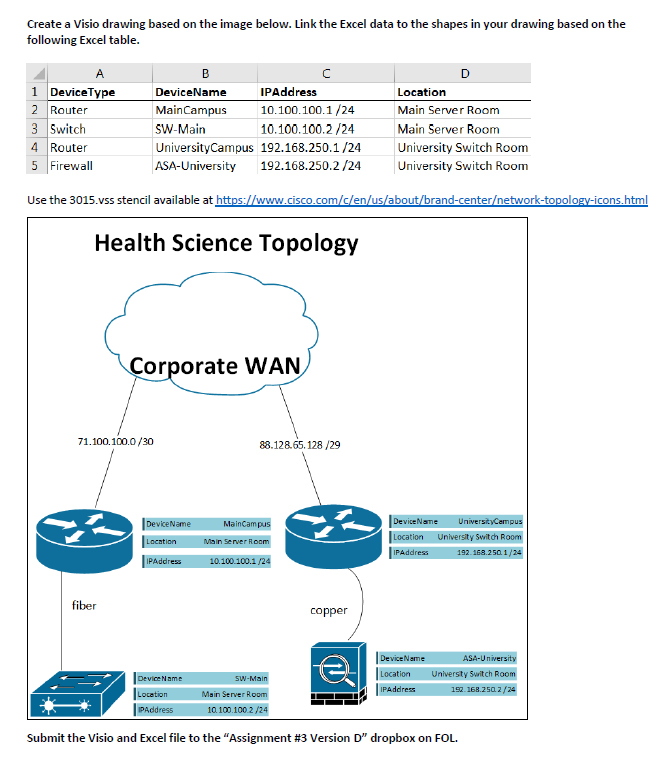
Create a Visio drawing based on the image below. Link the Excel data to the shapes in your drawing based on the following Excel table. A 1 DeviceType 2 Router 3 Switch 4 Router University Switch Room 5 Firewall University Switch Room Use the 3015.vss stencil available at https://www.cisco.com/c/en/us/about/brand-center/network-topology-icons.html Health Science Topology B DeviceName IPAddress Main Campus 10.100.100.1/24 SW-Main 10.100.100.2/24 University Campus 192.168.250.1/24 ASA-University 192.168.250.2/24 71.100.100.0/30 fiber Corporate WAN DeviceName Location IPAddress Device Name Location IPAddress 88.128.65.128/29 MainCampus Main Server Room 10.100.100.1/24 SW-Main Main Server Room 10.100.100.2/24 D copper Location Main Server Room Main Server Room DeviceName UniversityCampus Location University Switch Room 192.168.250 1/24 IPAddress Device Name ASA-University Location University Switch Room IPAddress 152.168.250.2/24 Submit the Visio and Excel file to the "Assignment # 3 Version D" dropbox on FOL.
Step by Step Solution
There are 3 Steps involved in it

Get step-by-step solutions from verified subject matter experts
 Study Help