







Question: Create a web page that looks like the attached document. Create a folder named PROG_Chap2 to hold your html document Be sure to use Notepad++
Create a web page that looks like the attached document.
- Create a folder named PROG_Chap2 to hold your html document
- Be sure to use Notepad++ to program your html code
- Be sure to test your page before submitting for grading
- When everything is working correctly, zip your folder and submit
FYI-Use spacing and indenting in your html code to give it a professional appearance and make it easy to read and debug (points will be subtracted if missing)
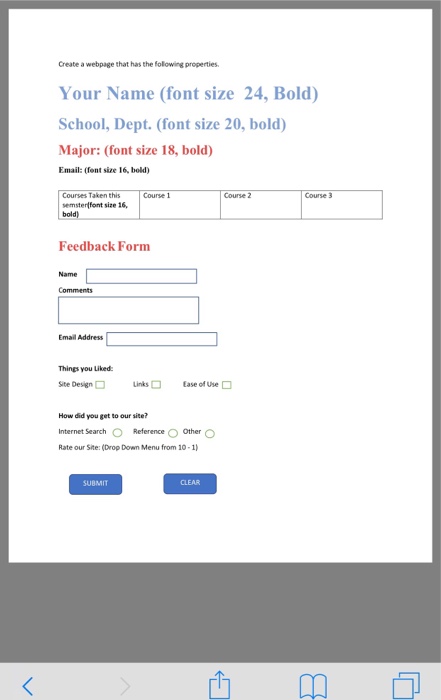
Create a webpage that has the folowing properties Your Name (font size 24, Bold) School, Dept. (font size 20, bold) Major: (font size 18, bold) Email: (font size 16, bold) Course 1 Course 3 Courses Taken this semsterlfont size 16, Course 2 Feedback Form Name Comments mal Adiress Things you Liked Site Design links Ease of Use How did you get to our site? Internet Search Reference OOthero Rate our Site: (Drop Down Menu from 10-1) SUBMIT CLEAR
Step by Step Solution
There are 3 Steps involved in it

Get step-by-step solutions from verified subject matter experts
 Study Help