







Question: Create a Web page with the following features using Notepad++: A centered heading 1 in green color and silver background formatted with inline styles. Two
Create a Web page with the following features using Notepad++:
-
A centered heading 1 in green color and silver background formatted with inline styles.
-
Two h2 tags in red color and yellow background.
-
One of the h2 tags should be centered.
-
A graphical background formatted with inline style.
-
Two images of flowers at the top and bottom of the page. Both images should be centered.
-
Two hr tags in green which cover 70% of the screen. One of the hr tags should be 10 pixels tall and the second one 15 pixels.
-
A bullet list containing links to Orange Coast College and Golden West College Web sites.
-
One of the links should display in red, and the other one in black.
-
Both links should display in 16pt fonts.
-
Name the assignment hassign3.htm.
- Zip your files making sure the zip file includes the Web pages and all the images you have used in this assignment. If you don't have a program that can zip the files, you can send the files individually.
- Upload your zip file or the the Web page and the images to the assignment area.
example:
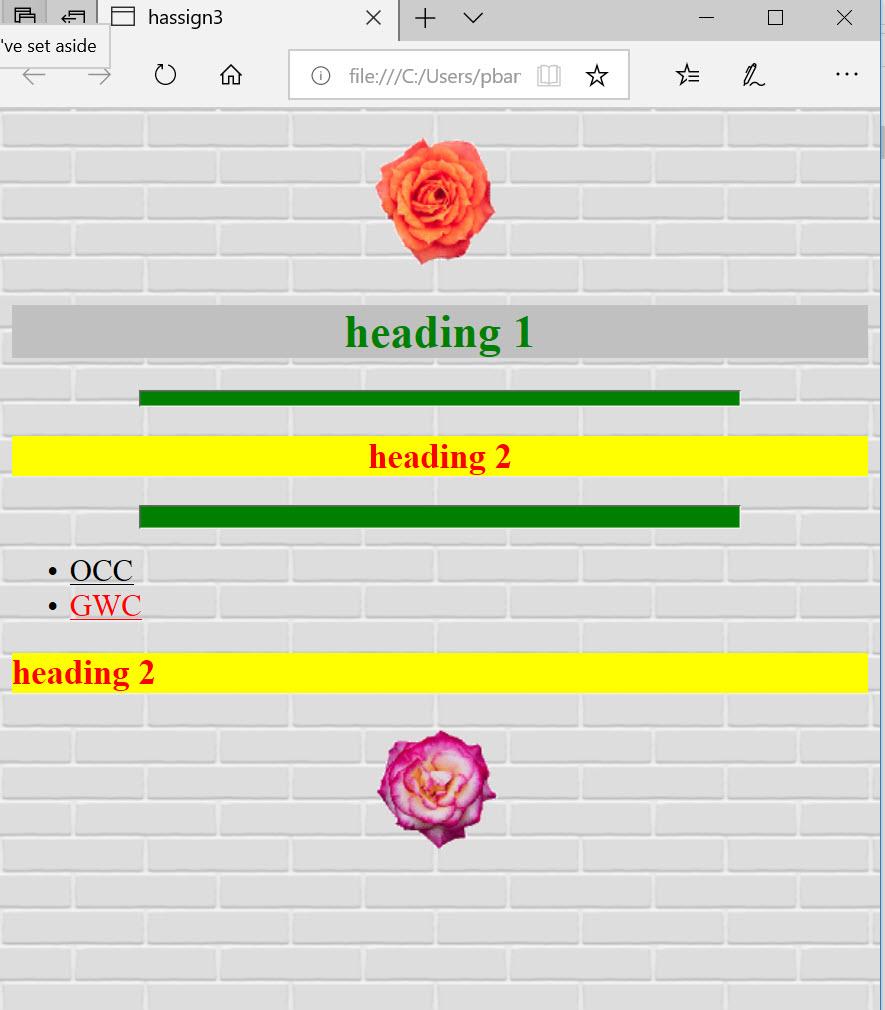
hassign3 + 've set aside - O file:///C:/Users/pbar ] 2 ... heading 1 heading 2 . OCC GWC . heading 2
Step by Step Solution
There are 3 Steps involved in it

Get step-by-step solutions from verified subject matter experts
 Study Help