



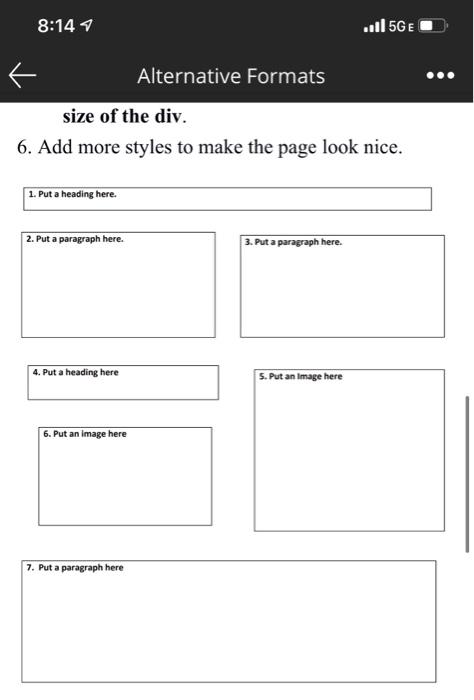
Question: Create a webpage about you that uses divs and the layout given below. You will use an internal style sheet to position the div elements
- Create a webpage about you that uses divs and the layout given below. You will use an internal style sheet to position the div elements using absolute positioning. Use the layout below to position the content on the page.
- You can use heading and paragraph elements or you can just put the text inside the div.
- You must use absolute positioning on each div to arrange the layout.
- You do not need to include borders for each div but you will find that borders around the text include the white space above the text that comes with block level paragraphs so may be easier to line it up.
- Your code should not look like anyone elses.
- Give each div a top, left, and width property[1].
- Remember for each div you are to use top, left, and width, not margin.
- Make sure the divs do not overlap.
- You will need some space between them.
- You can use a small amount of padding which adds padding around the text inside the div if you would like.
- The width of the webpage should be between 600 and 800 pixels wide.
- The entire page is on the left side of the window; when you resize the window the text and images do not move.
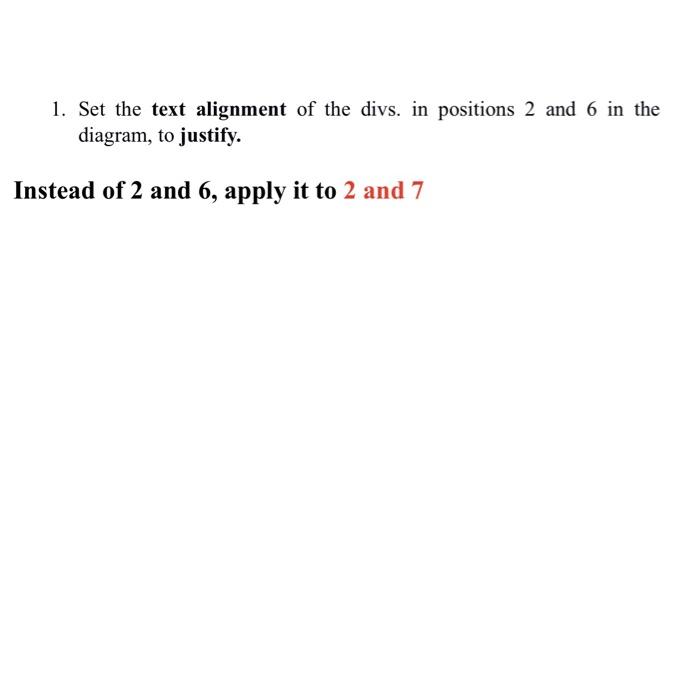
- Set the text alignment of the divs. in positions 2 and 6 in the diagram, to justify.
- Include images related to the webpage in the required positions (Positions 5 and 6 in the diagram).
- Be certain that the image is not wider than the size of the div.
- Add more styles to make the page look nice.
[1] The property bottom is not necessary if you use top, likewise the right property is not necessary if you use left.
8:144 ..11 5GE Alternative Formats size of the div. 6. Add more styles to make the page look nice. 1. Put a heading here. 2. Put a paragraph here. 3. Put a paragraph here. 4. Put a heading here 5. Put an image here 6. Put an image here 7. Put a paragraph here 1. Set the text alignment of the divs. in positions 2 and 6 in the diagram, to justify. Instead of 2 and 6, apply it to 2 and 7 8:144 ..11 5GE Alternative Formats size of the div. 6. Add more styles to make the page look nice. 1. Put a heading here. 2. Put a paragraph here. 3. Put a paragraph here. 4. Put a heading here 5. Put an image here 6. Put an image here 7. Put a paragraph here 1. Set the text alignment of the divs. in positions 2 and 6 in the diagram, to justify. Instead of 2 and 6, apply it to 2 and 7
Step by Step Solution
There are 3 Steps involved in it

Get step-by-step solutions from verified subject matter experts