







Question: Create a website using an external CSS file an html file and a Javascript file. With the Javascript file there will be a minimum 4
Create a website using an external CSS file an html file and a Javascript file. With the Javascript file there will be a minimum 4 JavaScript functions, which will be used to 1) Display Browser information, 2) Outline compatible HTML5 features, 3) Display basic screen information, and 4) Test for and create a simple HTML5 Canvas.
The HTML file will consist of the following four sections
1.) An unordered list, to be used as your navigation menu with an id of nav. This list should contain anchor elements to serve as clickable events that trigger each of your scripts. The list items and anchor elements must be styled using CSS to accomplish the drop-down effects need for the menu.
2.) An h1 element with an id of heading. The initial innerHTML of this element should be the text Click a menu item above to test various web features. Your scripts will alter it as needed.
3.) A div with an id of output. This div will be empty initially and altered as needed by your scripts.
4.) A canvas element with an id of myCanvas. The canvas will initially be set to a width and height of 0.
Next create a CSS enabled menu which runs across the top of the page. This menu bar must be able to adapt to various screen sizes so that the information does not get cut-off.
The menu of the website should consist of the following 4 main menu items and their associated sub items. The sub items should be accessible by way of a drop down item. These items should be structured in you nav unordered list within your html document
The 4 Main menu items are
1.) Browser Test
2.) HTML Feature Test
3.) Mobile Tests-sub menus
1. Screen Resolution 2. Screen Orientation
4.) Canvas Tests-sub menus
1. General Support 2. Text Support 3. Draw Canvas
Each of your menu items should link to a JavaScript function when selected. For the sub-item functionality, you may opt to direct these both to a single function with branching functionality, or you may choose to split the functionality into multiple functions.
The functionality for each JavaScript function is as follows:
1.) Browser Test- This function should access the browsers navigator object to display pertinent browser information using an unordered list. You should display at minimum the following: codename, name, version, cookies, language, platform, and user-agent. The function should identify the browsers info and then display it using the output div. A new header line should be displayed in the heading div
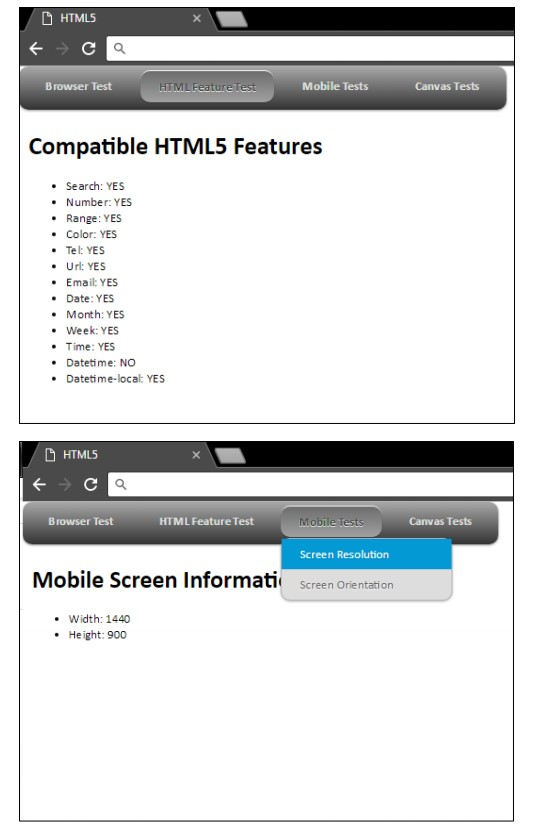
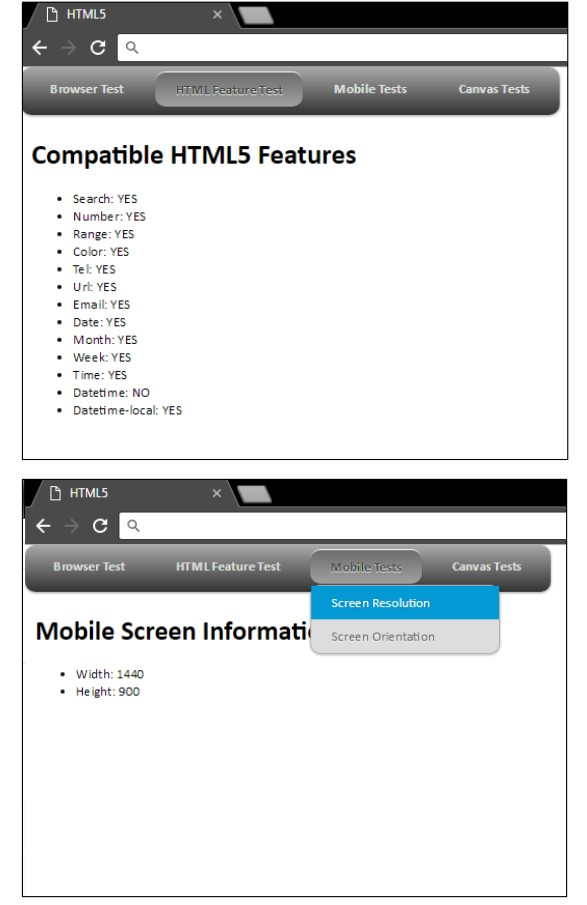
2.) HTML Feature Test- This function should be able to test the browsers ability to use various HTML5 features. You should check for and display either a Yes or No for the following features: Search boxes, Spinboxes, Sliders, Color pickers, Telephone numbers, Web addresses, Email addresses, Calendar data pickers, Months, Weeks, Timestamps, Precise date and time stamps, and Local dates and times. These feature options and their results should be displayed using an unordered list. This list should then be display to an updated output div. A new header line should be displayed in the heading div
3.) Mobile Tests
-Screen Resolution
1. This function should display the width and height of the current devices screen to the output div. 2. A new header line should be displayed in the heading div
-Screen Orientation
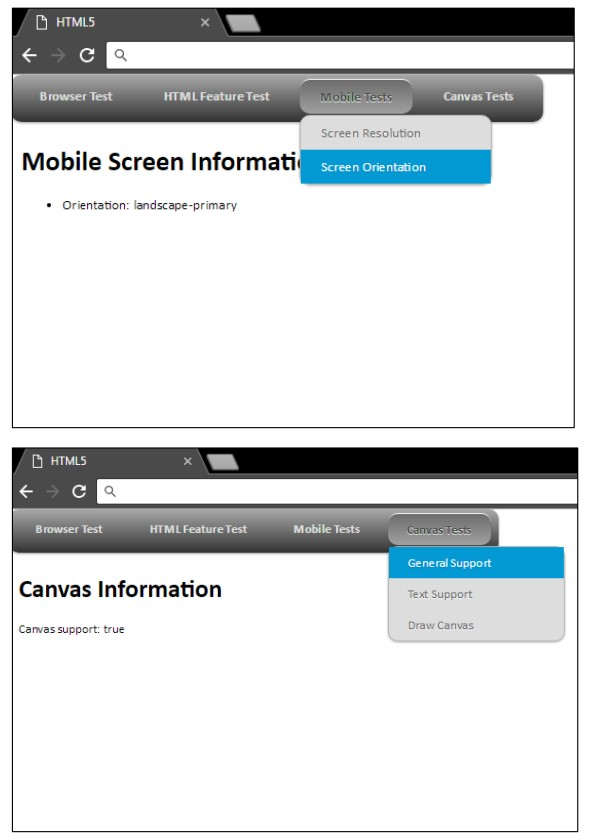
1. This function should display the orientation of the current devices screen to the output div. 2. A new header line should be displayed in the heading div.
4.) Canvas Tests
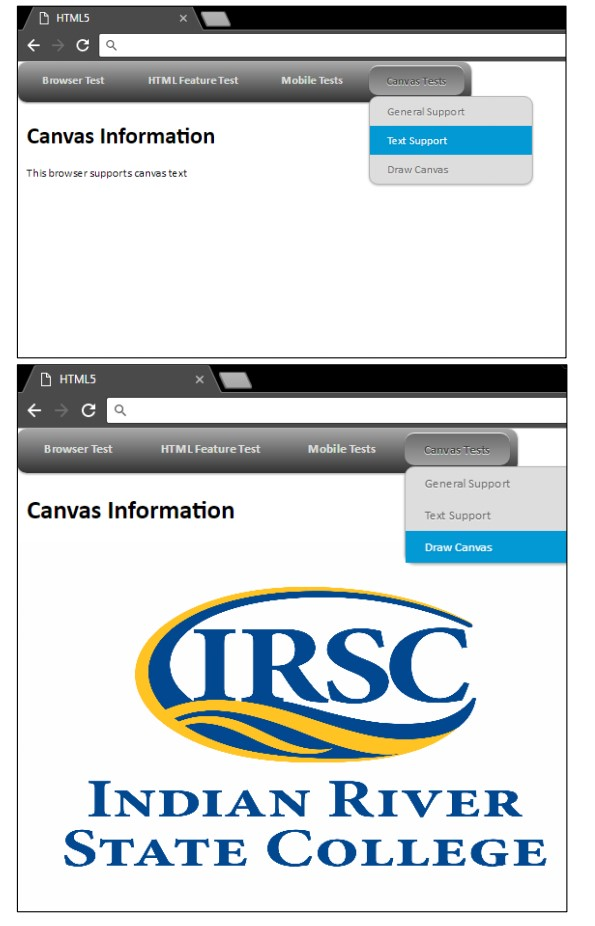
-General Support
1. This function should test the basic ability for the current browser to create a HTML5 Canvas, and display a message stating the results to the output div. 2. A new header line should be displayed in the heading div
-Text Support
1. This function should test the ability for the current browser to use HTML5 Canvas Text, and display a message stating the results to the output div. 2. A new header line should be displayed in the heading div
-Draw Canvas
1. This function should attempt to draw an image to the myCanvas element. 2. This image must be sized to fill the current dimensions of the screen (height and width) 3. The image can be of your choosing, as long as it is appropriate. 4. A new header line should be displayed in the heading div.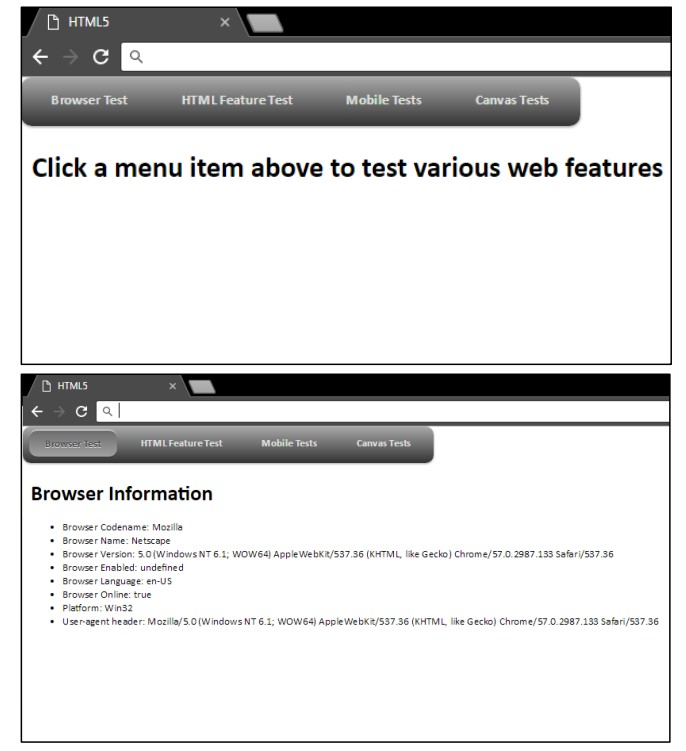
G HTML5 Browser Test HTML FeatureTest Mobile Tests Canvas Tests Click a menu item above to test various web features D HTMLS HTML Feature Test Mobile Tests Canvas Tests Browser Information .Browser Codename: Mozilla Browser Name: Netscape Browser Version: 5.0(Windows NT 6.1: WOW64) AppleWebKit/537.36 (KHTML, like Gecko) Chrome/57.0.2987.133 Safari/537.36 Browser Enabled: undefined Browser Language: en-US Browser Online: true .Platform: Win32 User-agent header: Mozilla/5.0(Windows NT 6.1; WOW64) Apple Webkit/537.36 (KHTML like Gecko) Chrome/57.0.2987.133 Safari/537.36 G HTML5 Browser Test HTML FeatureTest Mobile Tests Canvas Tests Click a menu item above to test various web features D HTMLS HTML Feature Test Mobile Tests Canvas Tests Browser Information .Browser Codename: Mozilla Browser Name: Netscape Browser Version: 5.0(Windows NT 6.1: WOW64) AppleWebKit/537.36 (KHTML, like Gecko) Chrome/57.0.2987.133 Safari/537.36 Browser Enabled: undefined Browser Language: en-US Browser Online: true .Platform: Win32 User-agent header: Mozilla/5.0(Windows NT 6.1; WOW64) Apple Webkit/537.36 (KHTML like Gecko) Chrome/57.0.2987.133 Safari/537.36
Step by Step Solution
There are 3 Steps involved in it

Get step-by-step solutions from verified subject matter experts
 Study Help