







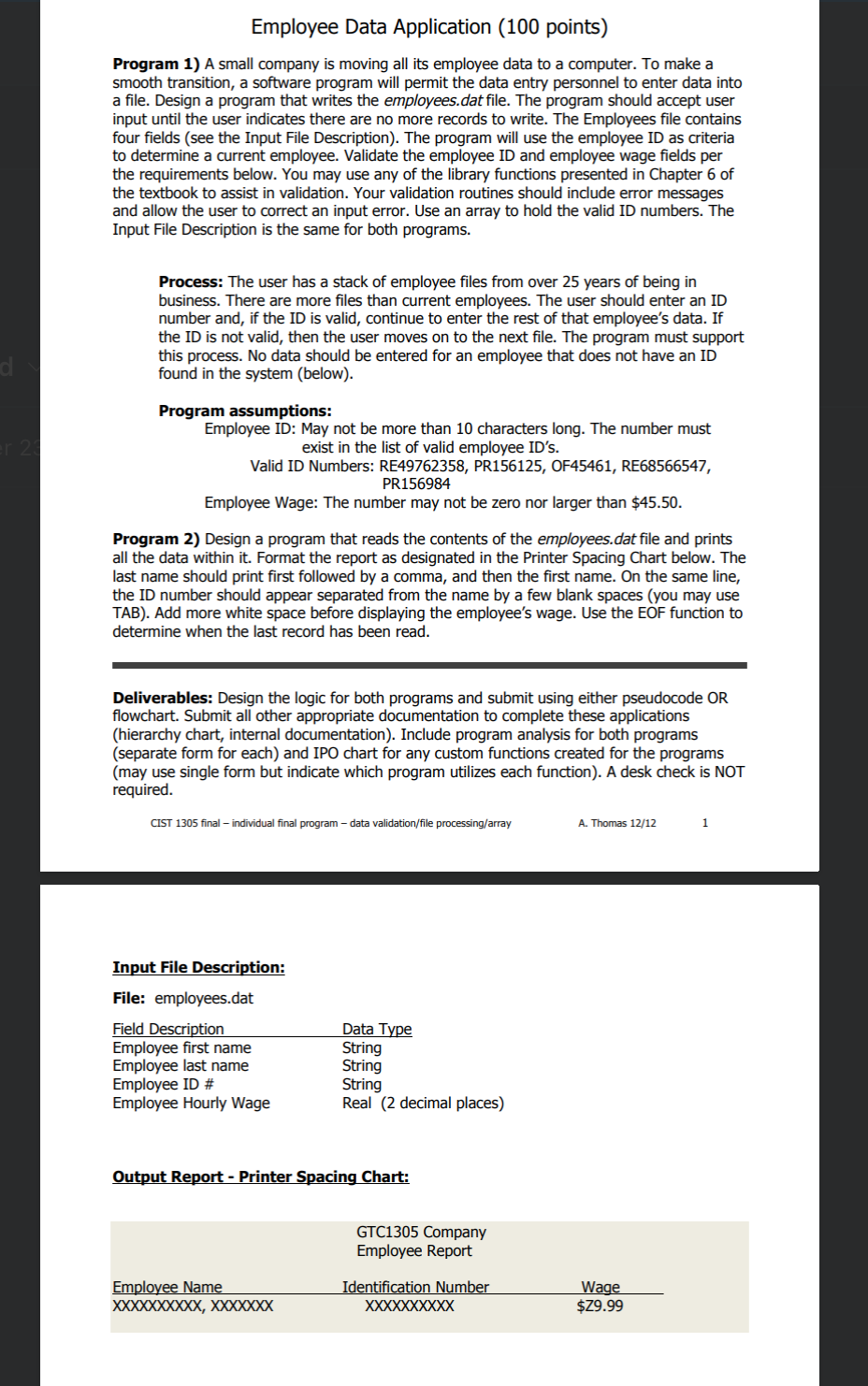
Question: Create a Word document that contains: Analysis using IPO Task Hierarchy Chart Pseudo Code Tips for Final Project For # 1 Problem. / / The
Create a Word document that contains:
Analysis using IPO
Task Hierarchy Chart
Pseudo Code
Tips for Final Project
For # Problem.
The pseudocode for opening the output file and closing it
Declare Outsream EmployeeData EmployeeData is an output stream
Open EmployeeData with employeesdat Connect the output stream to the file
Close EmplyeesData Close it after wring all the employee records to the file
The pseudo code for writing data to the output stream
Example is writing the first record to the output stream as same as writing to the file
Write empID to EmployeeData
Write fName to EmployeeData
Write lName to EmployeeData
Write wage to EmployeeData
The pseudocode for writing a newline to the output stream
Write NEWLINE to EmployeeData
The overall conrol sequence in the main
declare Const numEmp number of employees
Create parallel arrays for employee record
declare String idNumnumEmp
declare String firstNamenumEmp
declare String lastNamenumEmp
declare Real wagenumEmp
declare Boolean continue true
declare Integer count
Array of valid employee IDs
declare string validIDnumEmp RE PR OF RE PR
open the output stream and connect it to the output file
declare OutputFile employeeData
Open employeeData with "employees.dat"
Allows user to keep adding employee records until stop is requested.
whilecontinue
Getting employee ID name, and hourly wage
idNumcount callgetIDvalidID size pass validId array for input validation
callgetNameRef String fNamecount Ref String lNamecount
wage callgetWage
Writes employee record to file
Writes one record to file at a time
write employeeData idNumcount firstNamecount lastNamecount wagecount
Checks if user would like to add more employee records
continue checkContinue
if continue true
count count
End of while loop
Closes the output file
Close employeeData
End of main
Dear students, your role is to write the pseudo code for the functions
Functions you need to write
StringgetIdString validID, size
validID is the arrayName, size is the size of array
This function returns a valid employee ID
Thid function gets an employee data and validate it by doing the sequential search on validID array
getNameRef String fNameindex Ref String lNameindex
get first name and last name. No validation needed
RealgetWage
Returns the wage. This function validates the wage. It should be greater than and less than or equal to dollars.
BooleancheckContinue
Asks the user whether to continue. Returns true or false
Tips for Final Project
For # Problem
Pseudocode for opening employeesdat
declare InputStream employeeData
Open employeeData with "employees.dat"
Pseudo code for closing the input stream input file
close employeeData
Pseudo code for reading data from the input stream
Read EmloyeesData employeeID
Pseudo code for write a prompt, a tab or data to the report screen
Print Enployee ID: Tab, Tab, Tab, employeeID
Pseudo code for writing a string literal with center justification to the report screen
Print CenterJustityEnployee Report
Follow the following control sequence in main and add your code
main
Variable declarations
Add code
Opening employees.dat
Add code
Printing report header
callprintHeader
Reads and prints employee records until end of file is reached
while NOT eofemployeeData
Read one record from employeeData
Add code
Prints one record
callprintRecord idNum, firstName, lastName, wage
close employeeData
Prints header of the report in the required format
moduleprintHeader
pageCenterfunction: places string on horizontal center of page
horizontalLinefunction: creates horizontal line across page
Add code for this module
Prints employee records in the required format
moduleprintRecordstring idNum, string firstName, string lastName, real wage
Add code for this module
Step by Step Solution
There are 3 Steps involved in it
1 Expert Approved Answer
Step: 1 Unlock

Question Has Been Solved by an Expert!
Get step-by-step solutions from verified subject matter experts
Step: 2 Unlock
Step: 3 Unlock
 Study Help