







Question: Create an address book application using JavaScript (plus HTML and CSS). (Use plain JavaScript, no third party libraries!) The **required functionality** is the following: *
Create an address book application using JavaScript (plus HTML and CSS).
(Use plain JavaScript, no third party libraries!)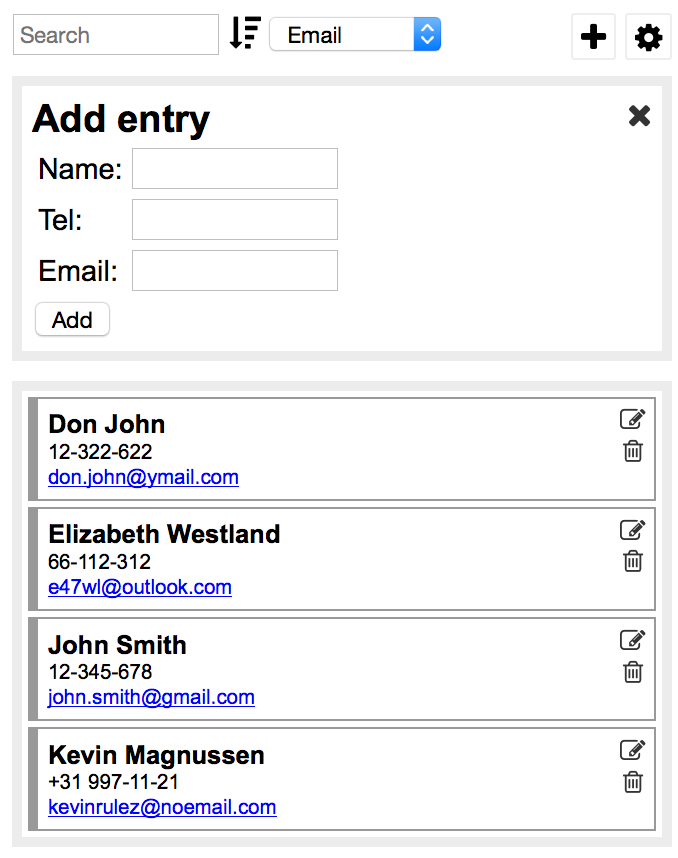
The **required functionality** is the following:
* Entries
- Entries have the following fields: name, telephone number, email
- Individual entries must be represented as an Entry object
- The contact list must be represented as an array of Entry objects
- The application must be shipped with some sample initial data (meaning, with a non-empty address book)
* Display a list of entries
- Emails should be clickable links that open in the mail client
* Add a search field to filter the list
- Only those entries are displayed that contain the searched string as part of the name, telephone, or email
- Matching is case-insensitive
* The user can delete existing entries
- Ask for a confirmation before deleting the entry
* The user can add new entries
- Perform input check
- The name field must never be empty
- Either tel or email has to be filled in
- Email has to be a valid email
- Tel may contain only numbers and + - ( ) and space
In addition, you need to implement **at least one extra feature** (of your choosing) from the following options:
* Allow the list to be sorted based on name, telephone, or email. The sorting criteria can be chosen from a select list.
* Add a settings panel that is hidden by default and is shown by clicking a button or link. The user can customize the appearance of the list, for example, change the font family and size for the different fields (name, tel, email), from predefined lists.
* Allow for existing entries to be modified.
Add entry Name: Tel: Email: Add Don John 12-322-622 don.john@ymail.com Elizabeth Westland 66-112-312 e47wl@outlook.com John Smith 12-345-678 john.smith@gmail.com Kevin Magnussen +31 997-11-21 kevinrulez@noemail.com
Step by Step Solution
There are 3 Steps involved in it

Get step-by-step solutions from verified subject matter experts
 Study Help