



Question: Create an advanced filter to find all purchases in the table that take place after September 30, 2015 (>9/30/2015). Enter the appropriate criteria in cell
Create an advanced filter to find all purchases in the table that take place after September 30, 2015 (>9/30/2015). Enter the appropriate criteria in cell A2 and filter the data in-place.
Insert a slicer for the Date field. Apply Slicer Style Other 1, format the slicer with 3 columns, and then resize and move the slicer so it covers range L1:P15 (set the slicer within the borders of these cells). Note, depending on the version of Office used, the style name may be White, Slicer Style Other 1. In the slicer, select all dates from 10/1/2015 through 10/31/2015.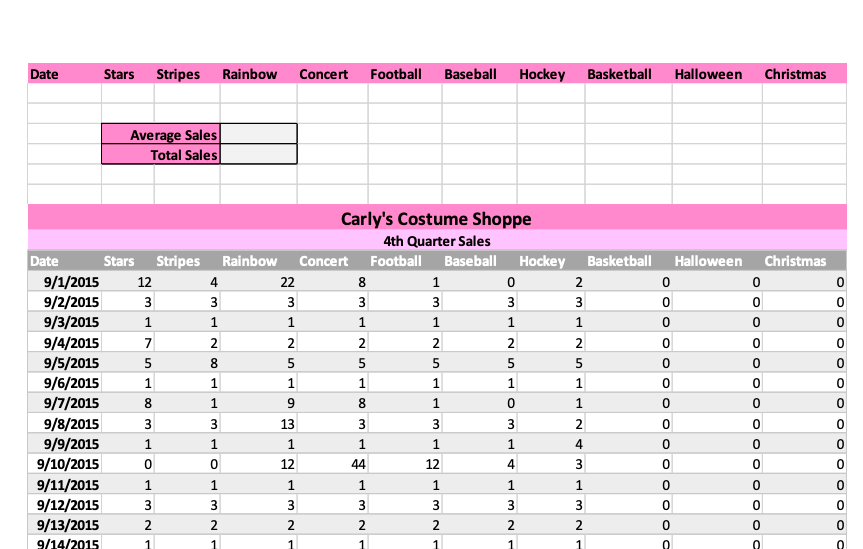
Date Stars Stripes Rainbow Concert Football Baseball Hockey Basketball Halloween Christmas Average Sales Total Sales 0 Halloween Christmas 0 0 0 0 0 0 3 0 0 2 0 0 2 5 0 0 8 0 0 Carly's Costume Shoppe 4th Quarter Sales Date Stars Stripes Rainbow Concert Football Baseball Hockey Basketball 9/1/2015 12 4. 22 8 1 o 2 9/2/2015 3 3 3 3 3 3 3 9/3/2015 1 1 1 1 1 1 1 9/4/2015 7 2 2 2 2 2 9/5/2015 5 5 5 5 5 5 9/6/2015 1 1 1 1 1 1 9/7/2015 8 1 9 8 1 9/8/2015 3 3 13 3 3 3 9/9/2015 1 1 1 1 1 1 4 9/10/2015 0 0 12 44 12 4 3 9/11/2015 1 1 1 1 1 1 1 9/12/2015 3 3 3 3 3 3 3 9/13/2015 2 2 2 2 2 2 2 9/14/2015 1 1 0 0 0 9 0 1 0 0 0 2 0 0 0 0 0 0 3 0 0 Ep NWP 0 0 3 0 0 0 0 0 2 0 0 0 0 Date Stars Stripes Rainbow Concert Football Baseball Hockey Basketball Halloween Christmas Average Sales Total Sales 0 Halloween Christmas 0 0 0 0 0 0 3 0 0 2 0 0 2 5 0 0 8 0 0 Carly's Costume Shoppe 4th Quarter Sales Date Stars Stripes Rainbow Concert Football Baseball Hockey Basketball 9/1/2015 12 4. 22 8 1 o 2 9/2/2015 3 3 3 3 3 3 3 9/3/2015 1 1 1 1 1 1 1 9/4/2015 7 2 2 2 2 2 9/5/2015 5 5 5 5 5 5 9/6/2015 1 1 1 1 1 1 9/7/2015 8 1 9 8 1 9/8/2015 3 3 13 3 3 3 9/9/2015 1 1 1 1 1 1 4 9/10/2015 0 0 12 44 12 4 3 9/11/2015 1 1 1 1 1 1 1 9/12/2015 3 3 3 3 3 3 3 9/13/2015 2 2 2 2 2 2 2 9/14/2015 1 1 0 0 0 9 0 1 0 0 0 2 0 0 0 0 0 0 3 0 0 Ep NWP 0 0 3 0 0 0 0 0 2 0 0 0 0
Step by Step Solution
There are 3 Steps involved in it

Get step-by-step solutions from verified subject matter experts