







Question: Create an application that displays the current time in hours, minutes, and seconds. The display should use a 12 hour clock and indicate whether its
Create an application that displays the current time in hours, minutes, and seconds. The display should use a 12 hour clock and indicate whether its AM or PM. The application looks like this:
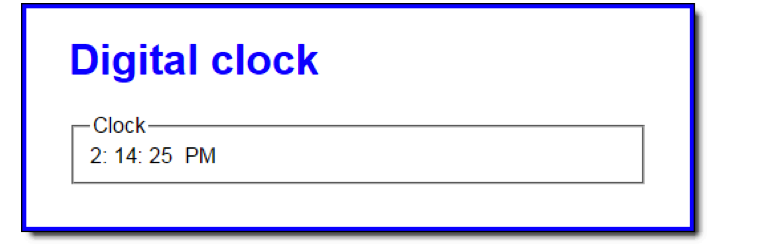
To convert the computers time from a 24 hour clock to a 12 hour clock, first check to see if the hours value is greater than 12. If so, subtract 12 from the hours value and set the AM/PM value to PM. Also, be aware that the hours value for midnight is 0.
In the JavaScript file, note that four functions are supplied. The $ function. The start of a displayCurrentTime function. The padSingleDigit function that adds a leading zero to single digits. And the start of an onload event handler.
In the displayCurrentTime function, add code that uses the Date object to determine the current hour, minute, and second. Convert these values to a 12 hour clock, determine the AM/PM value, and display these values in the appropriate span tags.
In the onload event handler, code a timer that calls the displayCurrentTime function at 1 second intervals. Also, make sure that the current time shows as soon as the page loads.
index.html:
Digital clock
clock.css:
body {
font-family: Arial, Helvetica, sans-serif;
background-color: white;
margin: 0 auto;
width: 450px;
border: 3px solid blue;
padding: 0 2em 1em;
}
h1 {
color: blue;
}
label {
float: left;
width: 11em;
text-align: right;
padding-bottom: .5em;
}
input {
margin-left: 1em;
margin-bottom: .5em;
}
fieldset {
margin-bottom: 1em;
}
clock.js:
"use strict";
var $ = function(id) { return document.getElementById(id); };
var displayCurrentTime = function() {
};
var padSingleDigit = function(num) {
return (num
};
window.onload = function() {
// set initial clock display and then set interval timer to display
// new time every second. Don't store timer object because it
// won't be needed - clock will just run.
};
Digital clock Clock 2: 14: 25 PM
Step by Step Solution
There are 3 Steps involved in it

Get step-by-step solutions from verified subject matter experts
 Study Help