







Question: Create an Eclipse Java project that utilize attached Selection Sort and Binary Search algorithms to search for an Employee object in an Employee[] of size
Create an Eclipse Java project that utilize attached "Selection Sort" and "Binary Search" algorithms to search for an Employee object in an Employee[] of size 5, for which, need to write an Employee class, which should have first name (type String), last name (type String), and Employee ID number (type int), as well as getters, setters, constructor and necessary compareTo() method that facilitate sorting based on last name or Employee ID number. You need to modify or adapt the attached "Selection Sort" and "Binary Search" methods so that they can work with class objects in this exam project.
In the main() method, populate Employee array with sample Employee objects, perform Selection Sort() to sort the array, then test the binary Search method. The project should prompt the user for an Employee ID to search for, print unsorted array and sorted array as well as Binary Search results by displaying the first name, last name and Employee ID if the Employee object was found, otherwise, inform the user that the Employee object was not found.
![public void selectionSort (Comparable [] list) int min; Comparable temp; for (int](https://dsd5zvtm8ll6.cloudfront.net/si.experts.images/questions/2020/01/5e1c492393449_1578912034670.jpg)
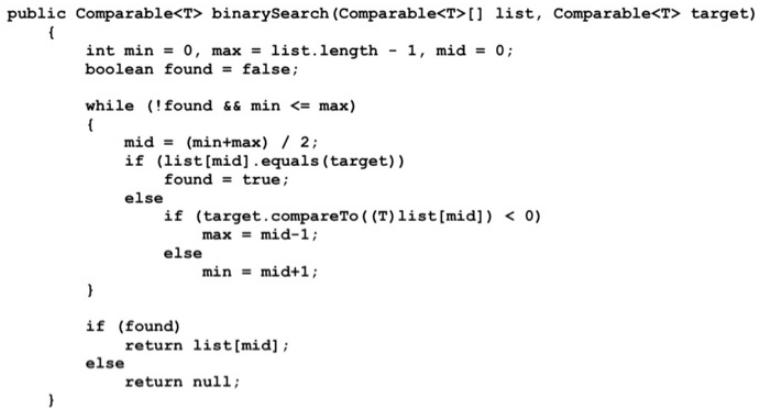
public void selectionSort (Comparable [] list) int min; Comparable temp; for (int index = 0; index < list.length-1; index++) min = index; for (int scan index+1; scan < list.length; scan++) if (list[scan].compareTo ( (T) list [min]) < 0) min = scan; // Swap the values temp = list [min]; list[min] = list[index]; list[index] = temp; public Comparable binarySearch (Comparable [] list, Comparable target) int min = 0, max = list.length - 1, mid = 0; boolean found = false; while (!found &6 min
Step by Step Solution
3.43 Rating (159 Votes )
There are 3 Steps involved in it
To complete this project follow the steps to create your Eclipse Java project Step 1 Create the Empl... View full answer

Get step-by-step solutions from verified subject matter experts
Document Format (2 attachments)

606ad568664a7_49720.pdf
180 KBs PDF File

606ad568664a7_49720.docx
120 KBs Word File
 Study Help