







Question: Create an Express Web Application which allows students to evaluate their courses. Your MongoDB database should have a collection students to store student information and
Create an Express Web Application which allows students to evaluate their courses. Your MongoDB database should have a collection students to store student information and a collection comments or assessment feedback to store student comments or assessment feedback for the course. You will have to provide a login page (ejs page) to allow the students to login, a sign up page for students to register (ejs page), a submit comments or assessment feedback page (ejs) to allow the students to enter the comments or enter feedback about assessments, a view student comments or assessment feedback page (ejs), and the Thank You page (ejs). Important: Please not that you will use comment model and related items. The sign up page should allow the students to sign up by providing first name, last name, email, password, and two other fields that will be different for each student. For example, you may create fields for favorite subject, number of languages, major, favorite sport, favorite team, favorite actor, favorite food, strongest technical skill, etc.
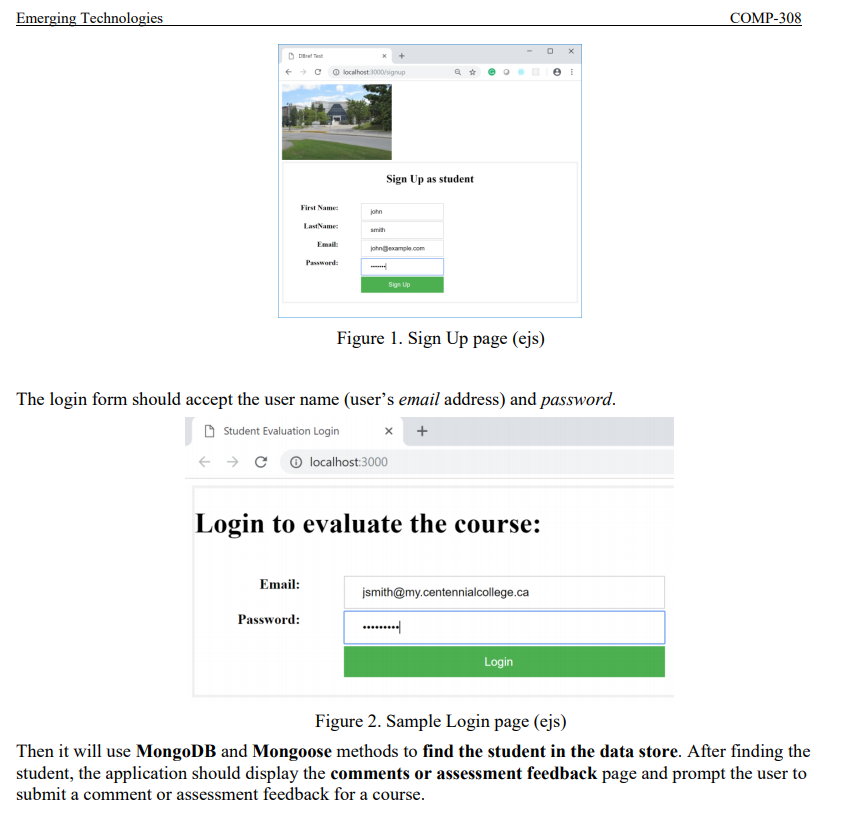
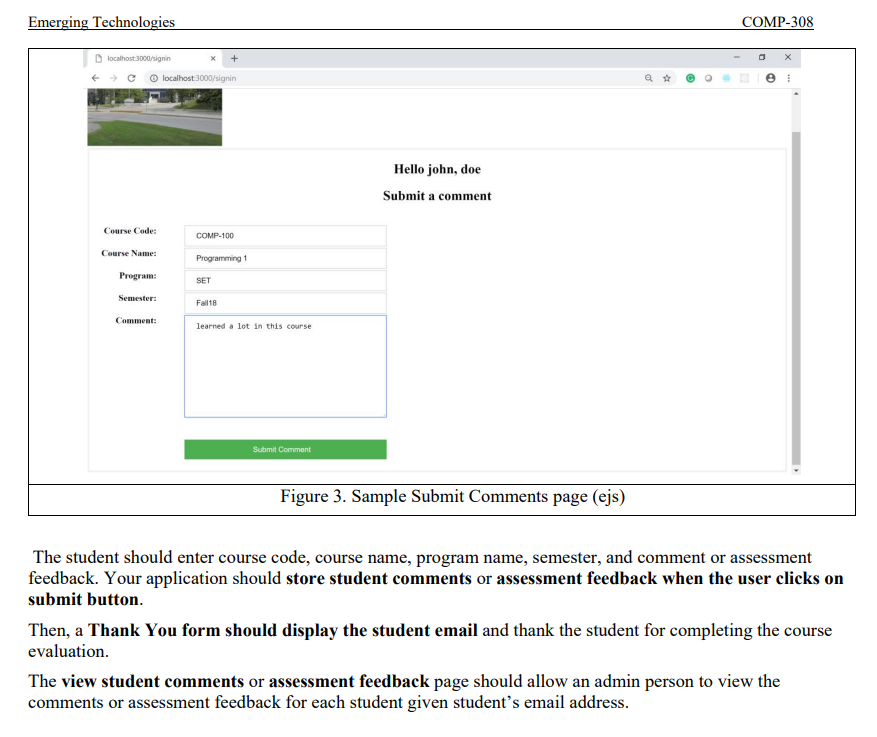
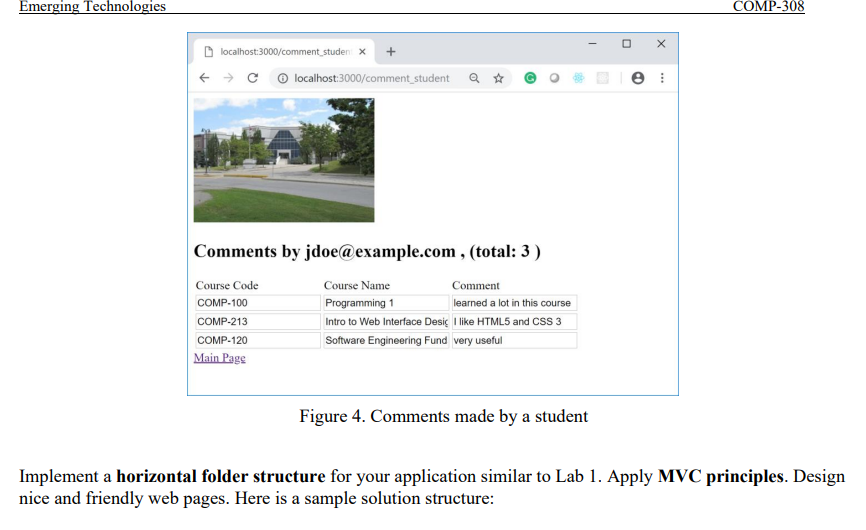
Emerging Technologies COMP-308 localhost3000/signup Sign Up as student First Name: LastName Smith John ample.com Password: Sign Up Figure 1. Sign Up page (ejs) The login form should accept the user name (user's email address) and password. Student Evaluation Login + + C localhost:3000 Login to evaluate the course: Email: jsmith@my.centennialcollege.ca Password: ....... Login Figure 2. Sample Login page (ejs) Then it will use MongoDB and Mongoose methods to find the student in the data store. After finding the student, the application should display the comments or assessment feedback page and prompt the user to submit a comment or assessment feedback for a course. Emerging Technologies COMP-308 localhost:8000/signin + localhost3000/signin Hello john, doe Submit a comment Course Code: COMP-100 Course Name: Programming 1 Program: SET Semester: Falls Comment: learned a lot in this course Submit Comment Figure 3. Sample Submit Comments page (ejs) The student should enter course code, course name, program name, semester, and comment or assessment feedback. Your application should store student comments or assessment feedback when the user clicks on submit button. Then, a Thank You form should display the student email and thank the student for completing the course evaluation. The view student comments or assessment feedback page should allow an admin person to view the comments or assessment feedback for each student given student's email address. Emerging Technologies COMP-308 - X localhost:3000/comment studen* clocalhost:3000/comment_student Comments by jdoe@example.com, (total: 3) Course Code COMP-100 COMP-213 COMP-120 Main Page Course Name Comment Programming 1 learned a lot in this course Intro to Web Interface Desi I like HTML5 and CSS 3 Software Engineering Fund very useful Figure 4. Comments made by a student Implement a horizontal folder structure for your application similar to Lab 1. Apply MVC principles. Design nice and friendly web pages. Here is a sample solution structure: Emerging Technologies COMP-308 localhost3000/signup Sign Up as student First Name: LastName Smith John ample.com Password: Sign Up Figure 1. Sign Up page (ejs) The login form should accept the user name (user's email address) and password. Student Evaluation Login + + C localhost:3000 Login to evaluate the course: Email: jsmith@my.centennialcollege.ca Password: ....... Login Figure 2. Sample Login page (ejs) Then it will use MongoDB and Mongoose methods to find the student in the data store. After finding the student, the application should display the comments or assessment feedback page and prompt the user to submit a comment or assessment feedback for a course. Emerging Technologies COMP-308 localhost:8000/signin + localhost3000/signin Hello john, doe Submit a comment Course Code: COMP-100 Course Name: Programming 1 Program: SET Semester: Falls Comment: learned a lot in this course Submit Comment Figure 3. Sample Submit Comments page (ejs) The student should enter course code, course name, program name, semester, and comment or assessment feedback. Your application should store student comments or assessment feedback when the user clicks on submit button. Then, a Thank You form should display the student email and thank the student for completing the course evaluation. The view student comments or assessment feedback page should allow an admin person to view the comments or assessment feedback for each student given student's email address. Emerging Technologies COMP-308 - X localhost:3000/comment studen* clocalhost:3000/comment_student Comments by jdoe@example.com, (total: 3) Course Code COMP-100 COMP-213 COMP-120 Main Page Course Name Comment Programming 1 learned a lot in this course Intro to Web Interface Desi I like HTML5 and CSS 3 Software Engineering Fund very useful Figure 4. Comments made by a student Implement a horizontal folder structure for your application similar to Lab 1. Apply MVC principles. Design nice and friendly web pages. Here is a sample solution structure
Step by Step Solution
There are 3 Steps involved in it

Get step-by-step solutions from verified subject matter experts
 Study Help