







Question: create an html and JavaScript file to transfer or copy data from one field to another based on user indicating they should have the same
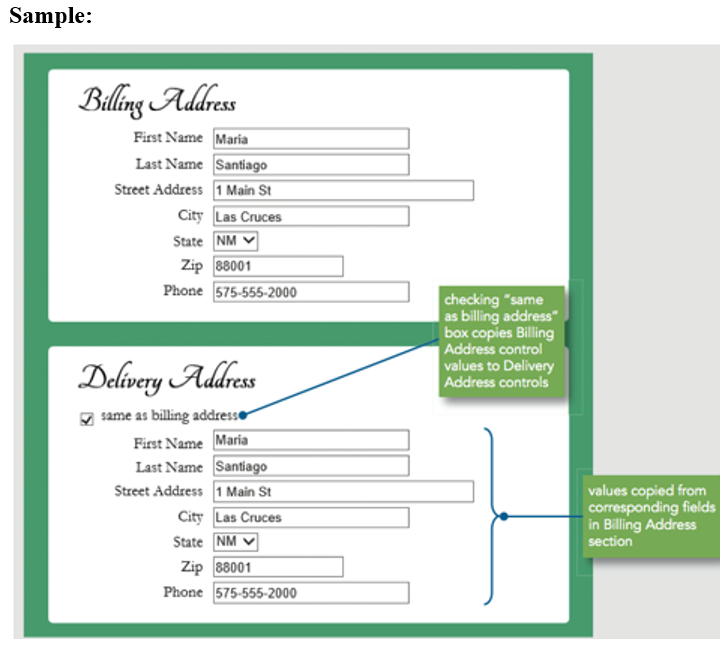
- create an html and JavaScript file to transfer or copy data from one field to another based on user indicating they should have the same value
Example: Shipping Address and Billing Address
- Create a custom browser based validation feedback using the following
- checkValidity() and setCustomValidity() methods -
- CSS :invalid and :valid pseudo-classes
- selectedIndex = -1
- placeholder
To change properties of form elements based on validity status.
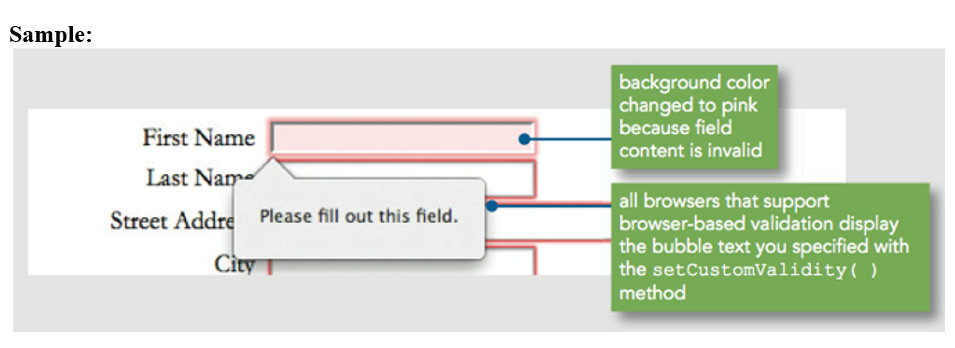
Sample: Billing Address First Name Maria Last Name Santiago Street Address 1 Main St City Las Cruces State NM Zip 88001 Phone 575-555-2000 checking "same as billing address" box copies Billing Address control values to Delivery Address controls Delivery Address same as billing addresse First Name Maria Last Name Santiago Street Address 1 Main St City Las Cruces State NM V Zip 88001 Phone 575-555-2000 values copied from corresponding fields in Billing Address section Sample: background color changed to pink because field content is invalid First Name Last Name Street Addre Please fill out this field. all browsers that support browser-based validation display the bubble text you specified with the setCustomValidity ( ) method City
Step by Step Solution
There are 3 Steps involved in it

Get step-by-step solutions from verified subject matter experts
 Study Help