



Question: Create an html page fruits.html that includes the following as in figure1: Figure 1 fruit.html 1. A header big font for Welcome to our online
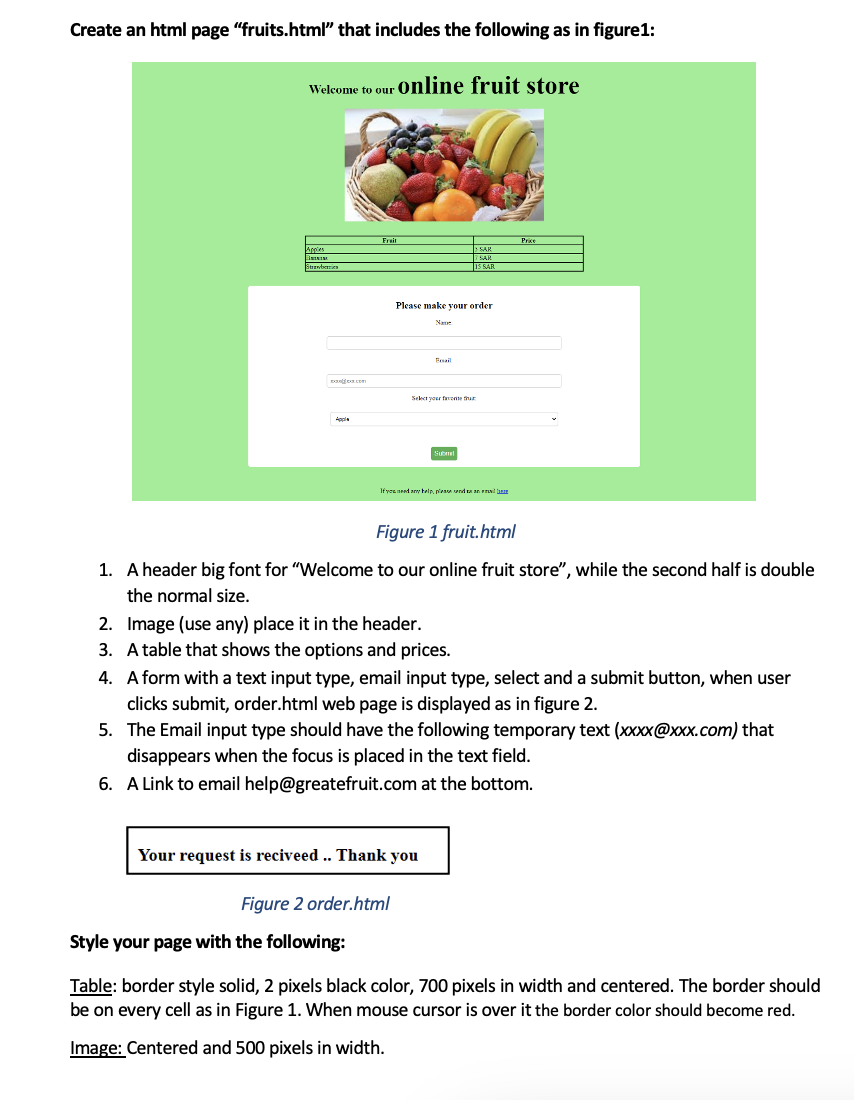
Create an html page "fruits.html" that includes the following as in figure1: Figure 1 fruit.html 1. A header big font for "Welcome to our online fruit store", while the second half is double the normal size. 2. Image (use any) place it in the header. 3. A table that shows the options and prices. 4. A form with a text input type, email input type, select and a submit button, when user clicks submit, order.html web page is displayed as in figure 2. 5. The Email input type should have the following temporary text (xxxx@xxx.com) that disappears when the focus is placed in the text field. 6. A Link to email help@greatefruit.com at the bottom. Figure 2 order.html Style your page with the following: Table: border style solid, 2 pixels black color, 700 pixels in width and centered. The border should be on every cell as in Figure 1. When mouse cursor is over it the border color should become red. Image: Centered and 500 pixels in width
Step by Step Solution
There are 3 Steps involved in it

Get step-by-step solutions from verified subject matter experts