







Question: Create an html page that looks like the image below. Please refer to https://www.w3schools.com/css/css_rwd_grid.asp (Links to an external site.) Here are the guidelines: Let the
Create an html page that looks like the image below.
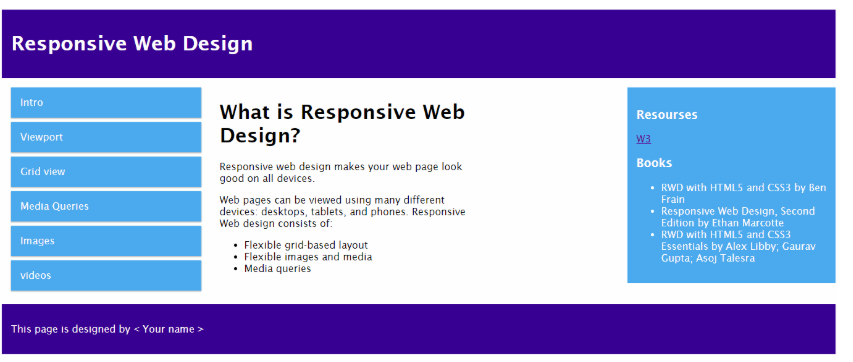
Please refer to https://www.w3schools.com/css/css_rwd_grid.asp (Links to an external site.)
Here are the guidelines:
Let the header background color be dark blue, font color to be white and padding to be 15px.
Let the footer have the same style as the header.
The middle portion of the web page consists of three columns, with the width of 25%, 33.3%, 25% respectively.
Responsive Web Design Intro What is Responsive Web Design? Resourses W3 Books Viewport Responsive web design makes your web page look good on all devices. Grid view Web pages can be viewed using many different devices: desktops, tablets, and phones. Responsive Web design consists of RWD with HTML5 and CSS3 by Ben . Responsive Web Design, Second RWD with HTMLS and CSS3 Frain Edition by Ethan Marcotte Essentials by Alex Libby, Gaurav Media Queries Images . Flexible grid-based layout Flexible images and media Media queries Gupta; Asoj Talesra videos This page is designed by
Step by Step Solution
There are 3 Steps involved in it

Get step-by-step solutions from verified subject matter experts
 Study Help