







Question: Create an HTML5 file that contains an HTML form like the screenshots shown above that accepts a Low Temperature and High Temperature and a submit
Create an HTML5 file that contains an HTML form like the screenshots shown above that accepts a Low Temperature and High Temperature and a submit button with the label Add the temperatures!. You can use the same file that you used in the previous Temperatures assignment but save the file as temps.html ad store it in your Ch07 directory. The temps.html file must be free of errors and validated. Add the necessary code to link to a CSS file called forms.css that is stored in your Ch07/css subdirectory. (Add the necessary code to use the temps2.js file that is stored in your Ch07/js subdirectory. (1 Points) 2. Download the forms.css file and store it in your Ch07/css subdirectory. You will need to edit the forms.css file so that it appears similar to the example shown in terms of cell alignment and shading. (3 Points) 3. Create and debug a JavaScript file that processes the Low and High Temperatures from the temps.html file that meets the following specifications (45 Points Total as broken down below) You can use the same temps.js file from the previous assignment name and save as indicated below: a. Save the file as temps2.js in your Ch07/js subdirectory. (1 Points) b. At the beginning of the file, create an anonymous function. See Step 2 on Page 260 in your textbook. Then be sure to complete the anonymous function definition at the end of the file and invoke it as shown on Step 3 on Page 260. (2 Points) c. Then indent the previous lines of code contained within your earlier function(s) to indicate that they are part of the anonymous function. (2 Points) d. An if statement must be used to ensure that the user enters both low and high temperatures that are numeric for any given day before the form is submitted. If the user does not enter one or both of the temperatures that are numeric, a message or messages must be displayed to tell the user that valid low and high temperatures must be entered. This message should appear where the summary row normally appears. The form will not be processed unless both temperatures are entered. (2 Points) e. The low and high temperature values entered from the html form must be processed into an array or arrays with loops as needed in the temps2.js file to calculate and display the results in an HTML table as shown that becomes the output to the temps.html file. Further detail on each part of processing the array and resulting HTML table appear in Items d through j below: i. The table must display a header row of Date, Low Temperatures, High Temperatures. (1 Points) ii. The first row of the table must display a row that contains the current date and the first pair of temperatures entered. (1 Points) iii. Each additional row follows the pattern of displaying a date which is one day older than the previous date and the most recent pair of temperatures entered. (1 Points) iv. The date must be displayed in the format shown. (1 Points) v. The average low temperature for all low temperatures entered must be calculated and displayed showing 1 decimal point. (5 Points) 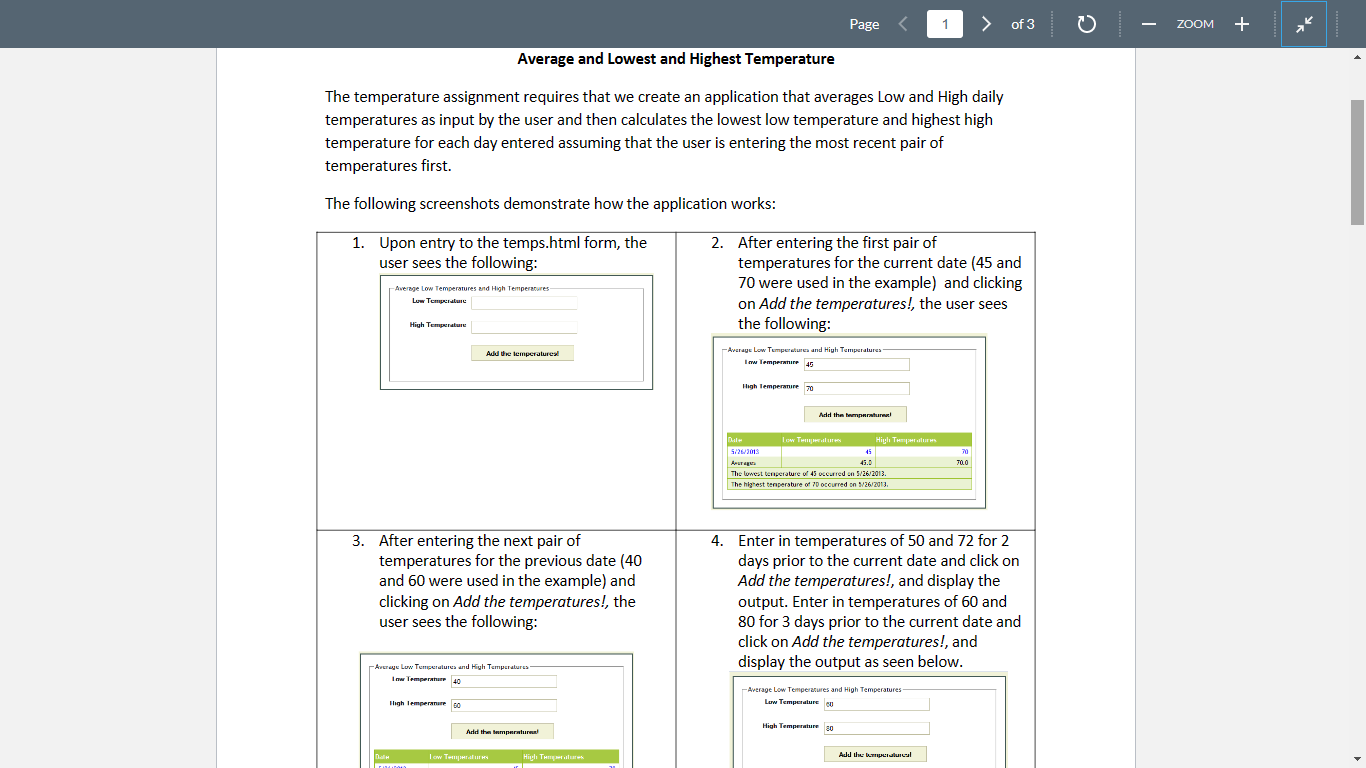
The temperature assignment requires that we create an application that averages Low and High daily temperatures as input by the user and then calculates the lowest low temperature and highest high temperature for each day entered assuming that the user is entering the most recent pair of temperatures first. The following screenshots demonstrate how the application works: 1. Upon entry to the temps.html form, the 2. After entering the first pair of user sees the following: temperatures for the current date (45 and 70 were used in the example) and clicking on Add the temperatures!, the user sees the following: 3. After entering the next pair of 4. Enter in temperatures of 50 and 72 for 2 temperatures for the previous date ( 40 days prior to the current date and click on and 60 were used in the example) and Add the temperatures!, and display the clicking on Add the temperatures!, the output. Enter in temperatures of 60 and user sees the following: 80 for 3 days prior to the current date and click on Add the temperatures!, and display the output as seen below. The temperature assignment requires that we create an application that averages Low and High daily temperatures as input by the user and then calculates the lowest low temperature and highest high temperature for each day entered assuming that the user is entering the most recent pair of temperatures first. The following screenshots demonstrate how the application works: 1. Upon entry to the temps.html form, the 2. After entering the first pair of user sees the following: temperatures for the current date (45 and 70 were used in the example) and clicking on Add the temperatures!, the user sees the following: 3. After entering the next pair of 4. Enter in temperatures of 50 and 72 for 2 temperatures for the previous date ( 40 days prior to the current date and click on and 60 were used in the example) and Add the temperatures!, and display the clicking on Add the temperatures!, the output. Enter in temperatures of 60 and user sees the following: 80 for 3 days prior to the current date and click on Add the temperatures!, and display the output as seen below
Step by Step Solution
There are 3 Steps involved in it

Get step-by-step solutions from verified subject matter experts
 Study Help