







Question: Create an ice order system management in c++ program use CRUD using TXT (TEXT) FILE. [Price of ice: 10 pesos per kilo] ICEE ORDER MANAGEMENT
Create an ice order system management in c++ program use CRUD using TXT (TEXT) FILE.
[Price of ice:
10 pesos per kilo]
ICEE ORDER MANAGEMENT SYSTEM
1. Create Order
2. Remove
3. Update
4. Display
5. Search order number/ Name
6. Exit and save to textfile
1. CREATE
Order #:
Name:
Delivery address:
Contact #:
Quantity (kg):
Press enter to continue
*Display Order INfo+ Payment
Order #:
Name:
Delivery address:
Contact #:
Quantity (kg):
Payment: P
(Payment will vary in quantity.
Ex. Quantity: 5
Payment: 50 pesos)
2. REMOVE
-remove the order
3. UPDATE
- Can change delivery address, contact #, quantity+payment
4. DISPLAY
-can show all orders from recent to oldest/ by order number 0000-9999
5. SEARCH
-can search and display the order by using the order number or Name
6. Exit and Save Changes to text file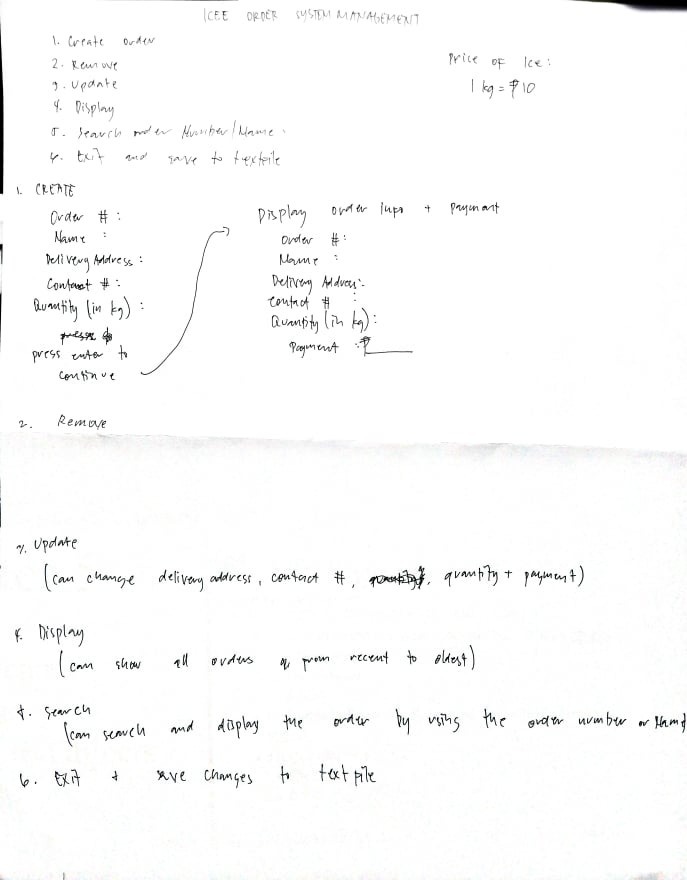
![TXT (TEXT) FILE. [Price of ice: 10 pesos per kilo] ICEE ORDER](https://dsd5zvtm8ll6.cloudfront.net/si.experts.images/questions/2024/09/66f3309e25299_72566f3309da8eef.jpg)
ICEE ORDER SYSTEM MANAGEMENT 1. Create Orden 2. Reun ove price of 9. Update Ice i 1 kg = 8 10 4. Display + payment . r. search onder Muniber I name. 4.txt save to textile 1. CREATE Ovde # : Display order lupo Name Order # Delivery Adress Mame Contact : Delivery Address Quantity (in kg) contact Quantity (in kg): press enter to Pagment 2 continue Remove 7. Update (can can change delivery address, contact # , quantity payment) & Display I can show TH ovdus a prom recent to oldest) to search (can search and display the order by using the order number or Hamad + ave changes to text file price of Ice: 1 kg = 110 .. Mumber (Mame have to textrile + + Payment Display onder info Onder # Mame Delivery Addron contact # . will vary in quantity. Quantity (in kg): Payment I payment Ex. Quantity: 5 kg Payment - 50 pesos
Step by Step Solution
There are 3 Steps involved in it

Get step-by-step solutions from verified subject matter experts
 Study Help