







Question: Create an IPO, a flowchart OR pseudo code that displays a menu to the user: 1) Enter USD to CAD the exchange rate 2) Convert
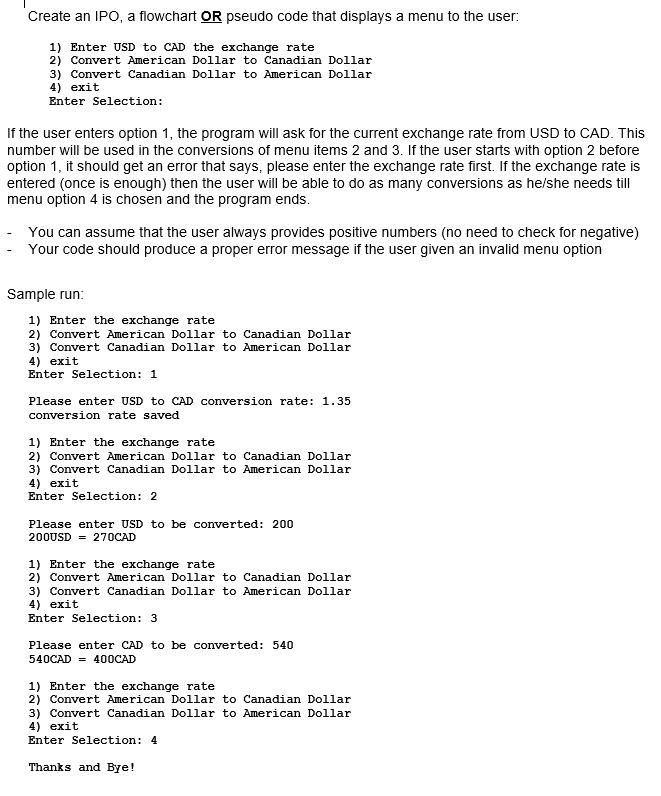
Create an IPO, a flowchart OR pseudo code that displays a menu to the user: 1) Enter USD to CAD the exchange rate 2) Convert American Dollar to Canadian Dollar 3) Convert Canadian Dollar to American Dollar 4) exit Enter Selection: If the user enters option 1, the program will ask for the current exchange rate from USD to CAD. This number will be used in the conversions of menu items 2 and 3. If the user starts with option 2 before option 1, it should get an error that says, please enter the exchange rate first. If the exchange rate is entered (once is enough) then the user will be able to do as many conversions as he/she needs till menu option 4 is chosen and the program ends. You can assume that the user always provides positive numbers (no need to check for negative) Your code should produce a proper error message if the user given an invalid menu option Sample run: 1) Enter the exchange rate 2) Convert American Dollar to Canadian Dollar 3) Convert Canadian Dollar to American Dollar 4) exit Enter Selection: 1 Please enter USD to CAD conversion rate: 1.35 conversion rate saved 1) Enter the exchange rate 2) Convert American Dollar to Canadian Dollar 3) Convert Canadian Dollar to American Dollar 4) exit Enter Selection: 2 Please enter USD to be converted: 200 200USD = 270CAD 1) Enter the exchange rate 2) Convert American Dollar to Canadian Dollar 3) Convert Canadian Dollar to American Dollar 4) exit Enter Selection: 3 Please enter CAD to be converted: 540 540CAD = 400CAD 1) Enter the exchange rate 2) Convert American Dollar to Canadian Dollar 3) Convert Canadian Dollar to American Dollar 4) exit Enter Selection: 4 Thanks and Bye
Step by Step Solution
There are 3 Steps involved in it

Get step-by-step solutions from verified subject matter experts
 Study Help