







Question: Create an object instance of the HashtableWrapperhString,Integeri class as described above, and as shown in figure 2. Ensure this hash table uses Strings as keys,
Create an object instance of the HashtableWrapperhString,Integeri class as described above, and as shown in figure 2. Ensure this hash table uses Strings as keys, Integers as values, and has an initial size of 5, as shown in figure 3.
Inspect the object you have just created, paying particular attention to the objects internal array. Now, using the void put(String key, Integer data) method, as shown in figure 7, add the (key,data) pair ("fred",37) to the hashtable ("fred" is the key, 37 is the data3 ). Inspect the object again. Now add the following (key,data) pairs, again inspecting the hashtable object after each new pair is entered4 : ("is",69) ("dead",0) ("but",999) ("not",-42) ("me!",-1)
Describe, and explain what happens. Note: This is not a programming exercise. Your logbook should contain an explanation for the observed behaviour of the hash table when these values are added. You may also like to have a look at the Java Hashtable API, and consider how this behaviour might be changed by using a different constructor call than that used in this example. You could also think about what the advantages and disadvantages of such differences might be. The following is also not a programming exercise. 2. Which of the following hash functions best avoids address collisions in a hash table with 100 elements (ensure you give reasons for your answer): public int hash1(String key) { return (int)(Math.round(Math.random() 100)); } public int hash2(String key) { return key.length() % 100; } public int hash3(String key) { int midpnt = key.length() / 2; return (key.charAt(0) + key.charAt(midpnt) + key.charAt(key.length()-1)); } public int hash4(String key) { int midpnt = key.length() / 2;
return ((key.charAt(0) + key.charAt(midpnt) + key.charAt(key.length()-1)) % 100); } The code bundle for the following coding exercises can be cloned from Github classroom. 3. The class HuddersfieldHashtable defines a generic interface for hash tables. The primary choice in implementing this interface is whether to use open addressing or chaining. The two abstract classes OpenAddressingHashtable and ChainingHashtable define the relevant hash table datastructures for each of these choices. In answering the following question note that all Java objects inherit the method int hashCode() from their parent class Object.
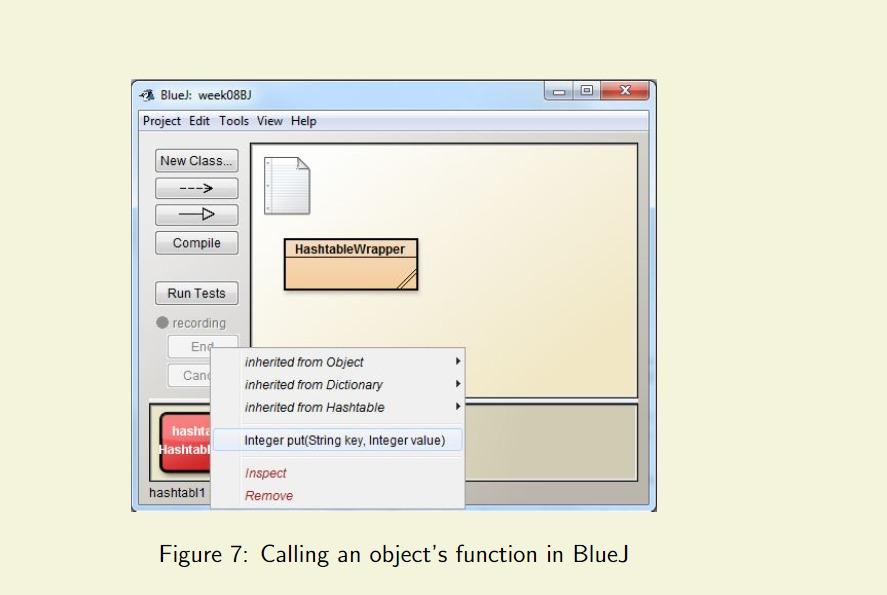
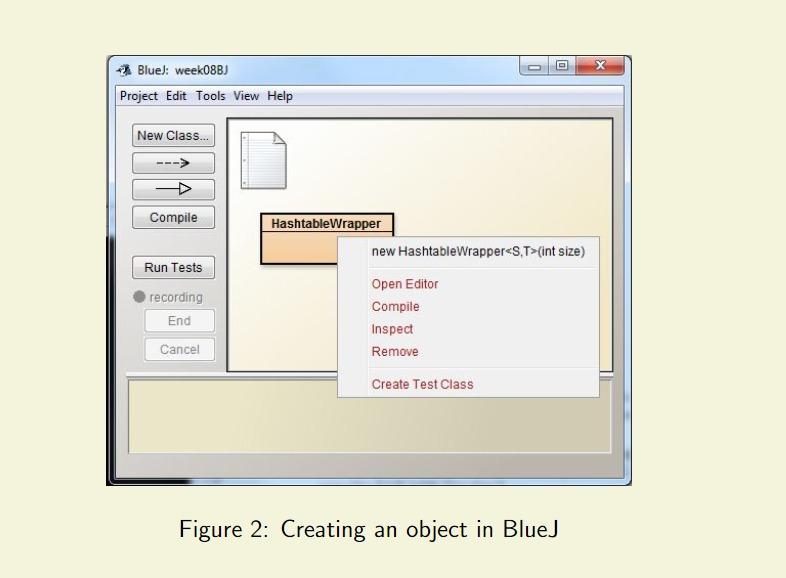
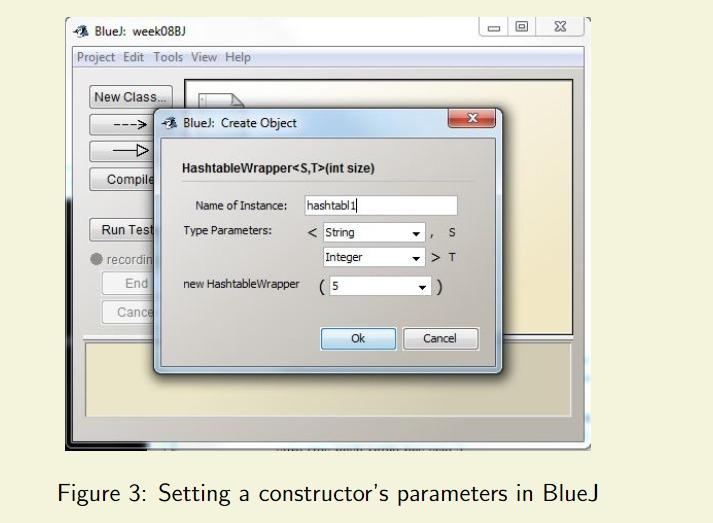
x Blue): week08B) Project Edit Tools View Help New Class... Compile Hashtable Wrapper Run Tests recording End Cand inherited from Object inherited from Dictionary inherited from Hashtable Integer put(String key, Integer value) hashta Hashtab hashtabl1 Inspect Remove Figure 7: Calling an object's function in BlueJ Blue): week08BJ Project Edit Tools View Help New Class... Compile HashtableWrapper new Hashtable Wrapper(int size) Run Tests recording End Open Editor Compile Inspect Remove Cancel Create Test Class Figure 2: Creating an object in BlueJ x Blue): week08BJ Project Edit Tools View Help New Class. X Blue): Create Object HashtableWrapper(int size) Compile Name of Instance: hashtablil Type Parameters: String Run Test recordin Integer > T End new HashtableWrapper (5 Cance Ok Cancel Figure 3: Setting a constructor's parameters in BlueJ x Blue): week08B) Project Edit Tools View Help New Class... Compile Hashtable Wrapper Run Tests recording End Cand inherited from Object inherited from Dictionary inherited from Hashtable Integer put(String key, Integer value) hashta Hashtab hashtabl1 Inspect Remove Figure 7: Calling an object's function in BlueJ Blue): week08BJ Project Edit Tools View Help New Class... Compile HashtableWrapper new Hashtable Wrapper(int size) Run Tests recording End Open Editor Compile Inspect Remove Cancel Create Test Class Figure 2: Creating an object in BlueJ x Blue): week08BJ Project Edit Tools View Help New Class. X Blue): Create Object HashtableWrapper(int size) Compile Name of Instance: hashtablil Type Parameters: String Run Test recordin Integer > T End new HashtableWrapper (5 Cance Ok Cancel Figure 3: Setting a constructor's parameters in BlueJ
Step by Step Solution
There are 3 Steps involved in it

Get step-by-step solutions from verified subject matter experts
 Study Help