







Question: Create an object-oriented (OO) tic-tac-toe game in Java. Use JOptionPanes message, and input dialogs to display messages and get user input. In addition to these
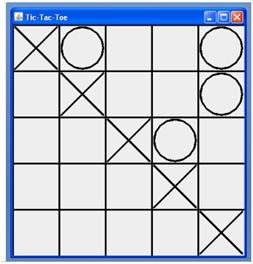
Create an object-oriented (OO) tic-tac-toe game in Java. Use JOptionPanes message, and input dialogs to display messages and get user input. In addition to these instructions, you may test the example Java program for clarification as to the program you should write. Ask the professor for clarification as needed. You program should include the following classes: TicTacToe , Board, Player, HumanPlayer, RandomPlayer , and Move. You may use the professors BoardShow class to graphically show the state of the game. This class is fairly basic in its drawing approach, but does provide a graphical view of the board.
See the Java documentation for the BoardShow class. You should need to use primarily two methods: The constructor, and updateBoard. You may also adjust the width of the lines using the setThickness method. You should submit the BoardShow.class file with your assignment, but you do not have to write this class.
Your TicTacToe class should include the main method and call other classes as needed. Your TicTacToe class should have two players of type Player for X and O. Your program should accept the number of rows and columns as command line arguments, separated by a space. For example, java TicTacToe 3 5 should start a game with 3 rows and 5 columns. If no parameters are specified, the game should start with a three-by-three board.
Please keep in mind that the BoardShow object you create will expect Board and Player objects to be passed into the constructor. To work with BoardShow, your Board and Player object must include at least the public methods listed below. You may, however, define the constructors for Board and Player as you determine best, and you may add additional public methods if you requ
Your Board class should include the following public methods:
int getRows(): returns the number of rows in this board int getColumns(): returns the number of columns in this board Player getPlayerAtLocation(int row,int column): returns a reference to the player at a given location Player win(): returns a reference to player x, player o, or null if neither player has won boolean tie(): returns true if the game has ended in a tie, and false otherwise. boolean makeMove(int row, int column, Player player): updates the board and returns true if the player can move in the requested location, false otherwise
Your Player class should be abstract, and declare the following public methods: char getPlayerType(): returns X or O to indicate the player Move getMove(Board board): given a board, the player indicates the square they would like returned via a Move object Your HumanPlayer and RandomPlayer classes should extend the Player class. The HumanPlayer class should prompt for a row and column from the user as a String, separated by a comma. The square indicies should start at 1. For example, 1,1 is the upper left square while 1,2 is the second upper square. If the user enters an invalid format continue to prompt for a move. This method will also insist the user select a square on the board. Your program should ask again if the square is already used; this can be done in this class or in the TicTacToe class. If the player selects cancel, then your program should exit. RandomPlayer is an AI player that randomly selects an available square when getMove is called. Your Move class should represent a players move. It should have at least two methods to indicate the location the player wants to play: int getRow() int getColumn() Start your game with a human player as X and an AI random player for O. Your player types should be easy to change by editing the source code and recompiling. Ie. The marker should be able to switch between human and AI random simply by calling the appropriate constructor.
Step by Step Solution
There are 3 Steps involved in it

Get step-by-step solutions from verified subject matter experts
 Study Help