







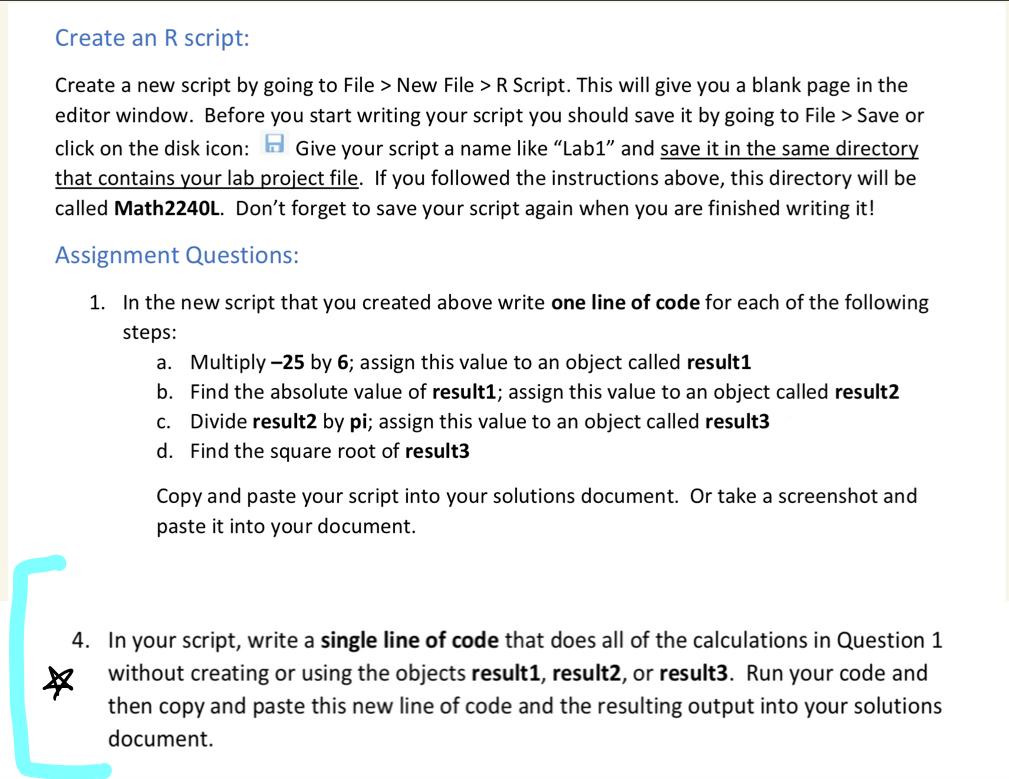
Question: Create an R script: Create a new script by going to File > New File > R Script. This will give you a blank page
Create an R script:
Create a new script by going to File New File Script. This will give you a blank page in the editor window. Before you start writing your script you should save it by going to File Save or click on the disk icon: Give your script a name like "Lab and save it in the same directory that contains your lab project file. If you followed the instructions above, this directory will be called MathL Don't forget to save your script again when you are finished writing it
Assignment Questions:
In the new script that you created above write one line of code for each of the following steps:
a Multiply by ; assign this value to an object called result
b Find the absolute value of result; assign this value to an object called result
c Divide result by ; assign this value to an object called result
d Find the square root of result
Copy and paste your script into your solutions document. Or take a screenshot and paste it into your document.
In your script, write a single line of code that does all of the calculations in Question without creating or using the objects result result or result Run your code and then copy and paste this new line of code and the resulting output into your solutions document.
Step by Step Solution
There are 3 Steps involved in it
1 Expert Approved Answer
Step: 1 Unlock

Question Has Been Solved by an Expert!
Get step-by-step solutions from verified subject matter experts
Step: 2 Unlock
Step: 3 Unlock
 Study Help