







Question: Create and Modify a Column Chart You create another chart showing the Balance sheet items. You change the chart to a clustered column and switch
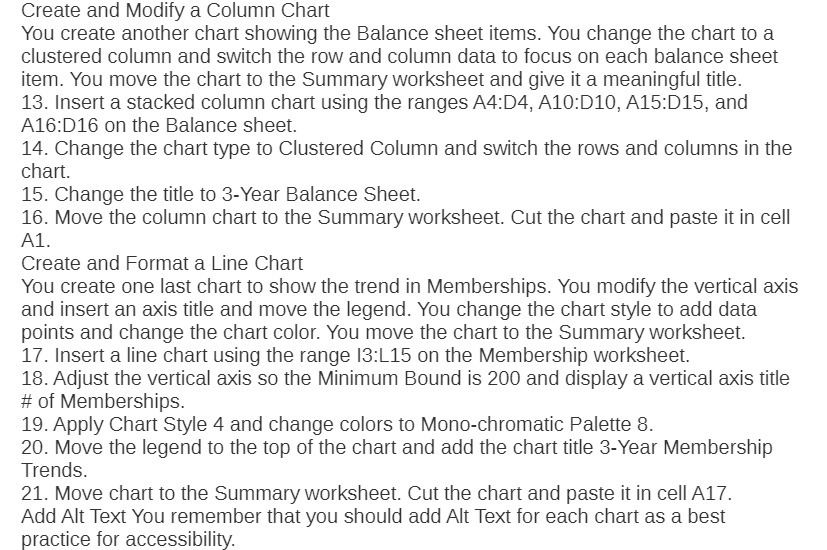
Create and Modify a Column Chart You create another chart showing the Balance sheet items. You change the chart to a clustered column and switch the row and column data to focus on each balance sheet item. You move the chart to the Summary worksheet and give it a meaningful title. 13. Insert a stacked column chart using the ranges A4134, A10:D10, A15:D15, and A16:D16 on the Balance sheet. 14. Change the chart type to Clustered Column and switch the rows and columns in the Chan. 15. Change the title to 3-Year Balance Sheet. 16. Move the column chart to the Summary worksheet. Cut the chart and paste it in cell A1- Create and Format a Line Chart You create one last chart to show the trend in Memberships. You modify the vertical axis and insert an axis title and move the legend. You change the chart style to add data points and change the chart color. You move the chart to the Summary worksheet. 1?. Insert a line chart using the range l3:L15 on the Membership worksheet. 18. Adjust the vertical axis so the Minimum Bound is 200 and display a vertical axis title at of Memberships. 19. Apply Chart Style 4 and change colors to Mono-chromatic Palette 8. 20. Move the legend to the top of the chart and add the chart title 3-Year Membership Trends. 21. Move chart to the Summary worksheet. Cut the chart and paste it in cell A17. Add Alt Text You remember that you should add Alt Text for each chart as a best practice for accessibility
Step by Step Solution
There are 3 Steps involved in it

Get step-by-step solutions from verified subject matter experts
 Study Help