







Question: Create BlackJack game using Matlab! >>hand=ShuffleDeck(1:5) hand= 42 35 34 39 11 >>imshow([BlueDeck{hand}]) with card games, it will be usefull to create another vector called
Create BlackJack game using Matlab!
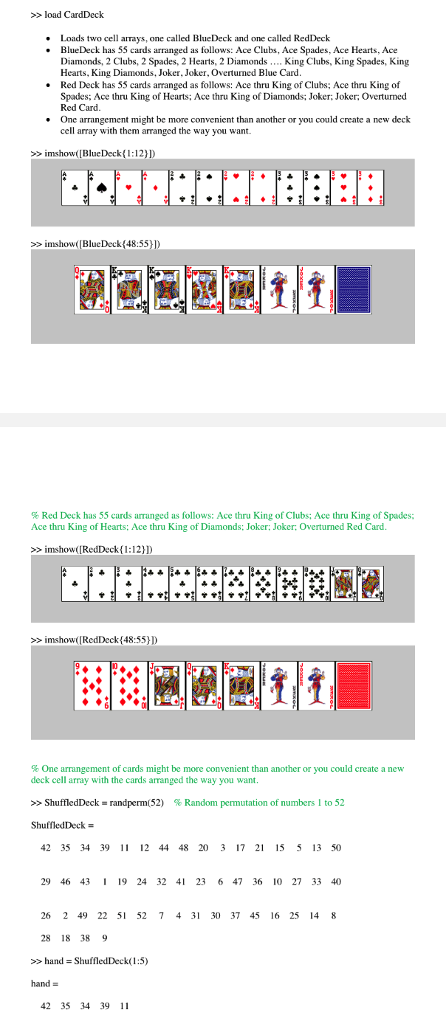
>>hand=ShuffleDeck(1:5)
hand=
42 35 34 39 11
>>imshow([BlueDeck{hand}])
with card games, it will be usefull to create another vector called DeckValues which reflects the value of each card in the Deck.
For example, values for the RedDeck could be (depending on your game);
DeckValues=[14 2:13 14 2:13 14 2:13 14 2:13];
In this case, the Ace all get a value of 14 (highest, Kings get 13, Queens get 12, Jacks get 11, and the remaining cards get face value.
DeckValues would vary depending on the type of card game.
BlueDeck
Columns 1 through 5
[96723 double] [96723 double] [96723 double] [96723 double] [96723 double]
Columns 6 through 10
[96723 double] [96723 double] [96723 double] [96723 double] [96723 double]
Columns 11 through 15
[96723 double] [96723 double] [96723 double] [96723 double] [96723 double]
Columns 16 through 20
[96723 double] [96723 double] [96723 double] [96723 double] [96723 double]
Columns 21 through 25
[96723 double] [96723 double] [96723 double] [96723 double] [96723 double]
Columns 26 through 30
[96723 double] [96723 double] [96723 double] [96723 double] [96723 double]
Columns 31 through 35
[96723 double] [96723 double] [96723 double] [96723 double] [96723 double]
Columns 36 through 40
[96723 double] [96723 double] [96723 double] [96723 double] [96723 double]
Columns 41 through 45
[96723 double] [96723 double] [96723 double] [96723 double] [96723 double]
Columns 46 through 50
[96723 double] [96723 double] [96723 double] [96723 double] [96723 double]
Columns 51 through 55
[96723 double] [96723 double] [96723 double] [96723 double] [96713 double]
RedDeck
Columns 1 through 5
[96723 double] [96723 double] [96723 double] [96723 double] [96723 double]
Columns 6 through 10
[96723 double] [96723 double] [96723 double] [96723 double] [96723 double]
Columns 11 through 15
[96723 double] [96723 double] [96723 double] [96723 double] [96723 double]
Columns 16 through 20
[96723 double] [96723 double] [96723 double] [96723 double] [96723 double]
Columns 21 through 25
[96723 double] [96723 double] [96723 double] [96723 double] [96723 double]
Columns 26 through 30
[96723 double] [96723 double] [96723 double] [96723 double] [96723 double]
Columns 31 through 35
[96723 double] [96723 double] [96723 double] [96723 double] [96723 double]
Columns 36 through 40
[96723 double] [96723 double] [96723 double] [96723 double] [96723 double]
Columns 41 through 45
[96723 double] [96723 double] [96723 double] [96723 double] [96723 double]
Columns 46 through 50
[96723 double] [96723 double] [96723 double] [96723 double] [96723 double]
Columns 51 through 55
[96723 double] [96723 double] [96723 double] [96723 double] [96713 double]
>load CardDeck Loads two cell arrays, one I called BlueDeck and one called RedDeck BlueDeck has 55 cards arranged as follows: Ace Clubs, Ace Spades, Ace Hearts, Ace Diamonds, 2 Clubs, 2 Spades, 2 Hearts, 2 Diamonds King Clubs, King Spades, King Hearts. King Diamonds, Joker, Joker, Overturned Blue Card. Red Deck has 53 cards arranged as follows: Ace thru King of Clubs; Ace thru King of Spades; Ace thru King of Hearts; Ace thru King of Diamonds; Joker: Joker Overturned Red Card. One arrangement might be more convenient than another or you could create a new deck cell array with them arranged the way you want. >> imshow> inshow(BlueDeck(48:55))) % Red Deck has 55 cards aranged as follows: Ace thru King of Clubs; Ace thru King of Spades; Ace thru King of Hearts; Ace thru King of Diamonds: Joker: Joker, Overturned Red Card. imshow (IRedDeck(1:12 >> imshow(RedDeck(48:55) D % One arrangement of cards might be more convenient than another or you could create a new deck cell array with the cards arranged the way you want >> ShuffledDeck-randperm(52) % Random permutation of numbers 1 to 52 42 35 34 39 1 12 44 4820 3 17 2 15 5 13 50 29 46 43 19 24 32 4 23 6 47 36 10 27 33 40 26 2 49 22 51 52 7 4 31 30 37 45 16 25 14 8 28 18 389 >> hand = ShuffledDeck( 1 :5) hand = 42 35 34 39 11 >load CardDeck Loads two cell arrays, one I called BlueDeck and one called RedDeck BlueDeck has 55 cards arranged as follows: Ace Clubs, Ace Spades, Ace Hearts, Ace Diamonds, 2 Clubs, 2 Spades, 2 Hearts, 2 Diamonds King Clubs, King Spades, King Hearts. King Diamonds, Joker, Joker, Overturned Blue Card. Red Deck has 53 cards arranged as follows: Ace thru King of Clubs; Ace thru King of Spades; Ace thru King of Hearts; Ace thru King of Diamonds; Joker: Joker Overturned Red Card. One arrangement might be more convenient than another or you could create a new deck cell array with them arranged the way you want. >> imshow> inshow(BlueDeck(48:55))) % Red Deck has 55 cards aranged as follows: Ace thru King of Clubs; Ace thru King of Spades; Ace thru King of Hearts; Ace thru King of Diamonds: Joker: Joker, Overturned Red Card. imshow (IRedDeck(1:12 >> imshow(RedDeck(48:55) D % One arrangement of cards might be more convenient than another or you could create a new deck cell array with the cards arranged the way you want >> ShuffledDeck-randperm(52) % Random permutation of numbers 1 to 52 42 35 34 39 1 12 44 4820 3 17 2 15 5 13 50 29 46 43 19 24 32 4 23 6 47 36 10 27 33 40 26 2 49 22 51 52 7 4 31 30 37 45 16 25 14 8 28 18 389 >> hand = ShuffledDeck( 1 :5) hand = 42 35 34 39 11
Step by Step Solution
There are 3 Steps involved in it

Get step-by-step solutions from verified subject matter experts
 Study Help