







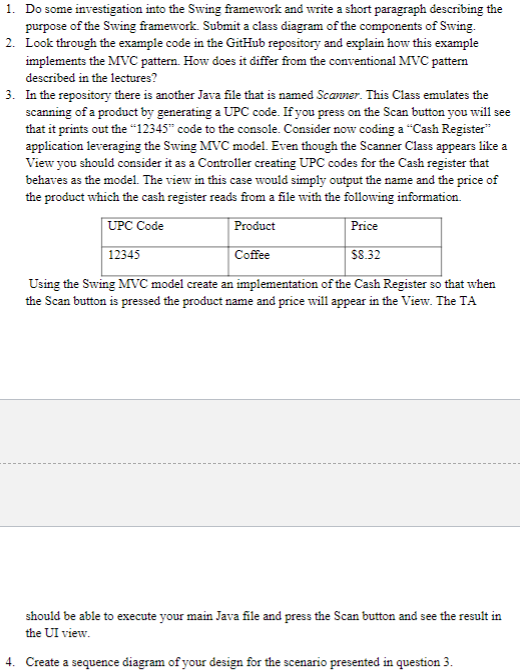
Question: CREATE BOTH OF THE DIAGRAMS AND ADD THE CODE: Do some investigation into the Swing framework and write a short paragraph describing the purpose of
CREATE BOTH OF THE DIAGRAMS AND ADD THE CODE:
Do some investigation into the Swing framework and write a short paragraph describing the
purpose of the Swing framework. Submit a class diagram of the components of Swing.
Look through the example code in the GitHub repository and explain how this example
implements the MVC pattern. How does it differ from the conventional MVC pattern
described in the lectures?
In the repository there is another Java file that is named Scanner. This Class emulates the
scanning of a product by generating a UPC code. If you press on the Scan button you will see
that it prints out the code to the console. Consider now coding a "Cash Register"
application leveraging the Swing MVC model. Even though the Scanner Class appears like a
View you should consider it as a Controller creating UPC codes for the Cash register that
behaves as the model. The view in this case would simply output the name and the price of
the product which the cash register reads from a file with the following information.
Using the Swing MVC model create an implementation of the Cash Register so that when
the Scan button is pressed the product name and price will appear in the View. The TA
should be able to execute your main Java file and press the Scan button and see the result in
the UI view.
Create a sequence diagram of your design for the scenario presented in question
import java.awt.BorderLayout;
import javax.swing.JButton;
import javax.swing.JFrame;
import javax.swing.JPanel;
public class Scanner
Scanner uses Swing framework to create a UPC code
private JFrame frame;
private JPanel scannerPanel;
private JButton scanButton;
public Scanner
frame new JFrameScanner;
frame.getContentPanesetLayoutnew BorderLayout;
frame.setDefaultCloseOperationJFrameEXITONCLOSE;
frame.setSize;
frame.setLocation;
frame.setVisibletrue; Create UI elements
scanButton new JButtonScan;
scannerPanel new JPanel;
Add UI element to frame
scannerPanel.addscanButton;
frame.getContentPaneaddscannerPanel;
scanButton.addActionListenere generateUPC;
private int generateUPC
int upcCode ;
System.out.printlnupcCode;
return upcCode;
public JFrame getFrame return frame;
public void setFrameJFrame frame this.frame frame;
public JPanel getScannerPanel return scannerPanel;
public void setScannerPanelJPanel scannerPanel this.scannerPanel scannerPanel;
public JButton getScanButton return scanButton;
public void setScanButtonJButton scanButton this.scanButton scanButton;
Step by Step Solution
There are 3 Steps involved in it
1 Expert Approved Answer
Step: 1 Unlock

Question Has Been Solved by an Expert!
Get step-by-step solutions from verified subject matter experts
Step: 2 Unlock
Step: 3 Unlock
 Study Help