







Question: Create database in MySQL Workbench 8.0 CE called INFO2312 2. Use the data in the attached image and create these same tables in
Create database in MySQL Workbench 8.0 CE called "INFO2312"
2. Use the data in the attached image and create these same tables in SQL
3. Use the tables and run the queries to answer the following statements
- a. Create table titled "dup_hotel" similar to "hotel", with their first and third columns
- b. Added comment column to guest table
- c. List full details of all hotels
- d. List full details of all hotels located in London. Include the query and results in your assignment solution.
- e. List the names and addresses of all guests in London, alphabetically ordered by name
4. Include screenshots of queries and results for the assignment solution
*EDIT* - Additional information/attachment/tables/figures: The additional information was the picture below vvvvvvvvvvvvvvv.
These are the tables you must input into SQL to complete the statements.
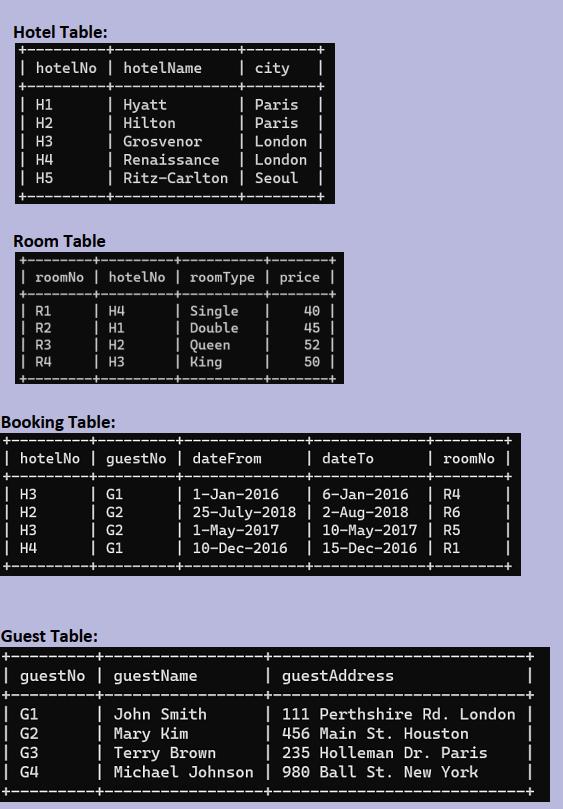
Hotel Table: hotelNo | H1 | H2 H3 | H4 | H5 R1 | R2 | R3 | R4 Room Table | roomNo | hotel No roomType | price | | Single | Double | Queen | King | hotel Name | Hyatt | Hilton | city | Paris | Paris | Grosvenor | London | Renaissance | London | Ritz-Carlton | Seoul | G1 | G2 Booking Table: 1 hotelNo I guest No dateFrom | H3 | G1 | 1-Jan-2016 H2 G2 | H3 | G2 | H4 | G1 | G3 | G4 H4 H1 H2 H3 Guest Table: + I guest No guestName 25-July-2018 | date To | 6-Jan-2016 | R4 2-Aug-2018 | R6 | 10-May-2017 | R5 | 1-May-2017 | 10-Dec-2016 | 15-Dec-2016 | R1 40 45 | 52 | 50 | + | John Smith Mary Kim Terry Brown | Michael Johnson | roomNo | I guestAddress | 111 Perthshire Rd. London | 456 Main St. Houston | 235 Holleman Dr. Paris | 980 Ball St. New York I +
Step by Step Solution
There are 3 Steps involved in it
Create the database CREATE DATABASE INFO2312 Use the database Create the tables based on the provide... View full answer

Get step-by-step solutions from verified subject matter experts
 Study Help