







Question: Create Database (schema) and tables with SQL Workbench. 1: Create a new schema (or database) named Lab6Schema and then one table (table6) and two records
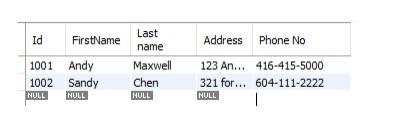 Create Database (schema) and tables with SQL Workbench.
1: Create a new schema (or database) named Lab6Schema and then one table (table6) and two records in it as shown below it by writing/executing SQL Commands.
2. Update the address for Sandy Chen to this new address ( 789 my street Toronto) by writing SQL Command.
3. Delete the first record from this table (Andy Maxwell) by writing SQL Command.
4. Delete this table by writing SQL Command.
5. Create a copy of the Invoices table named as OverdueInvoices in the newly created Lab6 schema and only include the following two columns.
Hint Use the ap.Invoices table and create a calculated column for Balance= Invoice_total-Payment_total-credit_total
Id FirstName Address Phone No 1001 Andy 1002 Sandy NULL NULL Last name Maxwell Chen HULL 123 An... 416-415-5000 321 for... 604-111-2222 NULL 1
Step by Step Solution
There are 3 Steps involved in it

Get step-by-step solutions from verified subject matter experts
 Study Help