







Question: Create firewall rules that block all traffic ecevept for http/https, ssh, ftp, port 8888, port 8889 traffic to your Linux machine. I've tried the following
Create firewall rules that block all traffic ecevept for http/https, ssh, ftp, port 8888, port 8889 traffic to your Linux machine.
I've tried the following two examples I put into a text file to show both in the screenshot. Then running "service iptables restart" but still all the ports are closed.
What does the [0:0] square brackets and sometimes numbers mean as well?
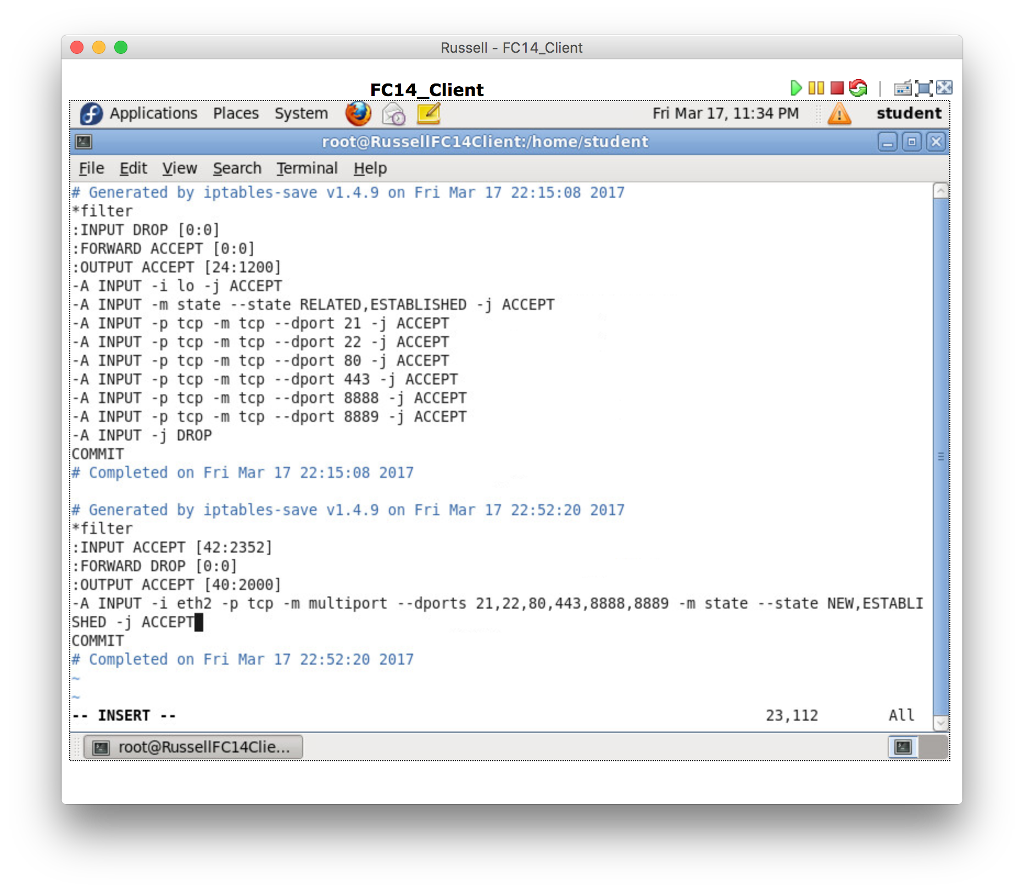
Russell FC14 Client FC14 Client Applications Places system Fri Mar 17, 11:34 PM A student root RussellFC14Client /home/student File Edit View Search Terminal Help Generated by iptables-save v1.4.9 on Fri Mar 17 22:15:08 2017 *filter :INPUT DROP [0:0] FORWARD ACCEPT [0:0] OUTPUT ACCEPT [24:1200] A INPUT -i lo -j ACCEPT A INPUT -m state state RELATED, ESTABLISHED -j ACCEPT A INPUT -p tcp m tcp dport 21 -j ACCEPT A INPUT -p tcp -m tcp dport 22 -j ACCEPT A INPUT -p tcp -m tcp dport 80 -j ACCEPT A INPUT -p tcp -m tcp dport 443 -j ACCEPT A INPUT -p tcp -m tcp dport 8888 -j ACCEPT A INPUT -p tcp -m tcp dport 8889 -j ACCEPT -A INPUT -j DROP COMMIT Completed on Fri Mar 17 22:15:08 2017 Generated by iptables save v1.4.9 on Fri Mar 17 22:52:20 2017 filter INPUT ACCEPT [42:2352] FORWARD DROP [0:0] OUTPUT ACCEPT [40:2000] A INPUT i eth2 -p tcp m multiport dports 21,22,80, 443,8888,8889 -m state state NEW,ESTABLI SHED -j ACCEP COMMIT Completed on Fri Mar 17 22:52:20 2017 INSERT 23, 112 All root a Russell FC14Clie
Step by Step Solution
There are 3 Steps involved in it

Get step-by-step solutions from verified subject matter experts
 Study Help