







Question: Create lc-3 code for task 2 Task 2: Download 1ab6a.2.a sm from the course website and complete it as follows. Add code that parses the
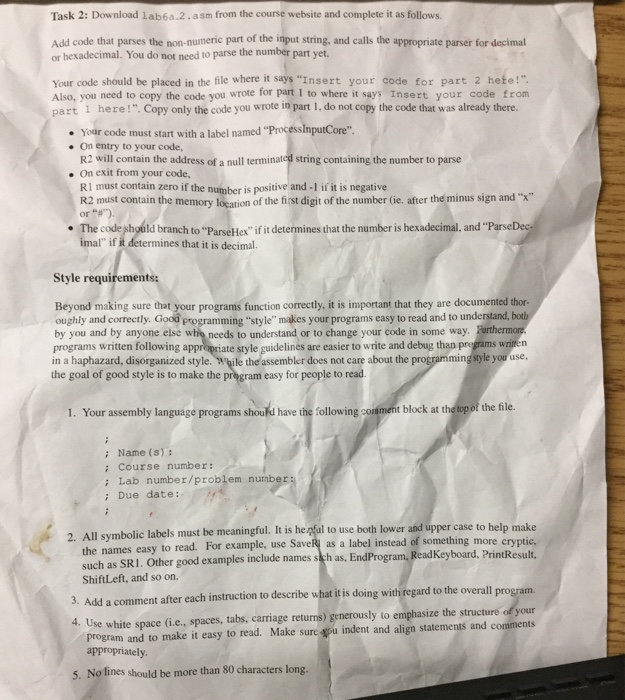
Task 2: Download 1ab6a.2.a sm from the course website and complete it as follows. Add code that parses the non-numeric part of the input string, and calls the appropriate parser for decimal or hexadecimal. You do not need to parse the number part yet. Your code should be placed in the file where it says "Insert your code for part 2 hete!" Also, you need to copy the code you wrote for part I to where it says Insert your code from part 1 here!". Copy only the code you wrote in part 1, do not copy the code that was already there. Your code must start with a label named "ProcessImputCore" On entry to your code, R2 will contain the address of a null terminated string containing the number to parse .On exit from your code, RI must contain zero if the number is positive and -1 if it is negative R2 must contain the memory location of the first digit of the number (ie. after the minus sign and "x" or The codeshould branch to "ParseHex" if it determines that the number is hexadecimal, and "Parse imal" if it determines that it is decimal. Style requ Beyond making sure that your programs function correctly, it is important that they are documented thor- oughly and correctly. Good programming "style" makes your programs easy to read and to understand by you and by anyone else who needs to understand or to change your code in some way programs written following appropriate style guidelines are easier to write and debug than pregrams wrimen in a haphazard, disorganized style. While the assembler does not care about the the goal of good style is to make the pregram easy for people to read min the file. 1. Your assembly language programs shoud have the following conment block at : Name (s) i Course number: ; Lab number/problem number: ; Due date: 2. All symbolic labels must be meaningful. It is he pfal to use both lower and up the names easy to read. For example, use SaveR as a label instead of something more cryptic, Result, such as SR1. Other good examples include names sieh as, EndProgram, ReadKeyboard, Print ShiftLeft, and so on. 3. Add a comment after each instruction to describe what it is doing with regard to the overall 4. Use white space (i.e., spaces, tabs, carriage returns) generously to emphasize the structure of your program. program and to make it easy to read. Make sure ou indent and align statements and comments appropriately 5. No lines should be more than 80 characters long Task 2: Download 1ab6a.2.a sm from the course website and complete it as follows. Add code that parses the non-numeric part of the input string, and calls the appropriate parser for decimal or hexadecimal. You do not need to parse the number part yet. Your code should be placed in the file where it says "Insert your code for part 2 hete!" Also, you need to copy the code you wrote for part I to where it says Insert your code from part 1 here!". Copy only the code you wrote in part 1, do not copy the code that was already there. Your code must start with a label named "ProcessImputCore" On entry to your code, R2 will contain the address of a null terminated string containing the number to parse .On exit from your code, RI must contain zero if the number is positive and -1 if it is negative R2 must contain the memory location of the first digit of the number (ie. after the minus sign and "x" or The codeshould branch to "ParseHex" if it determines that the number is hexadecimal, and "Parse imal" if it determines that it is decimal. Style requ Beyond making sure that your programs function correctly, it is important that they are documented thor- oughly and correctly. Good programming "style" makes your programs easy to read and to understand by you and by anyone else who needs to understand or to change your code in some way programs written following appropriate style guidelines are easier to write and debug than pregrams wrimen in a haphazard, disorganized style. While the assembler does not care about the the goal of good style is to make the pregram easy for people to read min the file. 1. Your assembly language programs shoud have the following conment block at : Name (s) i Course number: ; Lab number/problem number: ; Due date: 2. All symbolic labels must be meaningful. It is he pfal to use both lower and up the names easy to read. For example, use SaveR as a label instead of something more cryptic, Result, such as SR1. Other good examples include names sieh as, EndProgram, ReadKeyboard, Print ShiftLeft, and so on. 3. Add a comment after each instruction to describe what it is doing with regard to the overall 4. Use white space (i.e., spaces, tabs, carriage returns) generously to emphasize the structure of your program. program and to make it easy to read. Make sure ou indent and align statements and comments appropriately 5. No lines should be more than 80 characters long
Step by Step Solution
There are 3 Steps involved in it

Get step-by-step solutions from verified subject matter experts
 Study Help