







Question: create MS project using this instruction por Task 6.pdf X + | File | C:/Users/DELL/Desktop/Task%206.pdf Not syncing You are a member of a project team
create MS project using this instruction
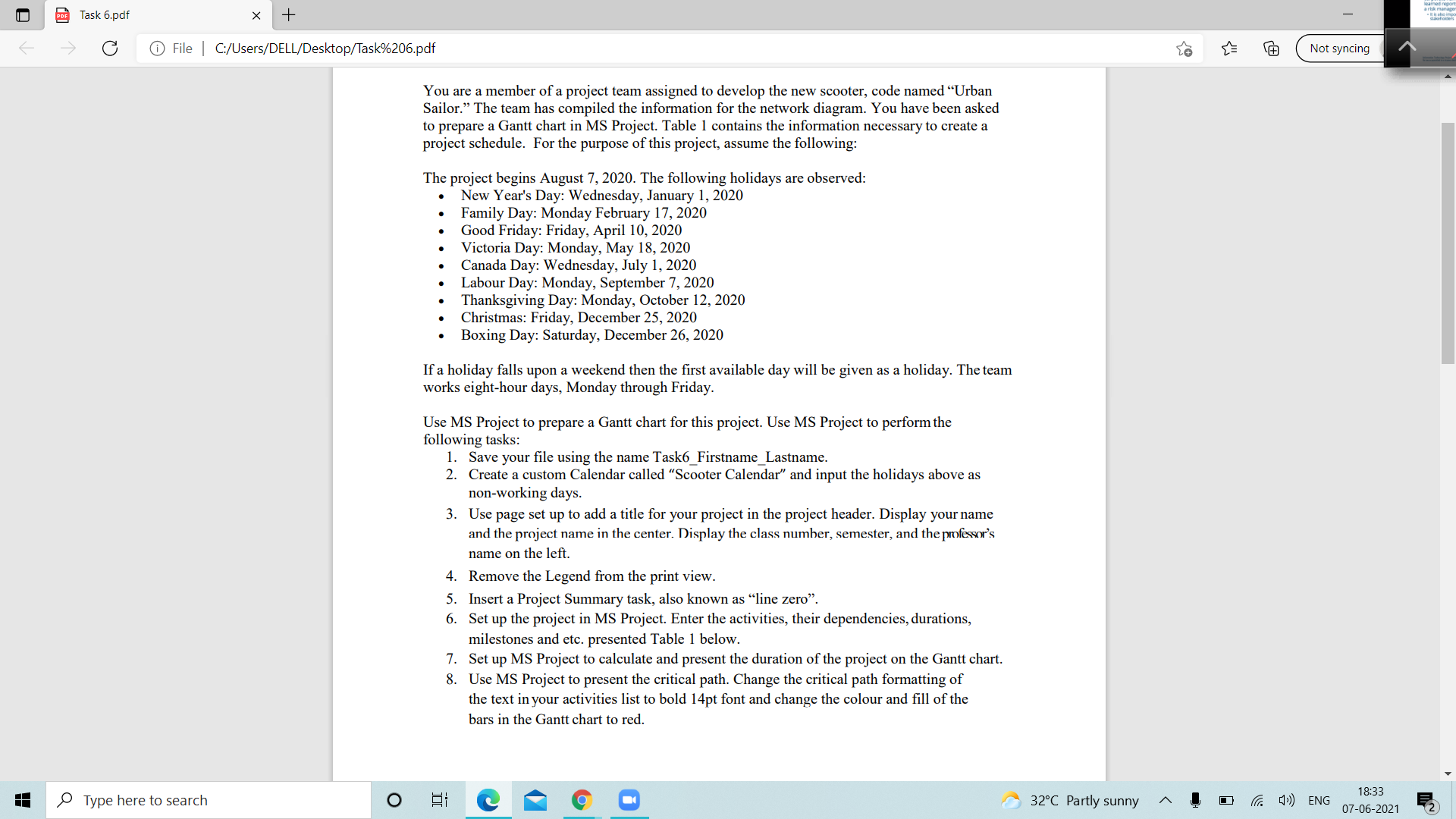
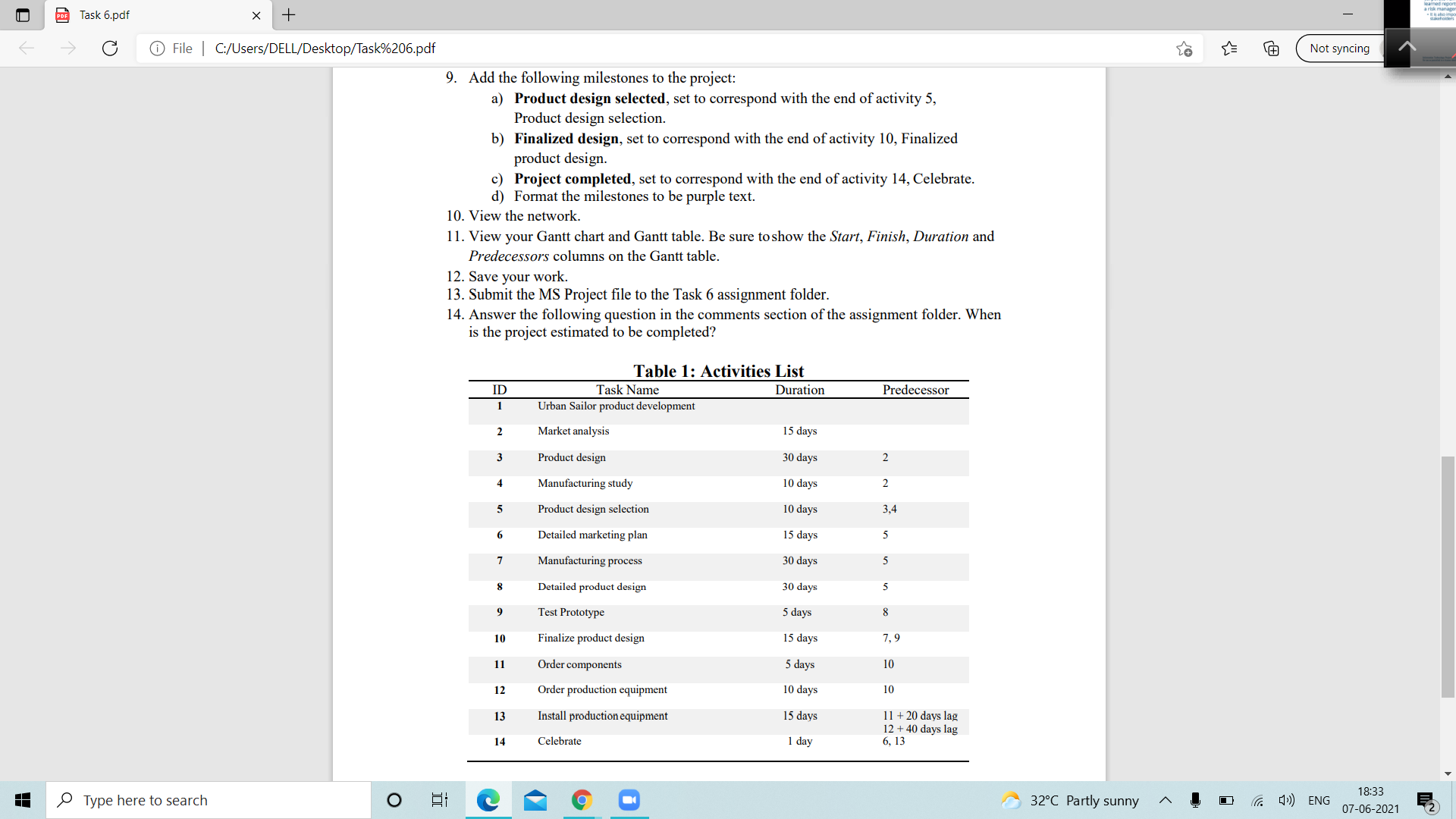
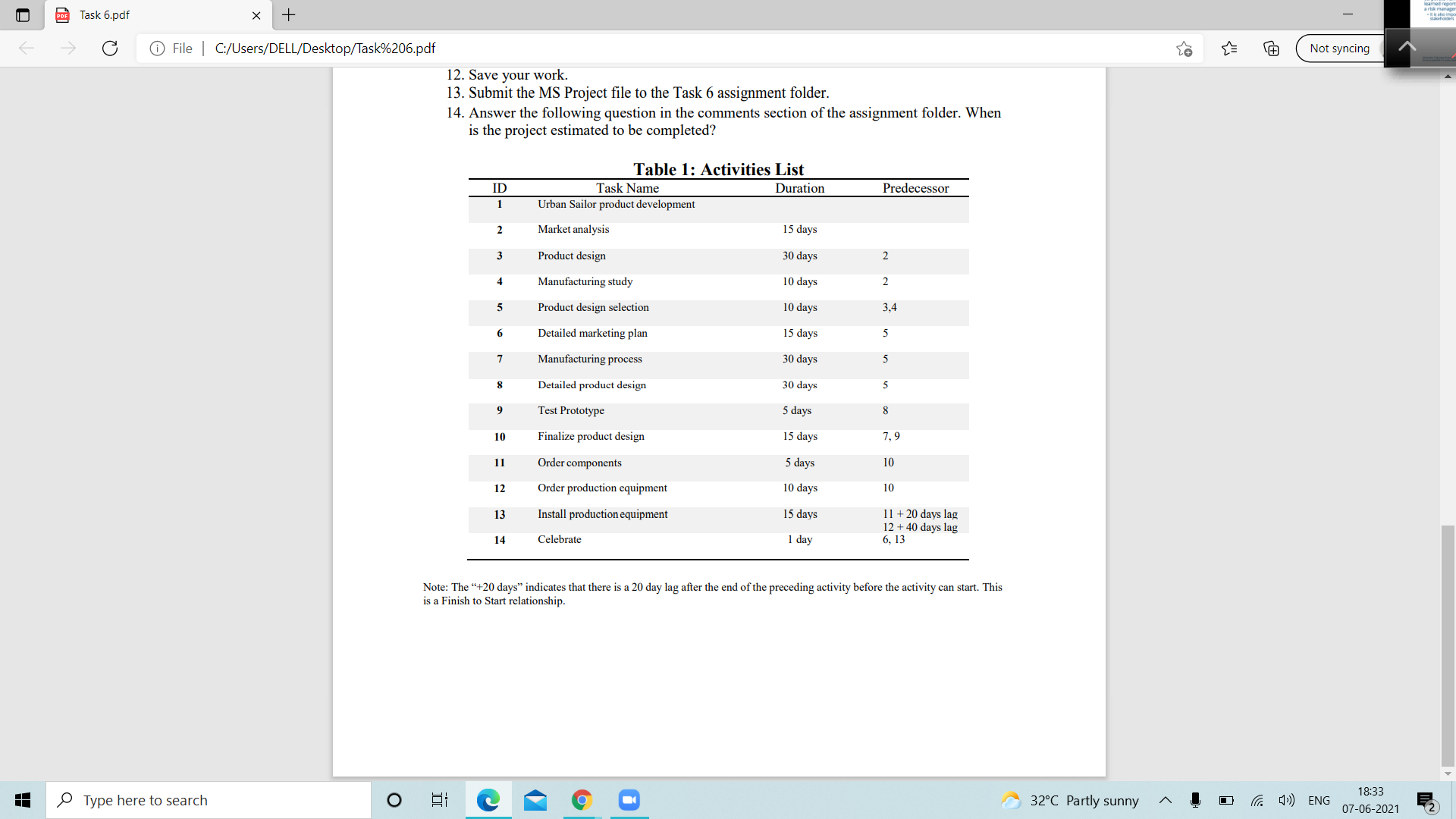
por Task 6.pdf X + | File | C:/Users/DELL/Desktop/Task%206.pdf Not syncing You are a member of a project team assigned to develop the new scooter, code named "Urban Sailor." The team has compiled the information for the network diagram. You have been asked to prepare a Gantt chart in MS Project. Table 1 contains the information necessary to create a project schedule. For the purpose of this project, assume the following: The project begins August 7, 2020. The following holidays are observed: New Year's Day: Wednesday, January 1, 2020 Family Day: Monday February 17, 2020 Good Friday: Friday, April 10, 2020 Victoria Day: Monday, May 18, 2020 Canada Day: Wednesday, July 1, 2020 Labour Day: Monday, September 7, 2020 Thanksgiving Day: Monday, October 12, 2020 Christmas: Friday, December 25, 2020 Boxing Day: Saturday, December 26, 2020 If a holiday falls upon a weekend then the first available day will be given as a holiday. The team works eight-hour days, Monday through Friday. Use MS Project to prepare a Gantt chart for this project. Use MS Project to perform the following tasks: 1. Save your file using the name Task6_Firstname_Lastname. 2. Create a custom Calendar called "Scooter Calendar" and input the holidays above as non-working days. 3. Use page set up to add a title for your project in the project header. Display your name and the project name in the center. Display the class number, semester, and the professor's name on the left. . Remove the Legend from the print view. 5. Insert a Project Summary task, also known as "line zero". 6. Set up the project in MS Project. Enter the activities, their dependencies, durations, milestones and etc. presented Table 1 below. 7. Set up MS Project to calculate and present the duration of the project on the Gantt chart. 8. Use MS Project to present the critical path. Change the critical path formatting of the text in your activities list to bold 14pt font and change the colour and fill of the bars in the Gantt chart to red. Type here to search O 9 18:33 32.C Partly sunny ~ 4 0 ( ) ENG 07-06-2021por Task 6.pdf X + Not syncing @ File | C:/Users/DELL/Desktop/Task%206.pdf 9. Add the following milestones to the project: a) Product design selected, set to correspond with the end of activity 5, Product design selection. b) Finalized design, set to correspond with the end of activity 10, Finalized product design. c) Project completed, set to correspond with the end of activity 14, Celebrate. d) Format the milestones to be purple text. 10. View the network. 1 1. View your Gantt chart and Gantt table. Be sure to show the Start, Finish, Duration and Predecessors columns on the Gantt table. 12. Save your work. 13. Submit the MS Project file to the Task 6 assignment folder. 14. Answer the following question in the comments section of the assignment folder. When is the project estimated to be completed? Table 1: Activities List ID Task Name Duration Predecessor 1 Urban Sailor product development 2 Market analysis 15 days 3 Product design 30 days N 4 Manufacturing study 10 days N 5 Product design selection 10 days 3.4 6 Detailed marketing plan 15 days Manufacturing process 30 days Detailed product design 30 days Test Prototype 5 days 8 10 Finalize product design 15 days 7.9 11 Order components 5 days 10 10 days 10 12 Order production equipment 13 Install production equipment 15 days 11 + 20 days lag 12 + 40 days lag 14 Celebrate 1 day 6, 13 18:33 Type here to search O 32.C Partly sunny ~ 4 0 1) ENG 07-06-2021choir por Task 6.pdf X + @ File | C:/Users/DELL/Desktop/Task%206.pdf Not syncing 12. Save your work. 13. Submit the MS Project file to the Task 6 assignment folder. 14. Answer the following question in the comments section of the assignment folder. When is the project estimated to be completed? Table 1: Activities List ID Task Name Duration Predecessor Urban Sailor product development 2 Market analysis 15 days 3 Product design 30 days N Manufacturing study 10 days N A Product design selection 10 days 3,4 a Detailed marketing plan 15 days U Manufacturing process 30 days Detailed product design 30 days ur 9 Test Prototype 5 days 8 10 Finalize product design 15 days 7.9 11 Order components 5 days 10 12 Order production equipment 10 days 10 13 Install production equipment 15 days 11 + 20 days lag 12 + 40 days lag 14 Celebrate 1 day 5, 13 Note: The "+20 days" indicates that there is a 20 day lag after the end of the preceding activity before the activity can start. This is a Finish to Start relationship. 18:33 Type here to search O 32.C Partly sunny ~ 4 0 ( ) ENG 07-06-2021
Step by Step Solution
There are 3 Steps involved in it

Get step-by-step solutions from verified subject matter experts
 Study Help