







Question: Create Project Inventory Management and Import the Inventory file into thge project. Define the field details as follows: Create a control total for TotalCost. What
Create Project Inventory Management and Import the Inventory file into thge project. Define the field details as follows:
- Create a control total for TotalCost. What is the amount?
- Study the Field Statistics for all Numeric fields, but especially, the QTY and TOTALCOST fields. Note the Net Value, Minimum Value, Maximum Value, # of Zero Items and # of Negative Records field statistics
- Identify obsolete inventory items (those with "Y" in the obsolete field). State how many and their TOTALCOST total.
- Identify negative quantities and negative totalcost. Create both extractions at the same time. State how many and their TOTALCOST total.
- Add a field (Virtual Numeric with 2 decimals) using APPEND to calculate the number of months of inventory. This is basically (Qty/(Usage/12). However if Usage is zero, then number of days of inventory is the number of days between delivery date and the year-end, "20151231". Use @Age to compute number of days between two dates. Divide this by 30 to get answer in number of months. Use @If function to set up if Usage =0, first condition, second condition). Calculate the field statistics for this variable. Note Avg Value, Max value and Min Value.
- Stratify the inventory into bands using the variable you created in e. Start with 0 and go upto 36 with an increment of 6. Create the database and call it Inventory Usage Ageing. Click Fields to Include and select only PRODCODE, DEPOT, TOTALCOST, and MONTHS. Print the stratification result in a 3D chart form and save it as a pdf file. Take a screenshot of items greater than 36 months inventory. How many product lines have more than 36 months usage?
- Calculate the accuracy of the inventory re-ordering system. Use @BETWEEN function to select those items where QTY is between MIN and MAX. The @Between function has three parameters. The first is the field being tested. The second is a low limit for that field and the third is a high limit. @Between selects those items that are between the two limits. It is quite common to use @Between preceded with .NOT. to identify items that are outside the set limits.
- Identify items where no current selling price has been entered. This is CURSELLPRI. Use Criteria instead of an extraction.
- Create a field that displays increase or decrease in selling prices. Basically calculate the percentage increase between PREVSELPRI and CURSELPRI. Call this field PRICE_MOV. However if PREVESELPRICE =0, then display percentage as 100. Create a stratification result of this field using an increment of 10.
- Extract any high variances of PRICE_MOV i.e. where PRICE_MOV increased or decreased by 50%. Use @Abs function to identify more than +50% or -50% increases/decrases. But exclude records where PREVSELPRI=0
- Create a field to calculate profit margin percentage, this is basically the difference between CURSELPRI and AV_COST. But if CURSELPRI=0 then display profit margin percentage as 0.Create Project Inventory Management and Import the Inventory file into the project. Define the field details as follows:
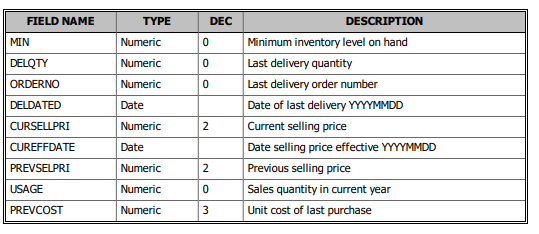
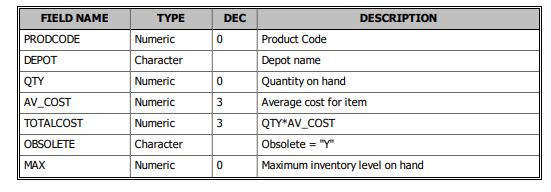
FIELD NAME MIN DELQTY ORDERNO DELDATED CURSELLPRI CUREFFDATE PREVSELPRI USAGE PREVCOST TYPE Numeric Numeric Numeric Date Numeric Date Numeric Numeric Numeric DEC 0 0 0 2 DESCRIPTION Minimum inventory level on hand Last delivery quantity Last delivery order number Date of last delivery YYYYMMDD Current selling price Date selling price effective YYYYMMDD Previous selling price 2 0 Sales quantity in current year Unit cost of last purchase 3
Step by Step Solution
There are 3 Steps involved in it
1 Expert Approved Answer
Step: 1 Unlock

Question Has Been Solved by an Expert!
Get step-by-step solutions from verified subject matter experts
Step: 2 Unlock
Step: 3 Unlock
 Study Help