







Question: Create Queries for Visual Studio Select students whose StuId is 700125 Select students born before 1937 Select students whose first name starts with 'D' Select
Create Queries for Visual Studio
Select students whose StuId is 700125
Select students born before 1937
Select students whose first name starts with 'D'
Select classes in the Business department
Select classes having more than 3 CreditHours
Select StuId's enrolled in Business classes
Select Names of Students enrolled Math 113
Select Names of Students enrolled in English classes
Select Names of Students enrolled in any class ordered by Student Lastname and Firstname
Select Names of Students and ClassId of Classes they are enrolled in for Class numbers greater than 100
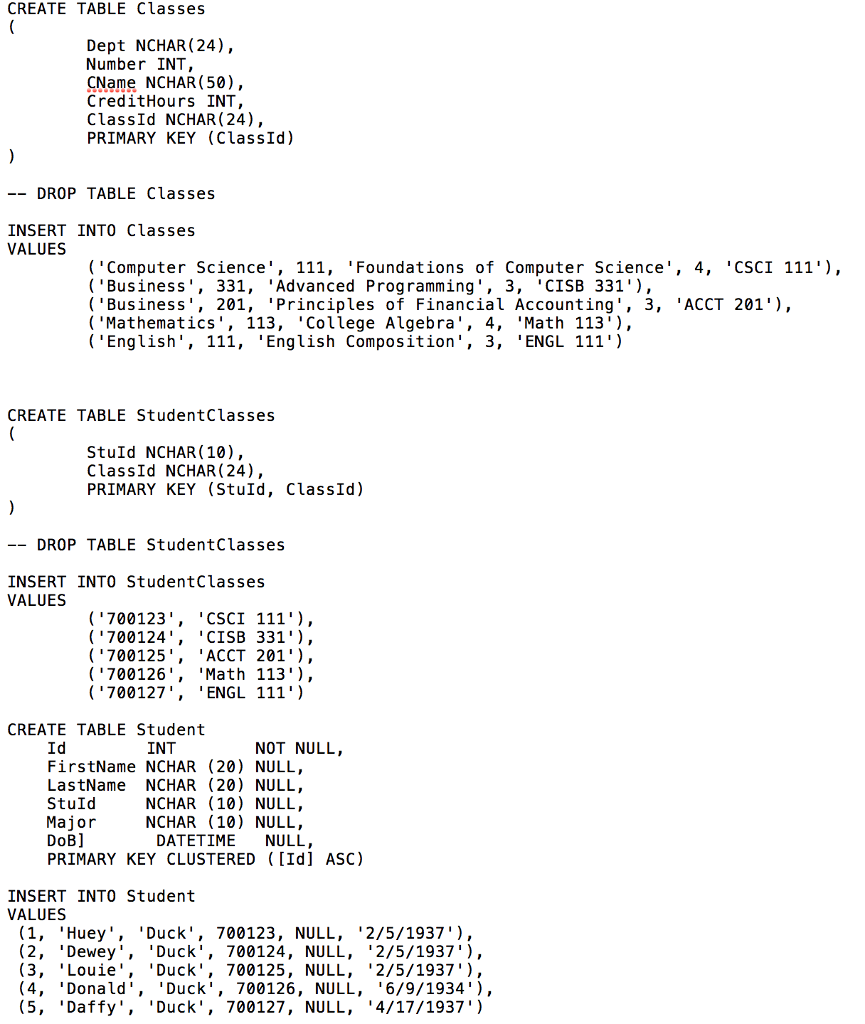
CREATE TABLE Classes Dept NCHAR(24), Number INT CName NCHAR (50), CreditHours INT ClassId NCHAR (24) PRIMARY KEY (ClassId) DROP TABLE Classes INSERT INTO Classes VALUES (Computer Science', 111, 'Foundations of Computer Science, 4, CSCI 111'), Business, 331, 'Advanced Programming', 3, 'CISB 331'), (Business', 201, 'Principles of Financial Accounting', 3, 'ACCT 201'), ('Mathematics', 113, 'College Algebra', 4, 'Math 113), ('English', 111, 'English Composition', 3, 'ENGL 111') CREATE TABLE StudentClasses StuId NCHAR (10), ClassId NCHAR (24) PRIMARY KEY (Stuld, ClassId) DROP TABLE StudentClasses INSERT INTO StudentClasses VALUES "CSCI 111' ) , 'CISB 331'), 'ACCT 201') , 'Math 113'), 'ENGL 111') ( 700123 ( '700124, 700125' , ('700126', ( '700127 CREATE TABLE Student INT NOT NULL, Id FirstName NCHAR (20) NULL, LastName NCHAR (20) NULL, StuId Major DoB] PRIMARY KEY CLUSTERED ([Id] ASC) NCHAR (10) NULL, NCHAR (10) NULL, DATETIME NULL INSERT INTO Student VALUES (1, 'Huey 'Duck, 700123, NULL, "2/5/1937'), (2, "Dewey. "Duck', 700124, NULL, '2/5/1937'), (3, 'Louie 'Duck', 700125, NULL, '2/5/1937'), (4, "Donald. "Duck', 700126, NULL, "6/9/1934" ) , (5, 'Daffy', "Duck', 700127, NULL, .4/17/1937')
Step by Step Solution
There are 3 Steps involved in it

Get step-by-step solutions from verified subject matter experts
 Study Help