







Question: Create Table Query Create Table Customer (CustomerID Int Not Null, Name Varchar(40) Not Null, Phone Varchar(20), Email Varchar(40) Not Null, Primary Key(CustomerID) ); Copy the
Create Table Query
Create Table Customer (CustomerID Int Not Null,
Name Varchar(40) Not Null, Phone Varchar(20), Email Varchar(40) Not Null, Primary Key(CustomerID)
);
Copy the above statements and paste them into the space that opened up for you in Visual Studio. After you run the above statement, you should see that the Customer table is created in your new database file. At this point, copy the CREATE TABLE statement and paste it into a new script (text) file. Name this script file yourNetid.txt, where yourNetid is your UIC Netid.
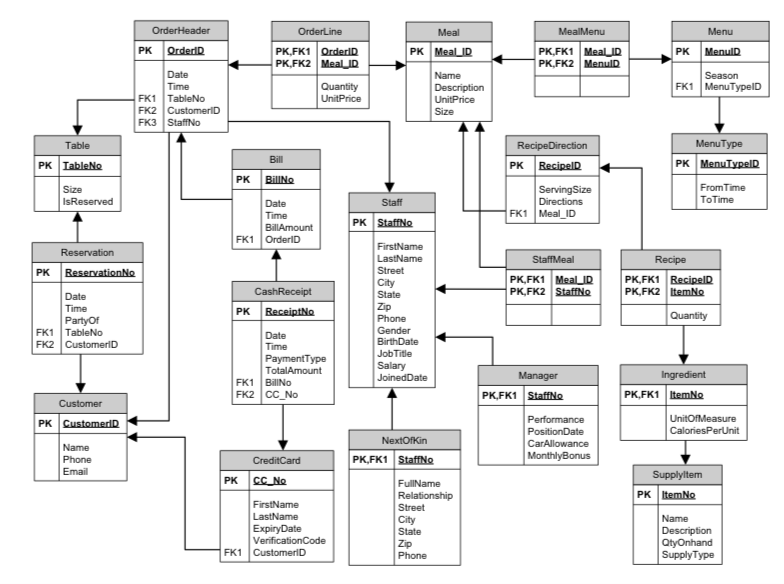
Since there are 20 tables in the relational schema, you need to repeat the CREATE TABLE statement 20 times. Use the GO command at the end to run the SQL statement and create all your tables at once. You should have 20 CREATE TABLE statements in yourNetid.txt file.
PK OrderiD PK MeaID PK.FK1 PK MenulD FK1 MenuTypelD FK1 TableNo FK2 CustomerlD FK3 StaffNo Table MenuT PK IableNo PK RecipelD PK MenuTyRelD PK BilINo FromTime ToTime FK1 Meal ID | PK | Staff FK1 OrderlD Recipe PK FK1 PK,FK2 PK | Receipt FK1 TableNo FK2 JobTitle PaymentType TotalAmount FK1 BillNo FK2 CC No | PK.FK1 |ltern PK CustomerlD PK FK1 StaffNo FK1 CustomeriD SupplyType
Step by Step Solution
There are 3 Steps involved in it

Get step-by-step solutions from verified subject matter experts
 Study Help