







Question: Create tables and insert the data from the file called OrderOL TPSchema.txt file. I suggest you create one table at a time to endure
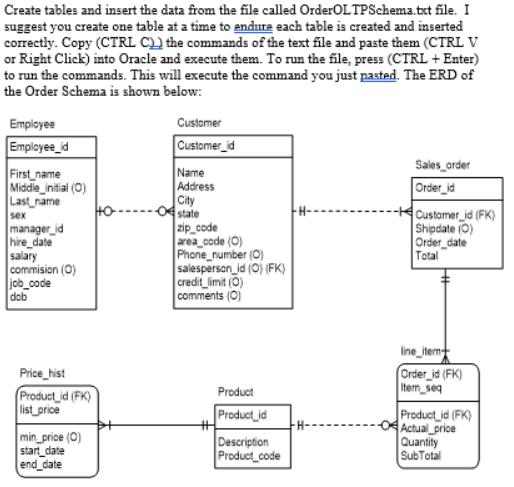
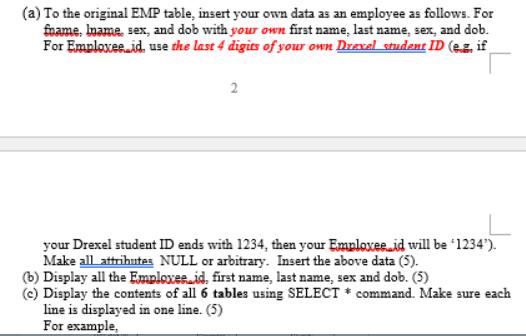
Create tables and insert the data from the file called OrderOL TPSchema.txt file. I suggest you create one table at a time to endure each table is created and inserted correctly. Copy (CTRL C) the commands of the text file and paste them (CTRL V or Right Click) into Oracle and execute them. To run the file, press (CTRL + Enter) to run the commands. This will execute the command you just pasted. The ERD of the Order Schema is shown below: Employee Employee_id First name Middle_initial (0) Last name sex manager_id hire_date salary commision (O) job_code dob Price_hist Product_id (FK) list_price min_price (0) start_date end_date Customer Customer_id Name Address City 04 state zip_code area_code (0) Phone number (O) salesperson_id (O) (FK) credit_limit (0) comments (0) #H Product Product_id Description Product code H- Sales_order Order_id Customer_id (FK) Shipdate (0) Order_date Total line_item Order_id (FK) Item seq Product_id (FK) Actual_price Quantity SubTotal (a) To the original EMP table, insert your own data as an employee as follows. For foame, Iname, sex, and dob with your own first name, last name, sex, and dob. For Emploxee.id, use the last 4 digits of your own Drexel student ID (e. if 2 your Drexel student ID ends with 1234, then your Emploxeeid will be "1234"). Make all attributes NULL or arbitrary. Insert the above data (5). (b) Display all the Emploxes id, first name, last name, sex and dob. (5) (c) Display the contents of all 6 tables using SELECT * command. Make sure each line is displayed in one line. (5) For example,
Step by Step Solution
3.30 Rating (150 Votes )
There are 3 Steps involved in it

Get step-by-step solutions from verified subject matter experts
 Study Help