







Question: create the code given... Task 4 : Smartwatch Driver Program these functions. Algorithm for the WatchDisplay driver program The WatchDisplay script will create the local
create the code given...
Task : Smartwatch Driver Program these functions.
Algorithm for the WatchDisplay driver program
The WatchDisplay script will create the local versions of the heatmap and zones images that will be displayed on a smart watch. The
WatchDisplay script will:
Clear any existing data in MATLAB
Read in the image of the dome
Get GPS data from the watch using the GPSdata helper function
Get radiation data from the scanner using the scanradiation helper function and the time returned by the GPSdata helper function
Remove noise in the radiation data using the removeNoise helper function using a filter size of
Get the zoom offset using the displaysettings helper function
Use your and functions to create the heatmap and zones images
Crop the heatmap and zones images to create the local version of the heatmap and the zones image according to the GPS row and
column and the display's zoom offset
Save the local version of the heatmap as heatmaplocal.png
Save the local version of the zones image as zoneslocal.png
A The WatchDisplay driver program should not display any images within MATLAB. If you use imshow from the driver program or
from any function, the Autograder will crash.
Script description
The outline of the script and comments are provided for you in the file called WatchDisplaystarter.m Don't forget to remove
from the filename before you try to run this script. The outline of the script and comments are provided for you in the file called WatchDisplaystarter.m Don't forget to remove starter
from the filename before you try to run this script.
Driver program for smartwatch display
Get GPS data from user
Get display settings
Create the heatmaplocal.png and zoneslocal.png images
Use the comments in the starter file to help you organize your code!
Testing your WatchDisplay driver program
The watchDisplay driver program depends on the data from the GPSdata and displaysettings functions, so to test your driver
program, you will need to temporarily override the data that comes from GPSdata displaysettings. Below is an example of the local
heatmap and zones images for a particular configuration: GPS Row GPS Col GPS Time Zoom Offset Size of local images: rows and
columns.
To verify that your watchDisplay driver program can produce the correct local images, comment out the calls to GPSdata and
displaysettings and instead specify the same GPS row, column, and time as shown in the example above:
rct GPSdata;
z displaysettings;
r ;
c ;
t ;
z ;
If your watchDisplay driver program is working correctly, it will create the files heatmaplocal.png and zoneslocal.png and they will
look like what is shown in the example above. Once you have verified that your WatchDisplay program produces the correct local images,
don't forget to uncomment your calls to GPSdata and displaysettings and delete the lines where you hardcode the GPS and zoom
setting!
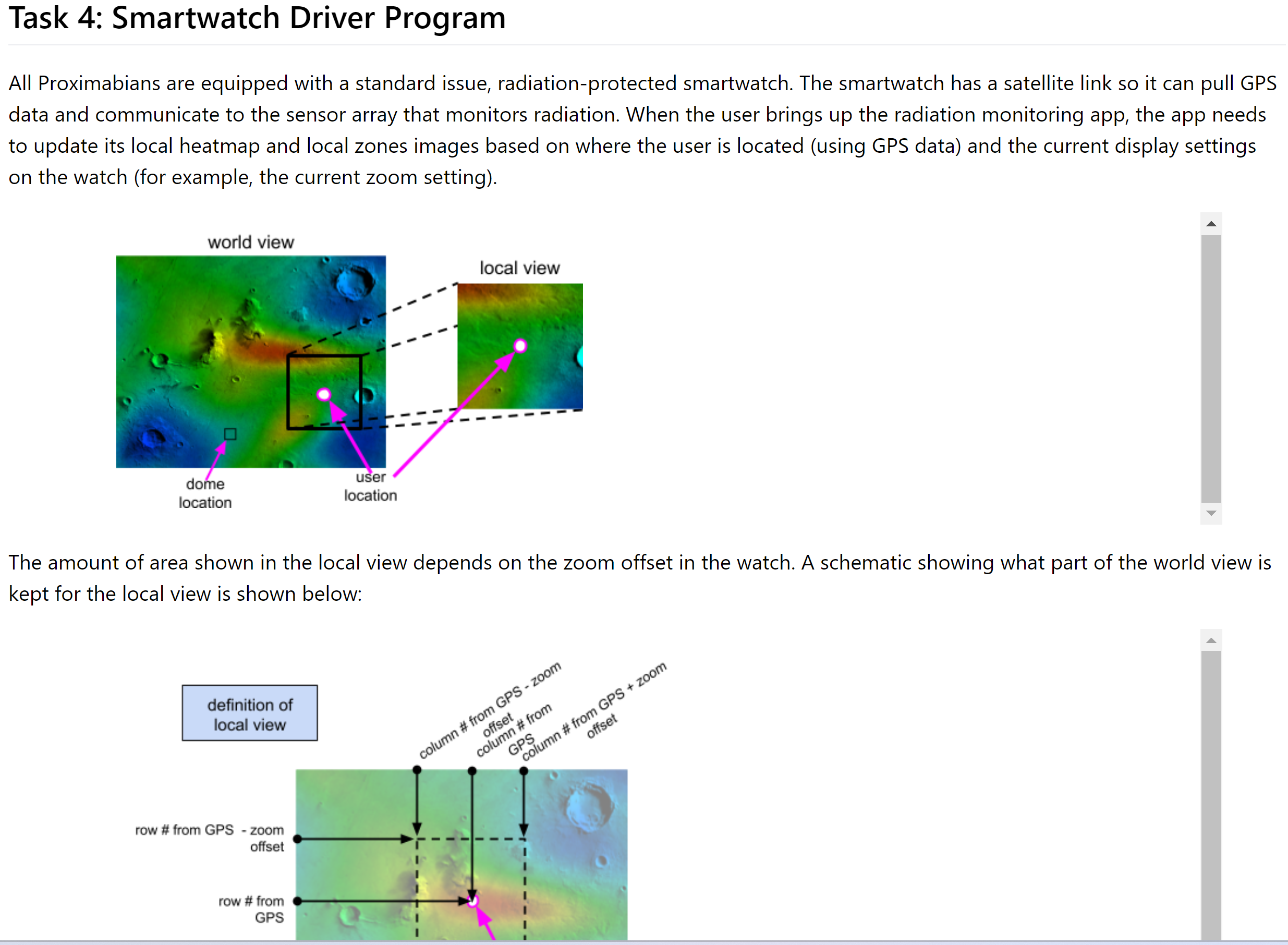
All Proximabians are equipped with a standard issue, radiationprotected smartwatch. The smartwatch has a satellite link so it can pull GPS
data and communicate to the sensor array that monitors radiation. When the user brings up the radiation monitoring app, the app needs
to update its local heatmap and local zones images based on where the user is located using GPS data and the current display settings
on the watch for example, the current zoom setting
The amount of area shown in the local view depends on the zoom offset in the watch. A schematic showing what part of the world view is
kept for the local view is shown below:
Step by Step Solution
There are 3 Steps involved in it
1 Expert Approved Answer
Step: 1 Unlock

Question Has Been Solved by an Expert!
Get step-by-step solutions from verified subject matter experts
Step: 2 Unlock
Step: 3 Unlock
 Study Help