







Question: Create the criteria range, the table, and the extract range with formatted headings and data. Save the worksheet. Perform the following extractions. a)all inventory items
Create the criteria range, the table, and the extract range with formatted headings and data.
Save the worksheet. Perform the following extractions.
- a)all inventory items with more than 10 in stock
- b)all inventory items from the manufacturer, Boles
- c)all inventory items under $100
- d)all inventory items with 5 or less in stock and a list price of less than $300
Part 2:Do you think small companies without extensive database experience might use tables such as this every day? What would be some advantages and disadvantages? What calculated fields might you add to the table?
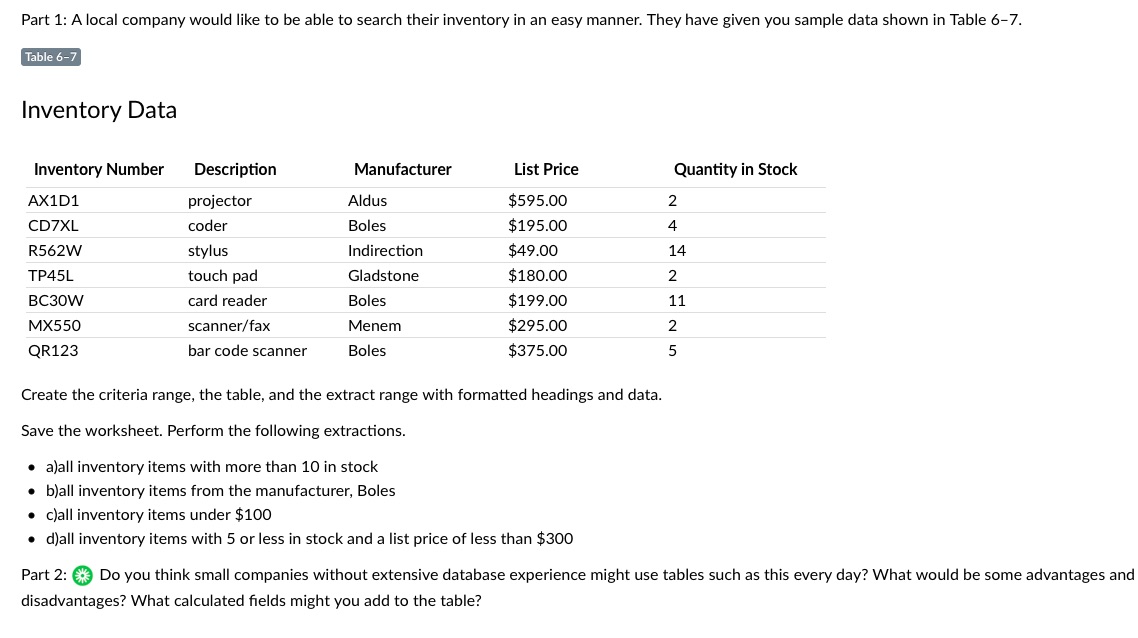
Part 1: A local company would like to be able to search their inventory in an easy manner. They have given you sample data shown in Table 67. Inventory Data Inventory Number Description Manufacturer List Price Quantity in Stock M101 projector Aldus $595.00 2 CDTXL coder Boles $195.00 4 R562W stylus Indirection $49.00 14 TP45L touch pad Gladstone $180.00 2 BC30W card reader Boles $199.00 11 MX550 scanner/fax Menem $295.00 2 QR123 bar code scanner Boles $375.00 5 Create the criteria range, the table. and the extract range with formatted headings and data. Save the worksheet. Perform the following extractions. o alall inventory items with more than 10 in stock 0 Mail inventory items from the manufacturer, Boles o clall inventory items under $100 0 dlall inventory items with 5 or less in stock and a list price of less than $300 Part 2: ea Do you think small companies without extensive database experience might use tables such as this every day? What would be some advantages and disadvantages? What calculated elds might you add to the table
Step by Step Solution
There are 3 Steps involved in it

Get step-by-step solutions from verified subject matter experts
 Study Help