







Question: Create the Database Table with data below: Set Echo off Drop table CIS_Purchase_Order; Drop Table CIS_Product; Drop Table CIS_Supplier; Drop Table CIS_Zip; REM *****Create Zip
Create the Database Table with data below:
Set Echo off
Drop table CIS_Purchase_Order; Drop Table CIS_Product; Drop Table CIS_Supplier; Drop Table CIS_Zip; REM *****Create Zip Code Table ***** Create Table CIS_Zip (ZipCode Integer Primary Key, City VarChar(15), State Char(2)); Insert Into CIS_Zip values (22801, 'Harrisonburg', 'VA'); Insert Into CIS_Zip values (99541, 'Baltimore', 'MD'); Insert Into CIS_Zip values (22802, 'Harrisonburg', 'VA'); Insert Into CIS_Zip values (88511, 'cguo', 'MD'); Insert Into CIS_Zip values (76565, 'New York', 'NY'); Insert Into CIS_Zip values (56421, 'Hollywood', 'WV'); Insert Into CIS_Zip values (22872, 'Roanoke', 'va'); Insert Into CIS_Zip values (90051, 'Washington', 'DC');
REM ******** Create and Load Supplier Table *************** Create Table CIS_Supplier (S_ID Char(5) Primary Key, S_Name VarChar(20), ZipCode Integer references CIS_ZIP);
Insert Into CIS_Supplier Values ('S-010', 'Hewlett Packard Ltd.', 88511); Insert Into CIS_Supplier Values ('S-020', 'Sears', 22801); Insert Into CIS_Supplier Values ('S-030', 'Cannon', 90051); Insert Into CIS_Supplier Values ('S-040', 'Memorex Ltd', 88511); Insert Into CIS_Supplier Values ('S-050', 'Microsoft', 99541); Insert Into CIS_Supplier Values ('S-060', 'Ultra', 88511); Insert Into CIS_Supplier Values ('S-070', 'Seagate Ltd', 22801); Insert Into CIS_Supplier Values ('S-080', 'Mondseato', 22872); Insert Into CIS_Supplier Values ('S-090', 'Intel', 90051);
REM ************ Create and Load Product Table *************** Create table CIS_Product (P_ID Char(5) Primary Key, P_Name VarChar(30), P_Class VarChar(12), P_Price Number(6,2), S_ID Char(5) References CIS_Supplier); Insert Into CIS_Product Values ('H-001', 'Lazer Jet VI', 'Printer', 395.95, 'S-010'); Insert Into CIS_Product Values ('H-002', 'Ink Jet 3250', 'Printer', 125.00, 'S-010'); Insert Into CIS_Product Values ('H-003', 'Ink Jet 410A', 'Printer', 245.00, 'S-010'); Insert Into CIS_Product Values ('H-004', 'DVD-R 50 Pack', 'DVD', 42.50, 'S-010'); Insert Into CIS_Product Values ('H-005', 'DVD+R 50 Pack', 'DVD', 125.00, 'S-010'); Insert Into CIS_Product Values ('H-006', '19 LCD Monitor', NULL, 125.00, 'S-010'); Insert Into CIS_Product Values ('S-001', '150 GB Internal Drive', 'storage', 145.00, 'S-020'); Insert Into CIS_Product Values ('S-002', '250 GB Internal Drive', 'Storage', 220.00, 'S-020'); Insert Into CIS_Product Values ('S-003', '1GB Key Drive', 'Storage', 99.99, 'S-020'); Insert Into CIS_Product Values ('S-004', '19 Inch LCD Display', NULL, 299.00, 'S-020'); Insert Into CIS_Product Values ('S-005', 'DVD+R 25 Pack', 'Storage', 29.95, 'S-020'); Insert Into CIS_Product Values ('C-001', '250 Bubble Jet', 'Printer', 255.00, 'S-030'); Insert Into CIS_Product Values ('C-002', '4.1 MB Focal Point', 'Camera', 300.00, 'S-030'); Insert Into CIS_Product Values ('C-003', 'R77 6.0 MB Snapshot', 'Camera', 425.95, 'S-030'); Insert Into CIS_Product Values ('M-001', '24X DVD Burner', 'Storage', 215.00, 'S-040'); Insert Into CIS_Product Values ('M-002', 'Windows Vista', NULL, 195.99, 'S-050'); Insert Into CIS_Product Values ('M-003', 'Windows XP Professional', NULL, 389.00, 'S-050'); Insert Into CIS_Product Values ('M-004', 'Visual Studio 2005', 'Software', 395.00, 'S-050'); Insert Into CIS_Product Values ('M-005', 'Visio 2005', 'Software', 250.00, 'S-050'); Insert Into CIS_Product Values ('S-006', '145 GB Cheeta', 'storage', 295.00, 'S-070'); Insert Into CIS_Product Values ('S-007', '130 GB External SCSI', 'Storage', 799.95, 'S-070'); Insert Into CIS_Product Values ('S-008', '300 GB Internal ATA', 'Storage', 329.95, 'S-070'); Insert Into CIS_Product Values ('S-009', '17 Inch Trinitron', 'Monitor', 129.95, 'S-070'); Insert Into CIS_Product Values ('I-001', '3.0 Ghz Celeron', 'Processor', 59.95, 'S-090'); Insert Into CIS_Product Values ('I-002', '3.4 Ghz P4', 'Processor', 229.95, 'S-090'); Insert Into CIS_Product Values ('I-003', 'Intel Pentium 4 531' , 'Processor', 129.95, 'S-090');
REM ********Create and Load Orders Table **************** Create Table CIS_Purchase_Order (O_ID Smallint Primary Key, O_date Date, Number_ordered Smallint, Unit_Cost Number (6,2), Purchaser VarChar(20), P_Id Char(5) References CIS_Product);
Insert into CIS_Purchase_Order Values (1011, '20-Jul-2007', 24, 190.00, 'Smith', 'C-001'); Insert into CIS_Purchase_Order Values (1012, '25-Jul-2007', 50, 186.90, 'Smith','S-006'); Insert into CIS_Purchase_Order Values (1013, '30-Jul-2007', 12, 99.00, 'cguo', 'H-006'); Insert into CIS_Purchase_Order Values (1014, '5-Aug-2007', 30, 190.00, 'Baker','C-001'); Insert into CIS_Purchase_Order Values (1015, '19-Aug-2007', 100, 145.00,'Baker', 'I-002'); Insert into CIS_Purchase_Order Values (1016, '25-Aug-2007', 12, 200.00, 'G. Smith','M-001'); Insert into CIS_Purchase_Order Values (1017, '25-Aug-2007', 300, 15.00, 'cguo', 'S-005'); Insert into CIS_Purchase_Order Values (1018, '10-Sep-2007', 24, 192.00,'Thomas', 'S-006'); Insert into CIS_Purchase_Order Values (1020, '10-Sep-2007', 24, 190.00,'Thomas','C-001'); Insert into CIS_Purchase_Order Values (1019, '30-Jul-2007', 6, 99.00, 'cguo', 'H-006'); Insert into CIS_Purchase_Order Values (1021, '10-Sep-2007', 24, 130.50, 'cguo', 'M-002'); Insert into CIS_Purchase_Order Values (1022, '12-Sep-2007', 30, 150.00, 'cguo', 'I-002'); Insert into CIS_Purchase_Order Values (1023, '30-Jul-2007', 24, 99.00, 'cguo', 'H-006'); Insert into CIS_Purchase_Order Values (1024, '10-Sep-2007', 48, 120.00, 'cguo', 'M-002');
Commit Work;
----------------------------------------//------------------
Then Answer these questions: 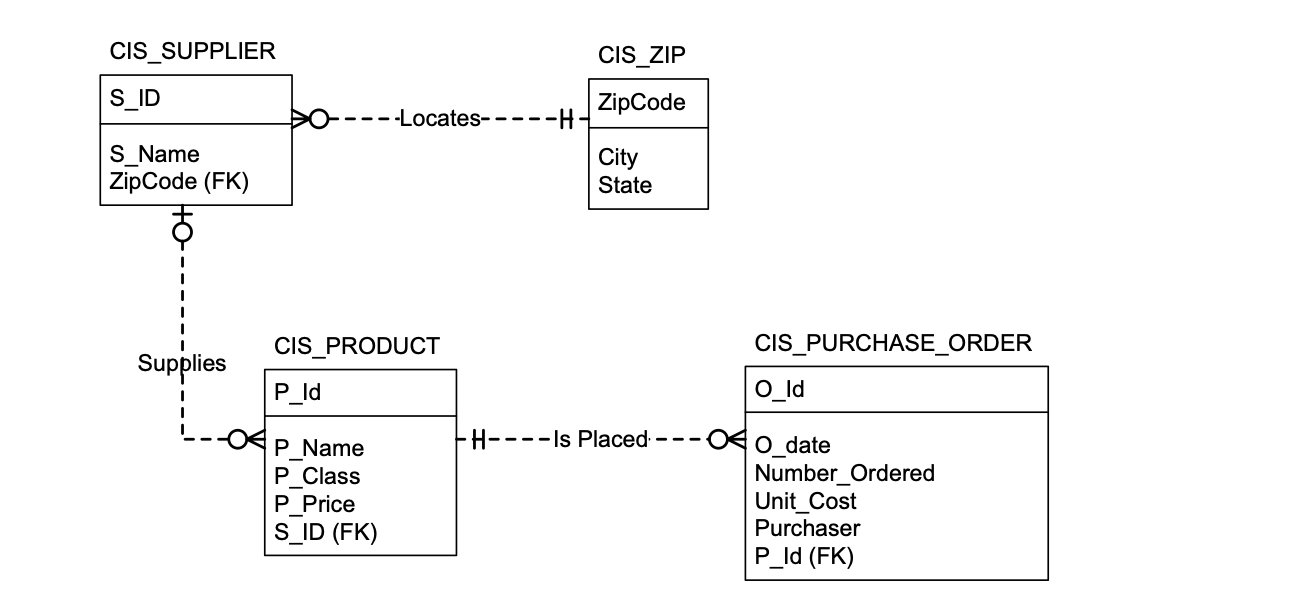
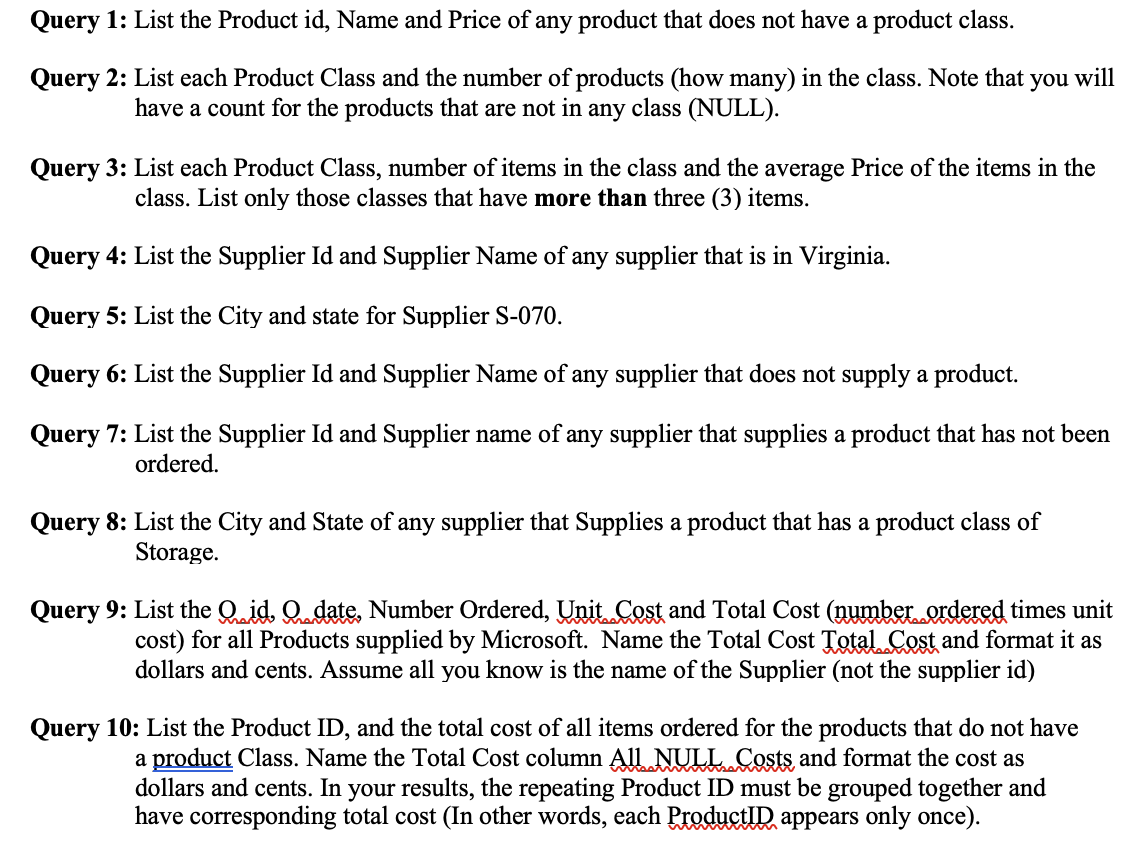
CIS_SUPPLIER CIS_ZIP \begin{tabular}{|l|l|l|} \hline S_ID & 0 & Cis_-.-Locates- .-.-H \\ \hline SipCode \\ \hline ZipCode (FK) & & City State \\ \hline \end{tabular} CIS_PURCHASE_ORDER \begin{tabular}{|l|} \hline O_Id \\ \hline O_date \\ Number_Ordered \\ Unit_Cost \\ Purchaser \\ P_Id (FK) \\ \hline \end{tabular} Query 1: List the Product id, Name and Price of any product that does not have a product class. Query 2: List each Product Class and the number of products (how many) in the class. Note that you will have a count for the products that are not in any class (NULL). Query 3: List each Product Class, number of items in the class and the average Price of the items in the class. List only those classes that have more than three (3) items. Query 4: List the Supplier Id and Supplier Name of any supplier that is in Virginia. Query 5: List the City and state for Supplier S-070. Query 6: List the Supplier Id and Supplier Name of any supplier that does not supply a product. Query 7: List the Supplier Id and Supplier name of any supplier that supplies a product that has not been ordered. Query 8: List the City and State of any supplier that Supplies a product that has a product class of Storage. Query 9: List the Qidid, Qudate, Number Ordered, Unit Cost and Total Cost (number ordered times unit cost) for all Products supplied by Microsoft. Name the Total Cost Total Cost and format it as dollars and cents. Assume all you know is the name of the Supplier (not the supplier id) Query 10: List the Product ID, and the total cost of all items ordered for the products that do not have a product Class. Name the Total Cost column All NULL Costs and format the cost as dollars and cents. In your results, the repeating Product ID must be grouped together and have corresponding total cost (In other words, each ProductID appears only once). CIS_SUPPLIER CIS_ZIP \begin{tabular}{|l|l|l|} \hline S_ID & 0 & Cis_-.-Locates- .-.-H \\ \hline SipCode \\ \hline ZipCode (FK) & & City State \\ \hline \end{tabular} CIS_PURCHASE_ORDER \begin{tabular}{|l|} \hline O_Id \\ \hline O_date \\ Number_Ordered \\ Unit_Cost \\ Purchaser \\ P_Id (FK) \\ \hline \end{tabular} Query 1: List the Product id, Name and Price of any product that does not have a product class. Query 2: List each Product Class and the number of products (how many) in the class. Note that you will have a count for the products that are not in any class (NULL). Query 3: List each Product Class, number of items in the class and the average Price of the items in the class. List only those classes that have more than three (3) items. Query 4: List the Supplier Id and Supplier Name of any supplier that is in Virginia. Query 5: List the City and state for Supplier S-070. Query 6: List the Supplier Id and Supplier Name of any supplier that does not supply a product. Query 7: List the Supplier Id and Supplier name of any supplier that supplies a product that has not been ordered. Query 8: List the City and State of any supplier that Supplies a product that has a product class of Storage. Query 9: List the Qidid, Qudate, Number Ordered, Unit Cost and Total Cost (number ordered times unit cost) for all Products supplied by Microsoft. Name the Total Cost Total Cost and format it as dollars and cents. Assume all you know is the name of the Supplier (not the supplier id) Query 10: List the Product ID, and the total cost of all items ordered for the products that do not have a product Class. Name the Total Cost column All NULL Costs and format the cost as dollars and cents. In your results, the repeating Product ID must be grouped together and have corresponding total cost (In other words, each ProductID appears only once)
Step by Step Solution
There are 3 Steps involved in it

Get step-by-step solutions from verified subject matter experts
 Study Help