







Question: Create the ERD in your drawing tool for microsoft visio for the following problem; Augment your ERD from problem 31--> [31. Draw an ERD containing
Create the ERD in your drawing tool for microsoft visio for the following problem;
Augment your ERD from problem 31--> [31. Draw an ERD containing the Lab, LabVisit, and Patient entity types connected by 1-M relationships from Lab to LabVisit and Patient to LabVisit. Choose appropriate relationship names using your common knowledge of interactions between labs, lab visits, and patients. Define minimum cardinalities so that a lab is required for a lab visit and a patient is required for a lab visit. For the Lab entity type, add attributes LabNo (primary key), LabName, LabStreet, LabCity, LabState, and LabZip. For the Patient entity type, add attributes PatNo (primary key), PatLastName, PatFirstName, PatDOB (date of birth). For the LabVisit entity type, add attributes for the LVNo (primary key), LVDate, LVProvNo, and optional LVOrdNo (for orders from physicians). Choose appropriate data types for the attributes based on your common knowledge.] with the Specimen entity type. For each specimen collected, the database should record a unique SpecNo, SpecArea (vaginal, cervical, or endocervical), and SpecCollMethod (thin prep or sure path). A 1-M relationship from LabVisit to Specimen. A lab visit must produce at least one specimen. A specimen is associated with exactly one lab visit.
Here was the answer to 31.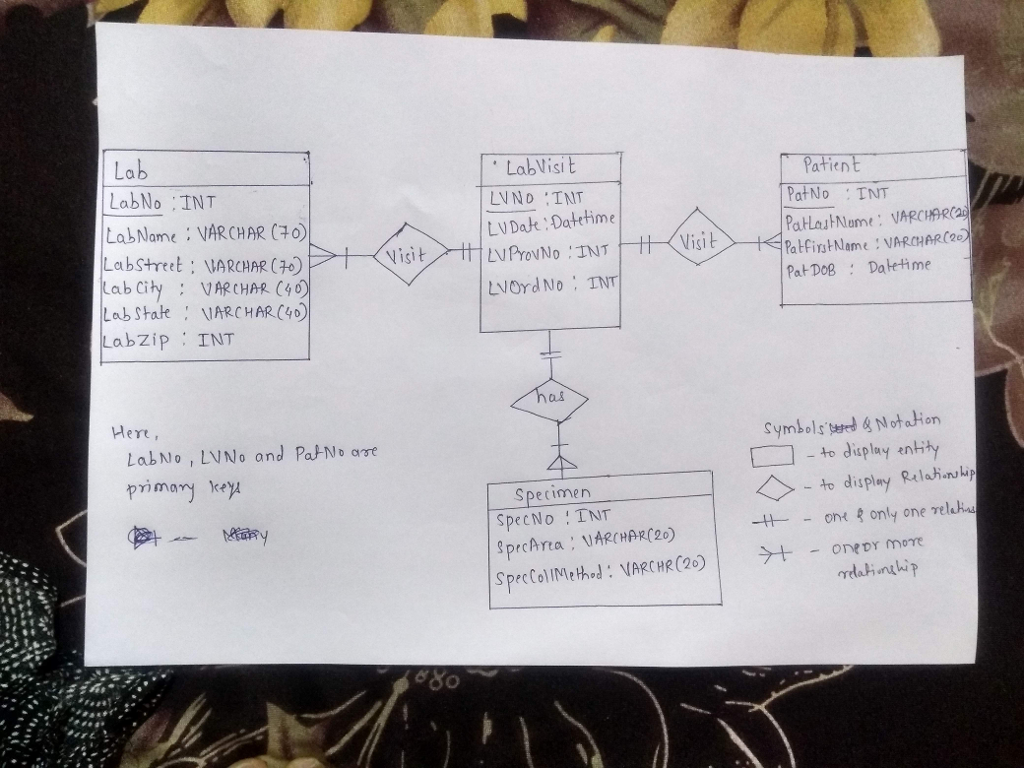
Lab LabNo INT Lab Visi Patien t PatNo TNT LabName VARCHAR C+O) Labstreet: VARCHAR () ab City : VARCHAR C4) Lab state VARCHARC4D abzip INT LVDat Datetime PatfinstNameVARCHARC2e at DoB: Datetime Visi t LVOrd No INT Here, Symbolssrd & Notaio LabNo , LVNo and Pat No arre primary ey -to display entity Specimen SpecNo INT prcArta : UARCHAR(20) to display Rela nulip eary -ont only one relha e So
Step by Step Solution
There are 3 Steps involved in it

Get step-by-step solutions from verified subject matter experts
 Study Help