







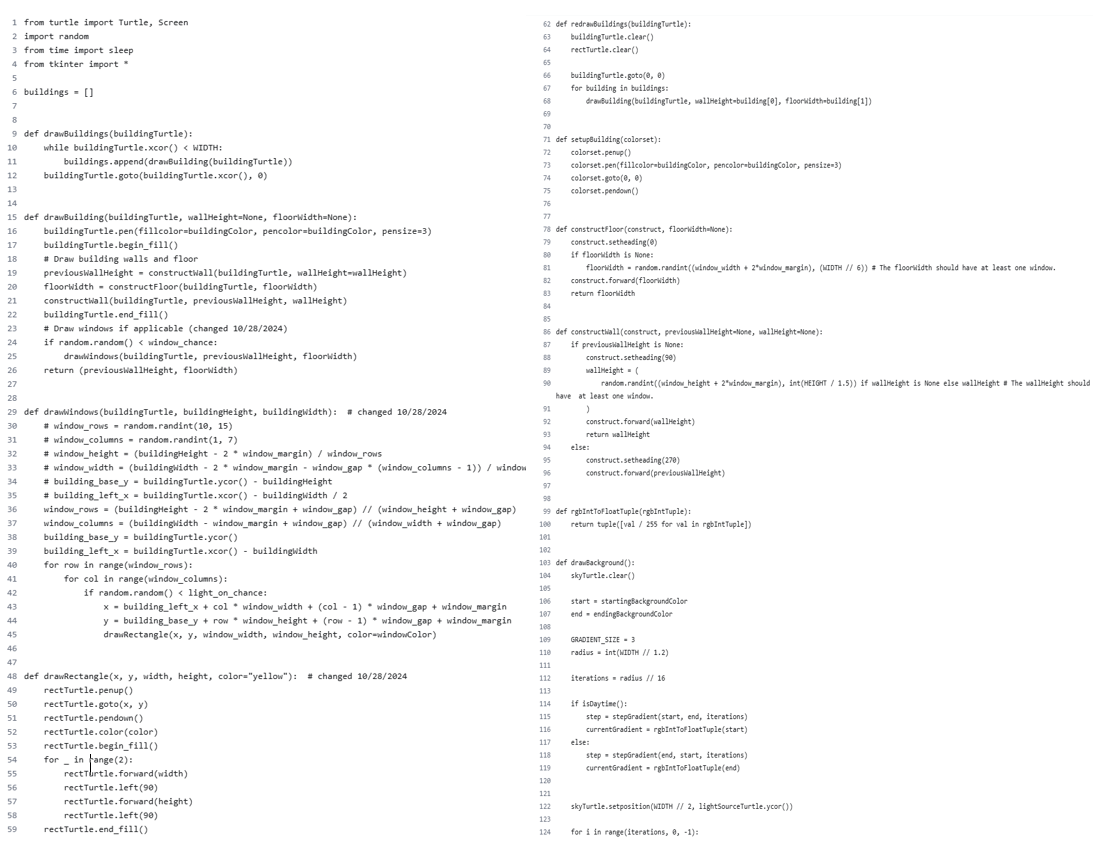
Question: Create the flowchart ( thumbs up if you are able to do ! check all 4 images . . . LAST IMAGE HAS EXAMPLE OF
Create the flowchart thumbs up if you are able to do check all images LAST IMAGE HAS EXAMPLE OF FLOWCHART
for i in rangeiterations:
currentGradient
currentGradienti stepi for i in rangeGRADIENTSIZE def dranLightSource:
skyTurtle.fillcolorcurrentGradient
skyTurtle.beginfill
drawCircleCenteredskyTurtle radius
skyTurtle.endfill
skyTurtle.setpositionskyTurtlexcor skyTurtle.ycorWIDTH iterations
def drawSky:
radius LIGHTSOURCERADIUS
a Set the turtle to the middle of the screen and bring it up as the day advances
Account for the light source entering and exiting the view
if isDaytime;
lightSourseTurtle.teleportWIDTH timeTick totalTicksHEIGHTradius
else:
This code could definitely be better the if loop shouldn't need to exist
lightSourceTurtle.teleportHIDTH timeTick totalTicks totalticksHEIGHTradius
a Dram background
dranfackground
a Dram stars if night
if not isDoytime:
dramStars
SunMoon
drawlightource
def redramSky:
radius LIGHTSOURCERADIUS
a Set the turtle to the middle of the screen and bring it up as the day advances
a Account for the light source entering and exiting the view
if isDaytime:
lightSourseTurtle.teleportWIDTH timeTick totaliticksHEIGMTradius
else:
This code could definitely be better the if loop shouldn't need to exist
lightSourceTurtle.teleportHIDTH timeTick totalTicks totalTicksHEIGHTradius
Dram background
drawfackground
a Dram stars if night
if not isDaytime;
if lenstarTurtles:
updatestars
else:
dranStars
SunMoon
drawLightSource
def dranStars:
starAmount WIDTH
stars
for i in rafgestarAmount:
stars.appendrandomStar
for star in stars:
dramStarstar star
topOfMoon lightSourceTurtlexcor lightSourceTurtle.ycor def drawLinelength turtle:
lightSourceTurtle.pendown turtle.pendoun
lightSourceTurtle.setheading turtle.forwardhalfLength
turtle.backwardlength
turtle.left
turtle.backwardhalflength
lightSourceTurtle.teleporttopOfMoon topOfMoon
lightSourceTurtle.setheading $ turtle.penup
lightSourceTurtle.circleinnerWidth
lightSourceTurtle.circleinnerWidth
if not wasPenDown:
lightSourceTurtle.penup
def isDaytime:
return timeTick totalTicks
def randomstar:
return randomrandint WIDTH random.randintHEIGHT HEIGHT
def updateStars:
for turtle in starTurtles:
x turtle.xcor
If x wIDTH:
x
turtle.setxx
turtle.setyrandomstar
turtle.clear
drawStarx wIDTH starTurtleturtle
def dramStarx yNone, starTurtleNone:
If starTurtle is None:
starTurtle defaultTurtle
starTurtles.appendstarTurtle
starTurtle.coloryellow
starTurtle.penup
starTurtle.gotox starTurtle.ycor if y is None else y
starTurtle.setheading
drawline starTurtle
starTurtle.right
defaultTurtleskyTurtle
starTurtle.left defaultTurtlelightSourceTurtle
drawLine starTurtle defaultTurtlebuildingTurtle
starTurtle.left setupbildingbuildingTurtle
drawLine starTurtle defaultTurtlerectTurtle
starTurtle.penup
global windowchance; windowchance floatentries
global lightonchance; lightonchance floatentries
global windowmargin; windowmargin intentries
global windowgap; windowgap intentries
global timeTick; timeTick intentries
global totalTicks; totalTicks intentries
sleepMilliseconds floatentries
global showTurtles; showTurtles showTurtlesBool.get
master.destroy
Turtle management
global skyTurtle; skyTurtle Turtle
global lightSourceTurtle; lightSourceTurtle Turtle
global starTurtles; starTurtles
global buildingTurtle; buildingTurtle Turtle
global rectTurtle; rectTurtle Turtle
screen setupScreen
setupTurtles
drawSky
drawBuildingsbuildingTurtle
# Fixes output in console when closed by user
try:
while True:
screen.update
sleepsleepMilliseconds
tickTime
redrawSky
redrawBuildingsbuildingTurtle
except TclError:
return
if name "main":
main
Create a Flowchart
Flowcharts help you catch possible mistakes early on and also let you see if you want to add more
functionality.
Example:
Delete the above description of Flowcharts and then copy and paste your
Flowcharts here, #:
Step by Step Solution
There are 3 Steps involved in it
1 Expert Approved Answer
Step: 1 Unlock

Question Has Been Solved by an Expert!
Get step-by-step solutions from verified subject matter experts
Step: 2 Unlock
Step: 3 Unlock
 Study Help