







Question: Create the following 3D-model part, Roller -- Model TX from the drawing views provided below. Add your choice of appropriate material. Save your part
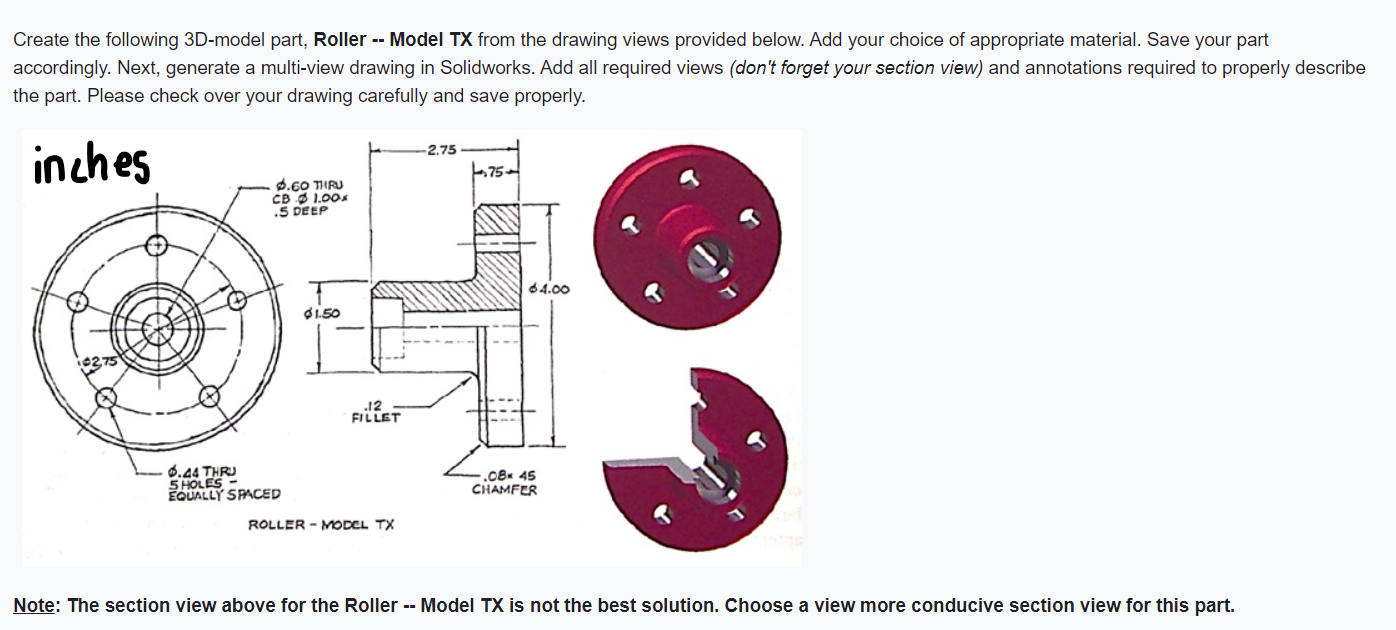
Create the following 3D-model part, Roller -- Model TX from the drawing views provided below. Add your choice of appropriate material. Save your part accordingly. Next, generate a multi-view drawing in Solidworks. Add all required views (don't forget your section view) and annotations required to properly describe the part. Please check over your drawing carefully and save properly. inches 42,75 6.60 TIRU CB 1.00x .5 DEEP -2.75 75. 64.00 $1.50 .12 FILLET -6.44 THRU 5 HOLES- EQUALLY SPACED ROLLER - MODEL TX -.08x 45 CHAMFER Note: The section view above for the Roller -- Model TX is not the best solution. Choose a view more conducive section view for this part.
Step by Step Solution
There are 3 Steps involved in it

Get step-by-step solutions from verified subject matter experts
 Study Help