







Question: Create the following directory structure by using MS DOS Commands. (The contents of the text files follow the directory structure.) Cot.txt 1.2.3.Jan1997Feb1997Mar1997450005000047000 Cotmix.txt 1.2.3.Jan1997Feb1997Mar1997450005000047500 Wool.bxt
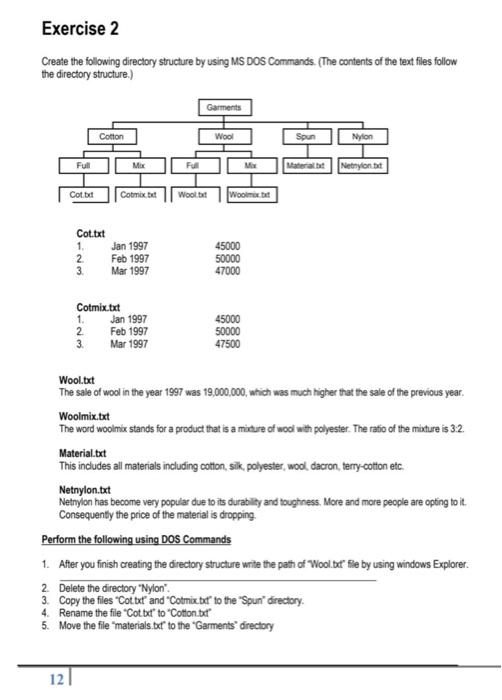
Create the following directory structure by using MS DOS Commands. (The contents of the text files follow the directory structure.) Cot.txt 1.2.3.Jan1997Feb1997Mar1997450005000047000 Cotmix.txt 1.2.3.Jan1997Feb1997Mar1997450005000047500 Wool.bxt The sale of wool in the year 1997 was 19,000,000, which was much higher that the sale of the previous year. Woolmix,txt The word woolinx stands for a product that is a midure of wool with polyester. The ratio of the mixture is 3:2. Material.bxt This includes all materials including cotton, silk, polyester, wool, dacron, terry-cotton etc. Netnylon.txt Netnylon has become very popular due to its durability and toughness. More and more people are opting to it. Consequenty the price of the material is dropping. Perform the following using DOS Commands 1. After you finish creating the directory structure wite the path of Wool.bt' fie by using windows Explorer. 2. Delete the directory "Nylon". 3. Copy the files "Cot bxt' and "Cotmix bd" to the "Spun'" directory. 4. Rename the file "Cot bet' to "Cotton bet' 5. Move the file "materials. bt" to the "Garments" directory
Step by Step Solution
There are 3 Steps involved in it

Get step-by-step solutions from verified subject matter experts
 Study Help