







Question: Create the following graphics dice program. The user will be throwing 5 dice. They will throw each of the 5 dice by clicking on their
Create the following graphics dice program.
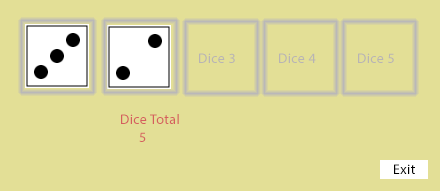
The user will be "throwing" 5 dice.
They will "throw" each of the 5 dice by clicking on their respective outlined areas. You will then need to generate a number between 1-6 for each click/throw and display that dice side in the clicked outlined area. After each click/throw the new running total will appear below the dice.
After all the dice have been clicked/thrown you will display a message below the dice total remarking on how lucky they are. Have an Exit button the user can click to exit the program. You can assume that the dice are clicked/thrown in order of 1 to 5. This program does not allow a second click/throw on a dice. If the user clicks outside of the dice outlines nothing should happen, no dice display, no error message.
You need to create and use a function that is called with every dice click/throw.
You need to create and use a function that generates the random dice number between 1-6.
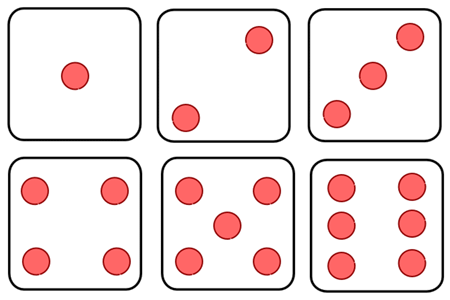
This program draws that dice in the appropriate outlined area. You can do this by calling another function or functions.
This is the pattern for each of the sides of the dice.
Dice 3 Dice 4 Dice 5 Dice Total Exit
Step by Step Solution
There are 3 Steps involved in it

Get step-by-step solutions from verified subject matter experts
 Study Help