







Question: Create the function AnalyzeHRs(file1, file2) in MATLAB Our colleagues on West campus (i.e. in medicine) have collected heart rate data for a set of patients.
 Create the function AnalyzeHRs(file1, file2) in MATLAB
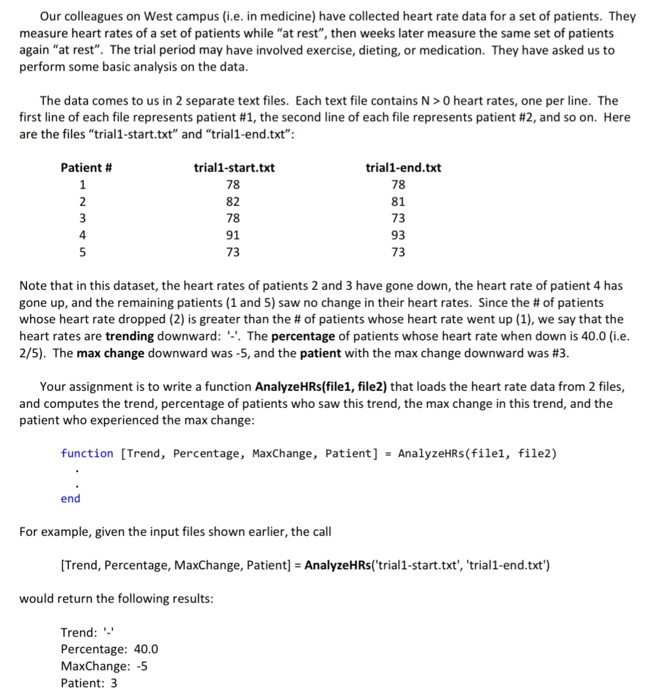
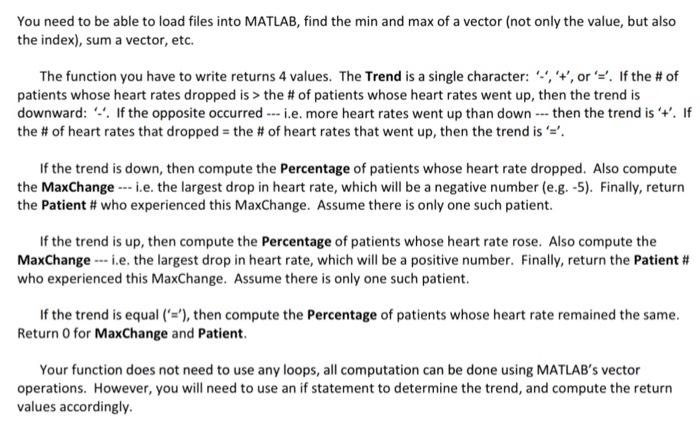
 Our colleagues on West campus (i.e. in medicine) have collected heart rate data for a set of patients. They measure heart rates of a set of patients while "at rest", then weeks later measure the same set of patients again "at rest". The trial period may have involved exercise, dieting, or medication. They have asked us to perform some basic analysis on the data The data comes to us in 2 separate text files. Each text file contains N>0 heart rates, one per line. The first line of each file represents patent #1, the second line of each file represents patient #2, and so on. Here are the files "trial1-start.txt" and "trial1-end.txt": Patient # trial1-start.txt trial1-end.txt 82 78 91 73 78 81 73 93 73 4 Note that in this dataset, the heart rates of patients 2 and 3 have gone down, the heart rate of patient 4 has gone up, and the remaining patients (1 and 5) saw no change in their heart rates. Since the # of patients whose heart rate dropped (2) is greater than the # of patients whose heart rate went up (1), we say that the heart rates are trending downward: -'. The percentage of patients whose heart rate when down is 40.0 (i.e 2/5). The max change downward was-5, and the patient with the max change downward was #3. Your assignment is to write a function AnalyzeHRs(file1, file2) that loads the heart rate data from 2 files and computes the trend, percentage of patients who saw this trend, the max change in this trend, and the patient who experienced the max change function [Trend, Percentage, MaxChange, Patient] AnalyzeHRs(file1, file2) end For example, given the input files shown earlier, the call Trend, Percentage, MaxChange, Patient] AnalyzeHRs('trial1-start.txt', 'trial1-end.txt') would return the following results Trend: Percentage: 40.0 MaxChange: -5 Patient: 3 Our colleagues on West campus (i.e. in medicine) have collected heart rate data for a set of patients. They measure heart rates of a set of patients while "at rest", then weeks later measure the same set of patients again "at rest". The trial period may have involved exercise, dieting, or medication. They have asked us to perform some basic analysis on the data The data comes to us in 2 separate text files. Each text file contains N>0 heart rates, one per line. The first line of each file represents patent #1, the second line of each file represents patient #2, and so on. Here are the files "trial1-start.txt" and "trial1-end.txt": Patient # trial1-start.txt trial1-end.txt 82 78 91 73 78 81 73 93 73 4 Note that in this dataset, the heart rates of patients 2 and 3 have gone down, the heart rate of patient 4 has gone up, and the remaining patients (1 and 5) saw no change in their heart rates. Since the # of patients whose heart rate dropped (2) is greater than the # of patients whose heart rate went up (1), we say that the heart rates are trending downward: -'. The percentage of patients whose heart rate when down is 40.0 (i.e 2/5). The max change downward was-5, and the patient with the max change downward was #3. Your assignment is to write a function AnalyzeHRs(file1, file2) that loads the heart rate data from 2 files and computes the trend, percentage of patients who saw this trend, the max change in this trend, and the patient who experienced the max change function [Trend, Percentage, MaxChange, Patient] AnalyzeHRs(file1, file2) end For example, given the input files shown earlier, the call Trend, Percentage, MaxChange, Patient] AnalyzeHRs('trial1-start.txt', 'trial1-end.txt') would return the following results Trend: Percentage: 40.0 MaxChange: -5 Patient: 3
Step by Step Solution
There are 3 Steps involved in it

Get step-by-step solutions from verified subject matter experts
 Study Help