







Question: create the graph 1. Open the file Final Exam Template. 2. Enter the weights in column B (enter the weights as decimals - Percentages given
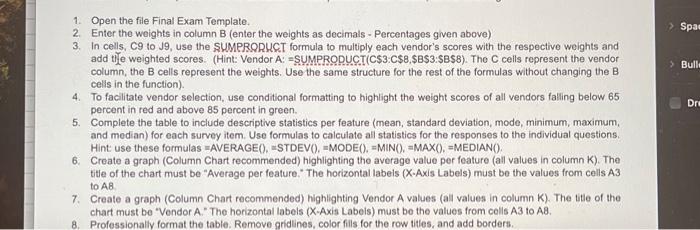
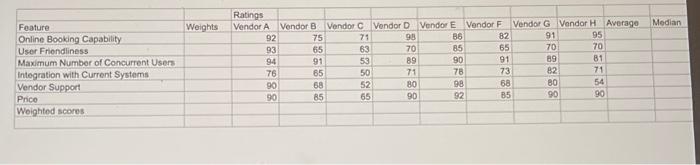
1. Open the file Final Exam Template. 2. Enter the weights in column B (enter the weights as decimals - Percentages given above) 3. In cells, C9 to J9, use the SUMPRORUCT formula to multiply each vendor's scores with the respective weights and add the weighted scores. (Hint: Vendor A: = SUMPRODUCT(C\$3:C\$8,\$BS3:\$BS8). The C cells represent the vendor column, the B cells represent the weights. Use the same structure for the rest of the formulas without changing the B cells in the function). 4. To facilitate vendor selection, use conditional formatting to highlight the weight scores of all vendors falling below 65 percent in red and above 85 percent in green. 5. Complete the table to include descriptive statistics per feature (mean, standard deviation, mode, minimum, maximum, and median) for each survey item. Use formulas to calculate all statistics for the responses to the individual questions. 6. Create a graph (Column Chart recommended) highlighting the average value per feature (all values in column K ). The title of the chart must be "Average per feature." The horizontal labels (X-Axis Labels) must be the values from cells A3 to AB. 7. Create a graph (Column Chart recommended) highlighting Vendor A values (all vatues in column K). The title of the chart must be "Vendor A." The horizontal labels (X-Axis Labels) must be the values from cells A3 to A8. 8. Professionally format the table. Remove gridlines, color fills for the row titles, and add borders
Step by Step Solution
There are 3 Steps involved in it

Get step-by-step solutions from verified subject matter experts
 Study Help