







Question: Create the insert quieres for the checking and saving table with the sql query provided and the excell spreed sheet for each Column. Over draft
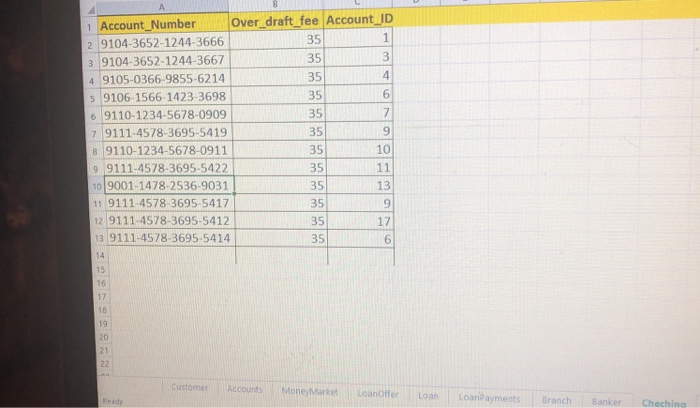
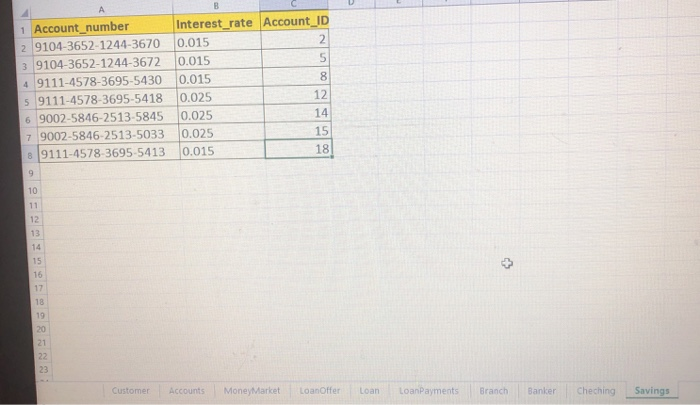
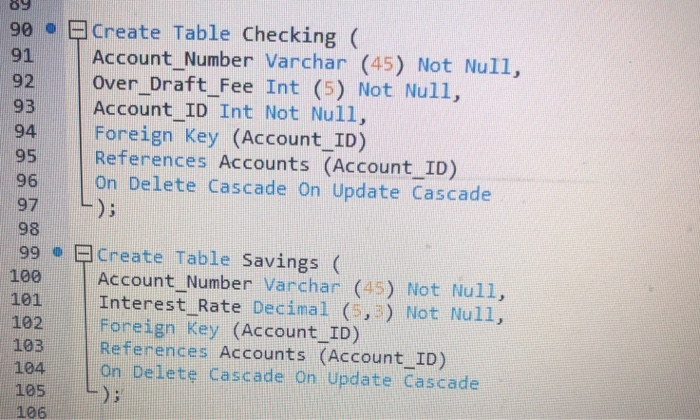
Over draft fee Account ID 35 35 35 35 35 35 35 35 35 35 35 35 1 Account Number 2 9104-3652-1244-3666 3 9104-3652-1244-3667 4 9105-0366-9855-6214 s 9106-1566-1423-3698 6 9110-1234-5678-0909 7 9111-4578-3695-5419 8 9110-1234-5678-0911 9 9111-4578-3695-5422 10 9001-1478-2536-9031 11 9111-4578-3695-5417 12 6 9 10 13 9 17 6 9111-4578-3695-5412 13 9111-4578-3695-5414 14 15 18 19 Customer Accounts MoneytMarket Loanoffer Loan Loandayments Branch Banker Cheching 1 Account_number 2 9104-3652-1244-3670 0.015 3 9104-3652-1244-3672 0.015 4 9111-4578-3695-5430 0.015 5 9111-4578-3695-5418 0.025 6 9002-5846-2513-5845 0.025 7 9002-5846-2513-5033 0.025 Interest rate Account ID 8 12 14 15 [9111-4578 3695 5413 10:015 10 15 Customer Accounts MoneyMarket Loanoffer Loan LoanPayments Branch Banker ChechingSavings 90 o Create Table Checking ( 91 Account Number Varchar (45) Not Null, 92 over_Draft_Fee Int (5) Not Null, 93 Account ID Int Not Null, 94 Foreign Key (Account _ID) 95 References Accounts (Account _ID) 96 On Delete Cascade on Update Cascade 97): 98 99 Create Table Savings ( 100 Account Number Varchar (45) Not Null, 101 Interest Rate Decimal (5,) Not Null, 102 Foreign Key (Account _ID) 103 References Accounts (Account ID) 104 On Delete Cascade On Update Cascade 105) 106
Step by Step Solution
There are 3 Steps involved in it

Get step-by-step solutions from verified subject matter experts
 Study Help