







Question: Create the ~/ops445/lab4/lab4d.py script. The purpose of this script is to demonstrate creating and manipulating strings. There will be four functions each will return a
- Create the~/ops445/lab4/lab4d.pyscript. The purpose of this script is to demonstrate creating and manipulating strings. There will be four functions each will return a single string.
- Use the following template to get started
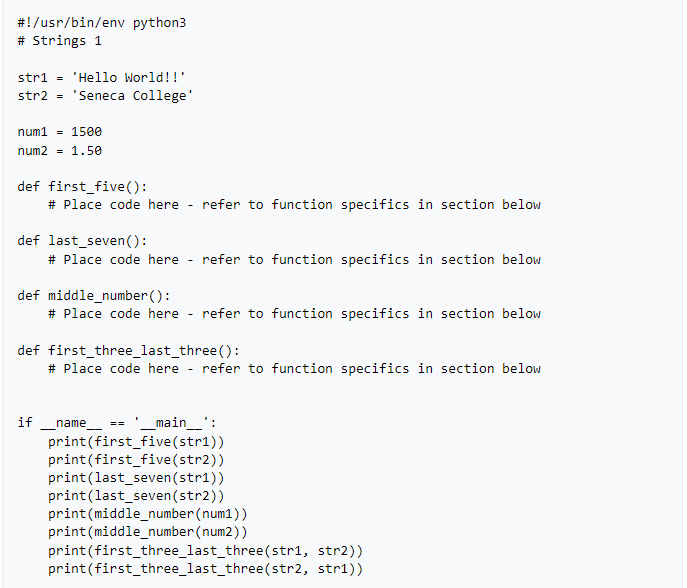
- The script should contain four functions (use your own argument names):
first_five():
- Accepts a single string argument
- Returns a string that contains the first five characters of the argument given
last_seven():
- Accepts a single string argument
- Returns a string that contains the last seven characters of the argument given
middle_number():
- Accepts a integer as a argument
- Returns a string containing the second and third characters in the number
first_three_last_three():
- Accepts two string arguments
- Returns a single string that starts with the first three characters of argument1 and ends with the last three characters of argument2
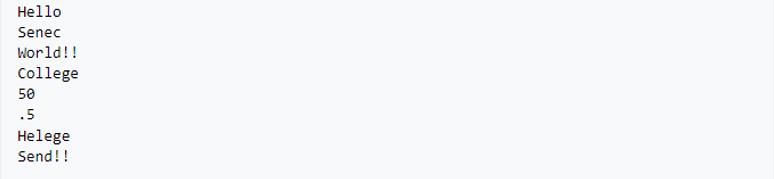
Output should be as shown below
#!/usr/bin/env python3 # Strings 1 str1= 'Hello World!!' str2 = 'Seneca College' num1 = 1500 num2 = 1.50 def first_five(): #Place code here - def last_seven(): # Place code here refer to function specifics in section below if def middle_number(): # Place code here - refer to function specifics in section below refer to function specifics in section below def first three_last_three(): # Place code here == - refer to function specifics in section below name _main__': print (first_five (str1)) print(first_five (str2)) print (last_seven (str1)) print (last_seven(str2)) print(middle_number(num1)) print (middle_number(num2)) print(first_three_last_three (str1, str2)) print (first_three_last_three(str2, str1))
Step by Step Solution
There are 3 Steps involved in it
Heres the Python script lab4dpy that demonstrates creating and manipulating strings python def first... View full answer

Get step-by-step solutions from verified subject matter experts
 Study Help