







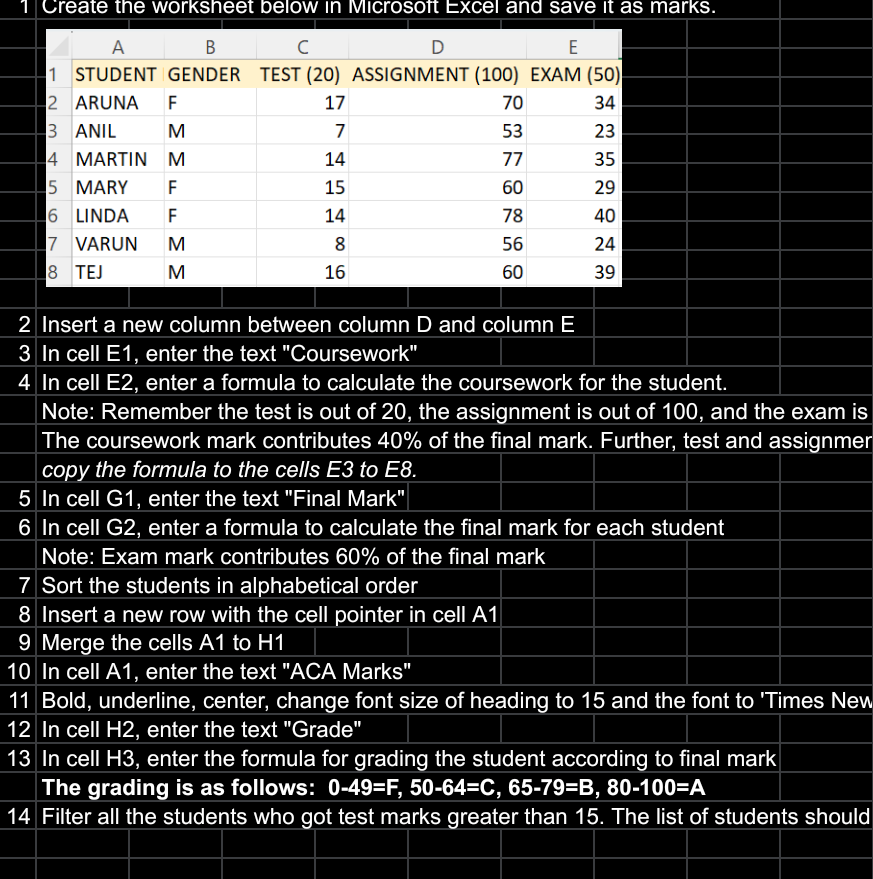
Question: Create the worksheet below In MicrOSoft EXCel and save It as marks.AARUNA 1 STUDENT GENDER TEST ( 2 0 ) ASSIGNMENT ( 1 0 0
Create the worksheet below In MicrOSoft EXCel and save It as marks.AARUNA STUDENT GENDER TEST ASSIGNMENT EXAM ANIL MARTIN M MARY F LINDA VARUNTEJMBM In cell E enter the text "Coursework"copy the formula to the cells E to E Merge the cells A to HD In cel G enter the text "Final Mark" Insert a new column between column D and column E Sort the students in alphabetical order Insert a new row with the cell pointer in cell A In cell A enter the text "ACA Marks"Note: Exam mark contributes of the final mark In celI E enter a formula to calculate the coursework for the studentNote: Remember the test is out of the assignment is out of and the exam isThe coursework mark contributes of the final mark. Further, test and assignmer In celI G enter a formula to calculate the final mark for each student Bold, underline, center, change font size of heading to and the font to 'Times New In cell H enter the text "Grade" In cell H enter the formula for grading the student according to final markThe grading is as follows: FCBA Filter all the students who got test marks greater than The list of students should
Step by Step Solution
There are 3 Steps involved in it
1 Expert Approved Answer
Step: 1 Unlock

Question Has Been Solved by an Expert!
Get step-by-step solutions from verified subject matter experts
Step: 2 Unlock
Step: 3 Unlock
 Study Help