







Question: Create this pls using microsoft access and send the file, thanks. 1. Create a new database. Save it using the filename Lastname.Firstname.accdb. (use your own
Create this pls using microsoft access and send the file, thanks.
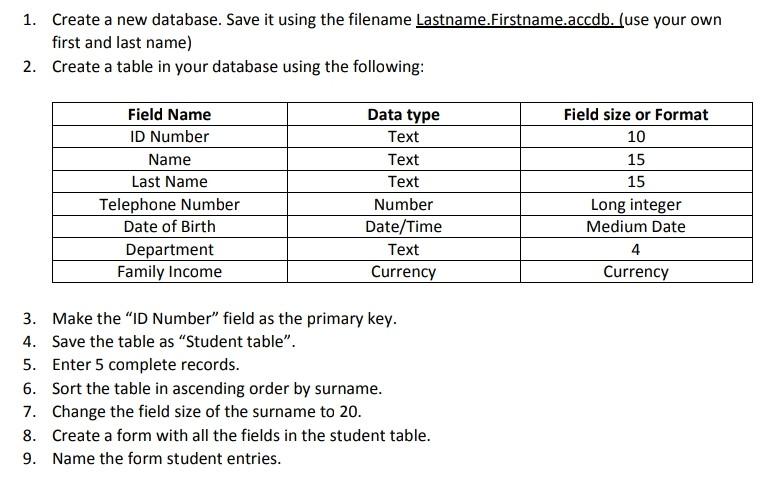
1. Create a new database. Save it using the filename Lastname.Firstname.accdb. (use your own first and last name) 2. Create a table in your database using the following: Field size or Format 10 Field Name ID Number Name Last Name Telephone Number Date of Birth Department Family Income Data type Text Text Text Number Date/Time Text Currency 15 15 Long integer Medium Date 4 Currency 3. Make the "ID Number" field as the primary key. 4. Save the table as "Student table". 5. Enter 5 complete records. 6. Sort the table in ascending order by surname. 7. Change the field size of the surname to 20. 8. Create a form with all the fields in the student table. 9. Name the form student entries
Step by Step Solution
There are 3 Steps involved in it

Get step-by-step solutions from verified subject matter experts
 Study Help