







Question: Create two IF statements to fill in the Refund Amount and the Amount Owed. The Total Tax Payments are the amount withheld from your paycheck,
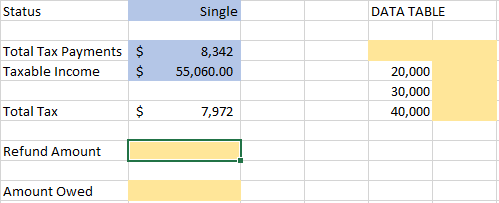
Create two IF statements to fill in the Refund Amount and the Amount Owed.
The Total Tax Payments are the amount withheld from your paycheck, plus any other sources of tax. The Total Tax is calculated based on your Taxable Income.
The Refund Amount (cell C9) is only present if your Total Tax Payments exceed your Total Tax. If it is shown, it will display the amount you overpaid. If your payments did not exceed your total tax, then the cell should be blank or "". The Refund Amount should never be a negative number.
The formula for Refund Amount is =IF( AnswerC4=C5C5>C4C4=C7C4>C5C5>C7C4>C7 , Answer""C4C4+C7C7C4-C7C7-C4 , AnswerC4+C7""C7-C4C4C4-C7C7 )
The Amount Owed (cell C11) is only present if your Total Tax Payments does not exceed your Total Tax. If it is shown, it will display the additional payment required. If your payments exceed your Total Tax, then the cell should be blank or "". The Amount Owed should never be a negative number.
The formula for Amount Owed is =IF( AnswerC4=C5C5>C7C4>C5C4=C7C5>C4C4>C7 , AnswerC4C7-C4C4-C7C7C4+C7"" , Answer""C7-C4C4C4-C7C4+C7C7 )
Status Single DATA TABLE Total Tax Payments $ Taxable Income $ 8,342 55,060.00 20,000 30,000 40,000 Total Tax $ 7,972 Refund Amount Amount Owed
Step by Step Solution
There are 3 Steps involved in it

Get step-by-step solutions from verified subject matter experts
 Study Help