







Question: Create Variables Design Turtle Graphics Task/Deliverable You will complete two in the Spotlight programs and two Programming Problems. 1. In The Spotlight-Calculating a Percentage-Program 2-15
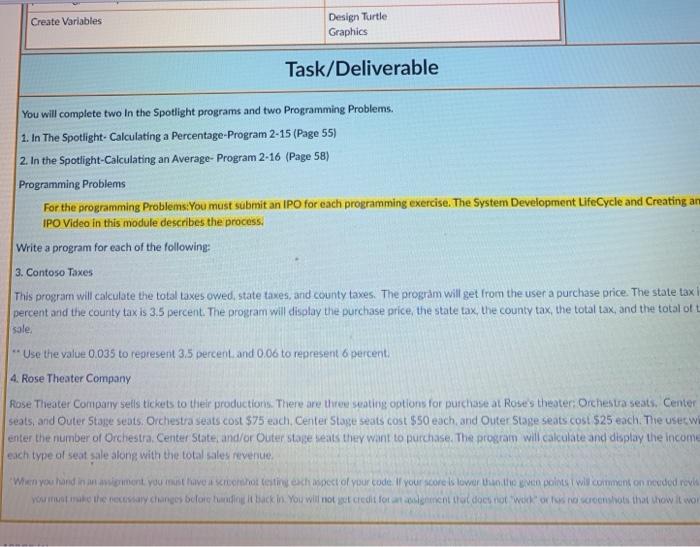
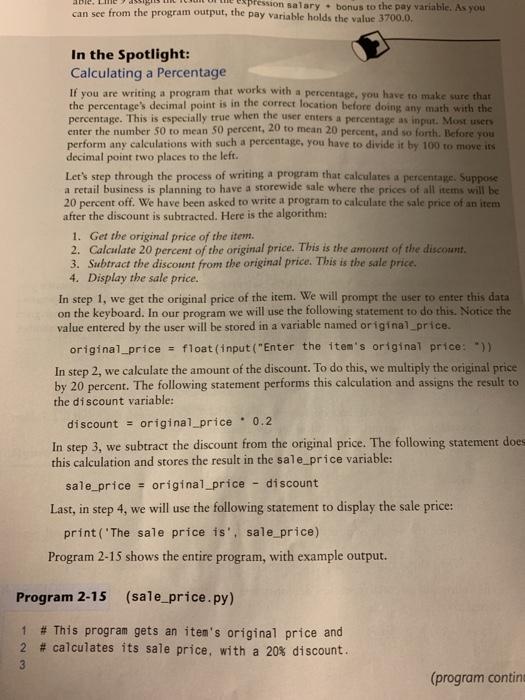
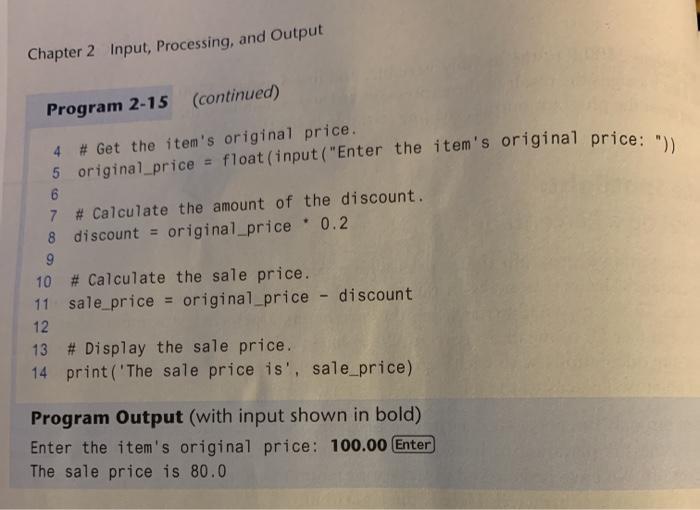
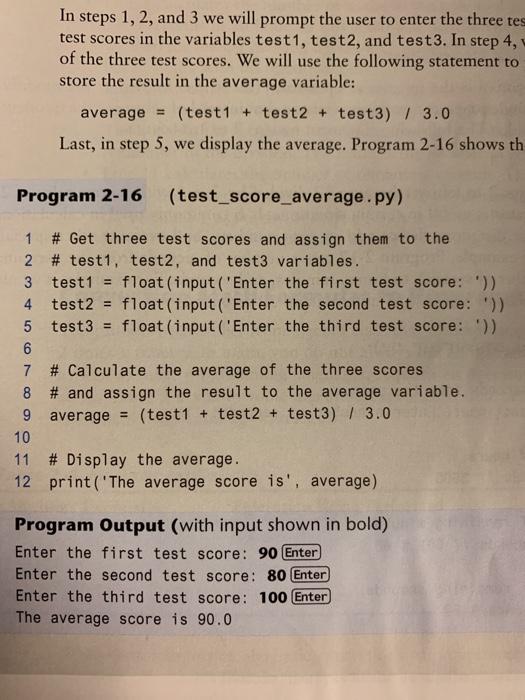
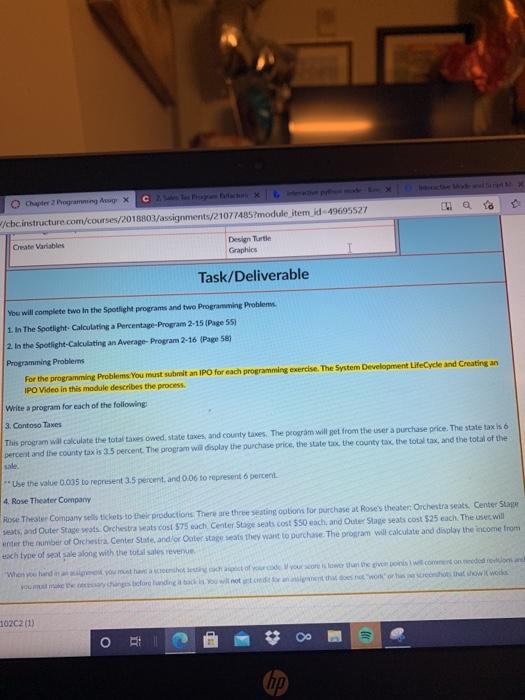
Create Variables Design Turtle Graphics Task/Deliverable You will complete two in the Spotlight programs and two Programming Problems. 1. In The Spotlight-Calculating a Percentage-Program 2-15 (Page 55) 2. In the Spotlight-Calculating an Average- Program 2-16 (Page 58) Programming Problems For the programming Problems: You must submit an IPO for each programming exercise. The System Development Life Cycle and Creating an IPO Video in this module describes the process. Write a program for each of the following: 3. Contoso Taxes This program will calculate the total taxes owed, state taxes, and county taxes. The program will get from the user a purchase price. The state tax percent and the county tax is 3.5 percent. The program will display the purchase price, the state tax, the county tax, the total tax, and the total of t sale, - Use the value 0.035 to represent 3.5 percent and 0.06 to represent 6 percent. 4. Rose Theater Company Rose Theater Company sells tickets to their productions. There are three seating options for purchase at Rose's theater Orchestra seats, Center seats, and Outer Stage seats. Orchestra seats cost $75 each. Center Stage seats cost $50 each, and Outer Stage seats cost $25 each. The user wi enter the number of Orchestra, Center State, and/or Outer stage seats they want to purchase. The program will calculate and display the income each type of seat sale along with the total sales revenue When you hand in woment you must have a shot testech spect of your code. If your score is lower than the even points will comment on nouded role You make the necessary changes bror handling I back in. You will not get credit fotocol al docs not wokolnosco shows that how it wor Pfession salary bonus to the pay variable. As you can see from the program output, the pay variable holds the value 3700.0. In the Spotlight: Calculating a Percentage If you are writing a program that works with a percentage, you have to make sure that the percentage's decimal point is in the correct location before doing any math with the percentage. This is especially true when the user enters a percentage as input. Most users enter the number 50 to mean 50 percent, 20 to mean 20 percent, and so forth. Before you perform any calculations with such a percentage, you have to divide it by 100 to move is decimal point two places to the left. Let's step through the process of writing a program that calculates a percentage. Suppose a retail business is planning to have a storewide sale where the prices of all items will be 20 percent off. We have been asked to write a program to calculate the sale price of an item after the discount is subtracted. Here is the algorithm: 1. Get the original price of the item. 2. Calculate 20 percent of the original price. This is the amount of the discount 3. Subtract the discount from the original price. This is the sale price. 4. Display the sale price. In step 1, we get the original price of the item. We will prompt the user to enter this data on the keyboard. In our program we will use the following statement to do this. Notice the value entered by the user will be stored in a variable named original_price. original_price = float(input("Enter the item's original price: )) In step 2, we calculate the amount of the discount. To do this, we multiply the original price by 20 percent. The following statement performs this calculation and assigns the result to the discount variable: discount = original_price. 0.2 In step 3, we subtract the discount from the original price. The following statement does this calculation and stores the result in the sale_price variable: sale_price = original_price discount Last, in step 4, we will use the following statement to display the sale price: print('The sale price is', sale_price) Program 2-15 shows the entire program, with example output. Program 2-15 (sale_price.py) # This program gets an item's original price and 2 # calculates its sale price, with a 20% discount. 1 3 (program conting Chapter 2 Input, Processing, and Output 6 Program 2-15 (continued) 4 # Get the item's original price. 5 original_price = float(input ("Enter the item's original price: ")) 7 # Calculate the amount of the discount. 8 discount = original_price. 0.2 9 10 # Calculate the sale price. 11 sale_price = original_price - discount 12 13 # Display the sale price. 14 print('The sale price is', sale_price) Program Output (with input shown in bold) Enter the item's original price: 100.00 Enter The sale price is 80.0 In steps 1, 2, and 3 we will prompt the user to enter the three tes test scores in the variables test1, test2, and test 3. In step 4, of the three test scores. We will use the following statement to store the result in the average variable: average = (test1 + test2 + test3) / 3.0 Last, in step 5, we display the average. Program 2-16 shows th Program 2-16 (test_score_average.py) 1 # Get three test scores and assign them to the 2 # test1, test2, and test3 variables. 3 test1 = float(input('Enter the first test score:)) 4 test2 = float (input('Enter the second test score:)) 5 test3 = float(input('Enter the third test score: )) 6 7 # Calculate the average of the three scores 8 # and assign the result to the average variable. 9 average = (test1 + test2 + test3) / 3.0 10 11 # Display the average. 12 print('The average score is', average) Program Output (with input shown in bold) Enter the first test score: 90 Enter Enter the second test score: 80 Enter Enter the third test score: 100 Enter The average score is 90.0 ILI 0 Och ogram Ang X cbcinstructure.com/courses/2018803/assignments/21077485?module item_id 49695527 Create Variables Design Turtle Graphics Task/Deliverable You will complete two in the Spotlight programs and two Programming Problems 1. In The Spotlight Calculating a Percentage Program 2-15 (Page 551 2. In the Spotlight-Calculating an Average- Program 2-16 Page 581 Programming Problems For the programming Problems. You must submit an IPO for each programming exercise. The System Development Lifecyde and Creating an IPO Video in this module describes the process. Write a program for each of the following 3. Contoso Takes This program wil calculate the totales owed state taxes, and county taxes. The program will get from the user a purchase price. The state taxis 6 percent and the county tax is 35 percent. The program will display the purchase price, the state tax, the county tax the total tax, and the total of the Use the value 0.035 to represent 3.5 percent, and 0.06 to represent percent 4. Rose Theater Company Rose Theater Company sells tickets to their productions. There are three seating options for purchase at Rose's theater, Orchestra seats Center Star sets and Outer Stage was: Orchestra ats cost $75 each Center Stage seats cost 550 each, and Outer Stage seats cost 525 each. The use will under the number of Orchestra Center State and/or Oaterstaat they want to purchase. The program will calculate and display the income from tach type of seat sale along with the total sales rever When you and you must have your own crowded chan forening at you will not to the work or twowi wodis 10202 (1) o (hp)
Step by Step Solution
There are 3 Steps involved in it

Get step-by-step solutions from verified subject matter experts
 Study Help