







Question: Created the basic Payday Calculator, The Payday Calculator allows employees to enter different item in a HTML form : (pay rates, number of hours worked,
Created the basic Payday Calculator, The Payday Calculator allows employees to enter different item in a HTML form :
(pay rates, number of hours worked, and vary their dependent deductions and see how their paychecks would be affected).
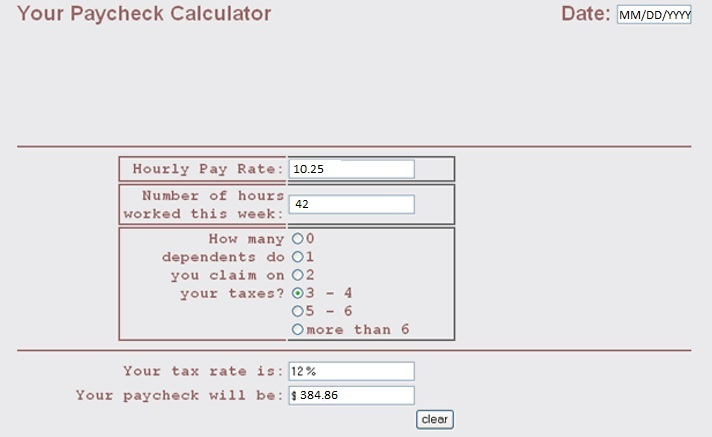
Create the JavaScript functions in a new document named script to give the page complete functionality along with updating the HTML below as needed to complete the task as shown in the image below.
Create a function named dollars( ) which will convert the a number amount to a two-decimal format.
Create a function named today( ) which will get todays date. Enter this program in the JavaScript section of the page to show when the page is loaded i.e.(MM/DD/YYYY).
Create a function named startform( ) which will have todays date appear when the user begins to use the form.
Create a function named tax_percent( ) to calculate the amount of the paycheck after the user has entered the number of hours worked in a week, the hourly pay rate, and the tax bracket, based on number of dependents. This function should also display two results: Display the percent of the paycheck that goes to taxes. This amount corresponds to the number of dependents. Display the final paycheck amount in the box provided on the form.
HTML:
Step by Step Solution
There are 3 Steps involved in it

Get step-by-step solutions from verified subject matter experts
 Study Help