







Question: Creating a basic HASHTABLE java Help! Please show a print out of your sample output, along with the statistics. Thank you HashTable in Java Help
Creating a basic HASHTABLE java Help!
Please show a print out of your sample output, along with the statistics. Thank you
HashTable in Java Help
public class HashTable implements IHashTable { //You will need a HashTable of LinkedLists. private int nelems; //Number of element stored in the hash table private int expand; //Number of times that the table has been expanded private int collision; //Number of collisions since last expansion private String statsFileName; //FilePath for the file to write statistics upon every rehash private boolean printStats = false; //Boolean to decide whether to write statistics to file or not after rehashing //You are allowed to add more for longest chain, etc. /** * Constructor for hash table * @param Initial size of the hash table */ public HashTable(int size) { //Initialize } /** * Constructor for hash table * @param Initial size of the hash table * @param File path to write statistics */ public HashTable(int size, String fileName){ //Set printStats to true and statsFileName to fileName }
@Override public boolean insert(String value) { //TODO }
@Override public boolean delete(String value) { //TODO }
@Override public boolean contains(String value) { //TODO }
@Override public void printTable() { //TODO } @Override public int getSize() { //TODO }
private void printStatisitcs(){ //printStatistics() to print the statistics after each expansion. This method will be called from insert/rehash only if printStats=true
//TODO }
private void rehash() { //rehash() to expand and rehash the items into the table when load factor goes over the threshold.
// TODO
} //TODO - Helper methods can make your code more efficient and look neater.
}
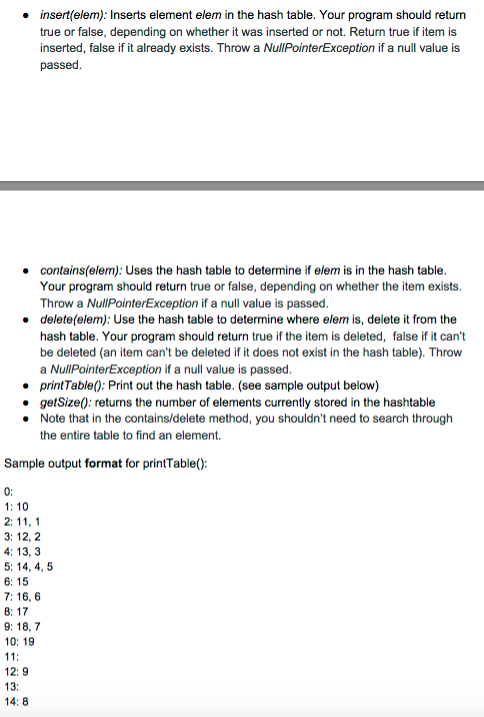
insert (elem): Inserts element elem in the hash table. Your program should return true or false, depending on whether it was inserted or not. Return true if item is inserted, false if it already exists. Throw a NullPointerException if a null value is passed. contains (elem): Uses the hash table to determine if elem is in the hash table. Your program should return true or false, depending on whether the item exists. Throw a NullPointerException if a null value is passed. deleterelem): Use the hash table to determine where elem is, delete it from the hash table. Your program should return true if the item is deleted, false if it can't be deleted (an item can't be deleted if it does not exist in the hash table). Throw a NullPointerException if a null value is passed. print Table 0: Print out the hash table. (see sample output below) getsize(): returns the number of elements currently stored in the hashtable Note that in the contains/delete method, you shouldn't need to search through the entire table to find an element. Sample output format for printTable() 1: 10 2: 11, 1 3: 12, 2 4: 13, 3 5: 14, 4, 5 6: 15 7: 16, 6 8: 17 9: 18, 7 10: 19 11 12: 9 13 14: 8
Step by Step Solution
There are 3 Steps involved in it
To create a basic Hashtable in Java with collision handling using separate chaining lets ensure we cover all the requirements and details from the rejection notes focusing on implementing a custom has... View full answer

Get step-by-step solutions from verified subject matter experts
 Study Help